
Rule templates
Start a rule from a ready-made template instead of a blank form. Pick one of 35 templates for API failures, slow responses, mocks, streaming replies, WebSocket changes and well-known service errors, fill in the orange blanks, check the plain-words summary and save.
A template is a rule that is already mostly written. Instead of starting from an empty form, you pick "make this API answer 502" or "fake an OpenAI stream", fill in the one or two things only you know (usually a domain) and save.
A template is only a starting point. It opens in the same rule form as any rule you make by hand, so you can change anything in it, add a condition or swap the action, and what you save is what the form holds.
New to rules? Build one by hand first with the Rules walkthrough. Templates make more sense once you have seen the form.
Open the templates panel#
Open Rules in the sidebar and click Create Rule. It is a menu with two choices:

- Create Rule opens the menu.
- From template opens the templates panel.
- From scratch opens the blank form, as before.
The panel slides in from the right and covers most of the window. Opening it creates nothing: nothing is saved until you press Use this template.
Pick a template#
The panel is titled Start from a template. It lists every template as a card, under four headings: API testing, Streaming, WebSocket and Services. Each heading has a line beside it saying what its templates are for.
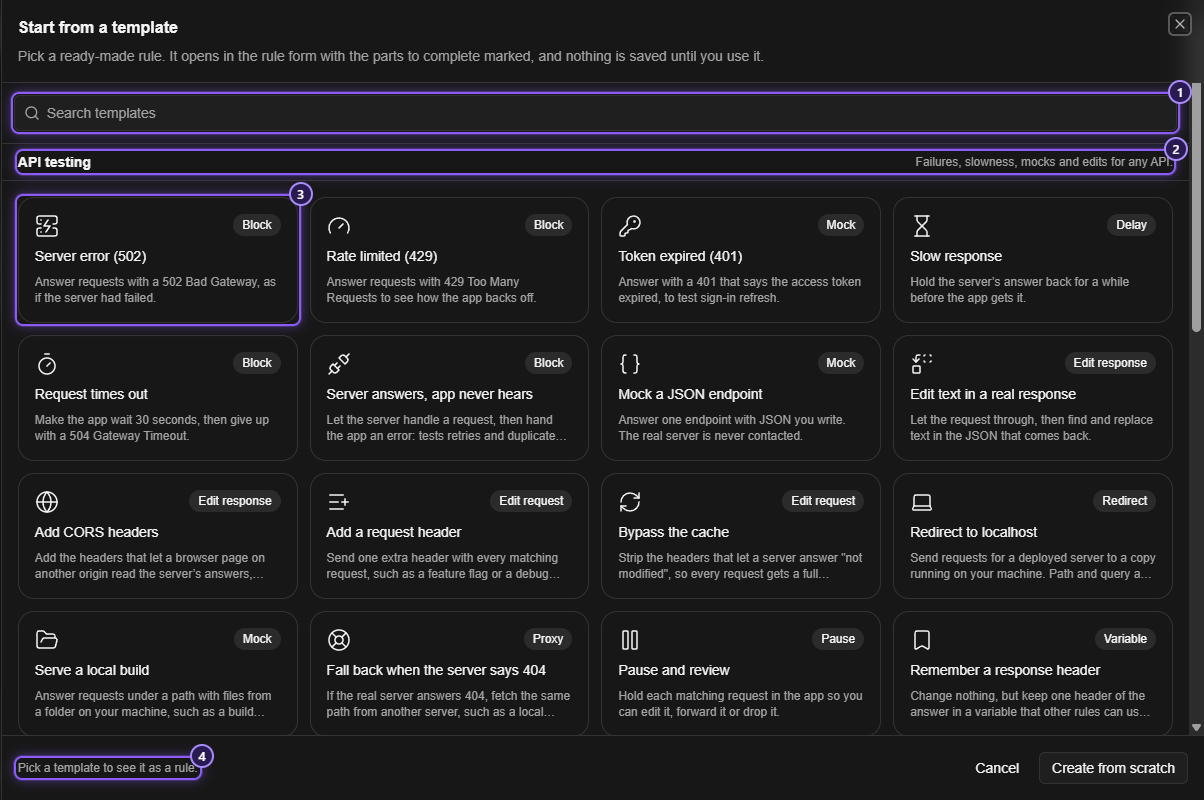
- Search templates. Type a few words: a card stays only if every word appears in its name, its description or its tag.
block 429finds Rate limited (429). If nothing matches, the panel says No templates match that search. - A section heading. It stays at the top while you scroll its cards.
- A card: an icon, a tag such as Block, Mock, Delay or Stream (the kind of action), the template's name and a line about it. A long line is cut short; hover the card to read all of it.
- The footer. With nothing picked it reads Pick a template to see it as a rule.
Click a card. The cards slide into a narrow column on the left, the card you picked stays marked, and the real rule form opens on the right, already filled in by the template. A grey placeholder shows for a moment while the form is built, and Use this template waits until the form is ready.
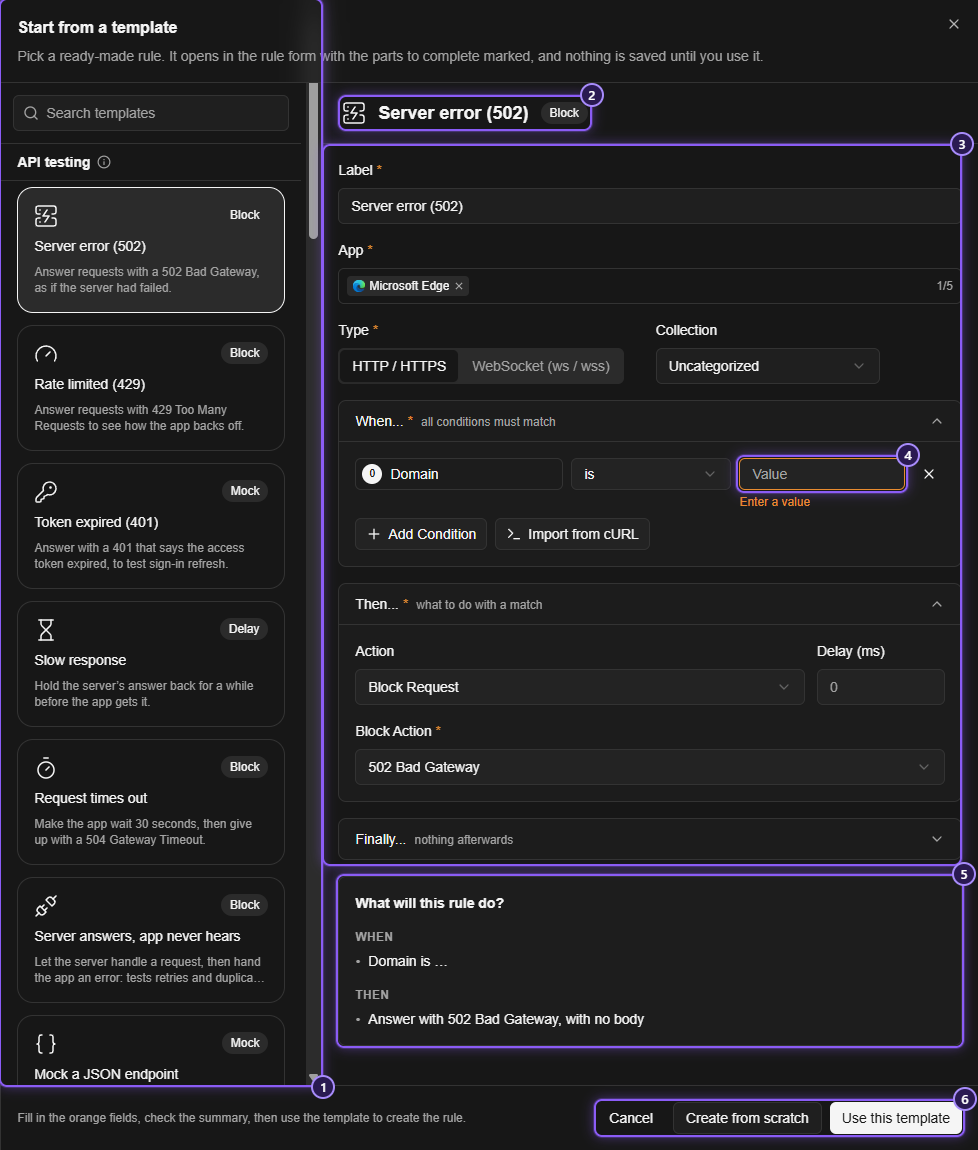
- The column of templates. The picked one is marked. Click another to switch.
- The template's name and tag.
- The rule form, opened on the template.
- A blank, in orange.
- What will this rule do?
- Cancel, Create from scratch and Use this template.
In the narrow column the line beside each heading is hidden. Hover the small i next to the heading to read it. The search box still works, so you can keep browsing while the form is open.
Picking a different template starts afresh: what you typed into the first one is not carried over.
The rule form inside the panel#
The form on the right is the real one, with the same boxes: Label, App, Type, Collection, When…, Then… and Finally…. Everything the template made is editable: you can add conditions, change the status, switch the action. Rules and its sub-pages explain each part.
A few things differ from the full-page form:
- There is no Create button and no help panel. The panel's own Use this template button saves, and
Ctrl + Sdoes not save here. - Label starts as the template's name, for example Server error (502). A template that already knows its address adds it, for example Fake an OpenAI chat stream: api.openai.com/v1/chat/completions. Change it to anything you like. Two rules can't share a name.
- App starts with your default applications. Choose them once in Settings > Rules > Default applications: new rules, from a template or from scratch, then start with those applications selected. You can pick up to five. Each rule can still change them. If you haven't chosen any, App is empty and the form asks for one with Select at least one application.
- Collection starts as the collection the Rules page was showing when you opened the panel, or Uncategorized under All rules. See Collections.
- Type is set by the template: WebSocket for the WebSocket templates, HTTP / HTTPS for the rest.
Orange fields#
A template can't know your domain, so it leaves that blank. A blank the rule can't work without is shown in orange, with the form's usual message under it (Enter a value, for instance).
Orange means please fill this in, not you made a mistake. The orange fields:
- turn back to normal a moment after you type something valid, with no need to press anything;
- pulse twice when the form opens, if your computer allows animations, so your eye lands on them.
The first time you press Use this template, the hints end. From then on a blank is an ordinary error and shows in red, as in any rule form, and nothing is saved until you have fixed it. The panel stays open.
Some blanks are optional and are not flagged. For example, Replace with in a find-and-replace template can stay empty, which removes the text.
Most templates start with only a Domain is condition. To narrow one to part of a server, add a Path condition with Add Condition.
What will this rule do?#
Under the form, a box called What will this rule do? says in plain words what the rule would do right now. It has two short lists, When and Then, and it follows every edit, including parts the template didn't make:
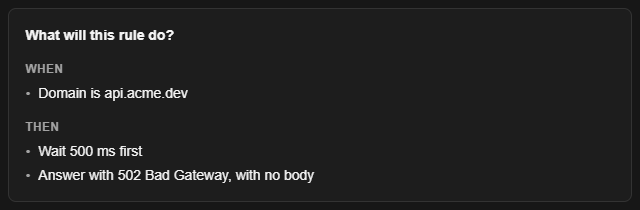
For example, after you fill in a domain and add a delay it reads:
- When · Domain is api.acme.dev
- Then · Wait 500 ms first · Answer with 502 Bad Gateway, with no body
A part that is still blank reads as …. A rule with no conditions reads Every request from the chosen apps.
The ordinary rule form has the same summary, one click away: under the form, What will this rule do? opens it in a side panel.
Save the rule#
Press Use this template in the footer. The form checks the rule as it always does, then:
- A message says Rule created.
- The panel closes. You stay on the Rules page, and the new rule is already in the list.
- The rule is switched on, so it acts on matching traffic from the very next request. Switch it off from the list if you aren't ready.
If something is wrong, the panel stays open and the problem is shown in the form. A name that is already taken is reported on Label.
The footer's other two buttons:
- Cancel closes the panel and forgets the search and the picked template. Nothing is saved.
- Create from scratch closes the panel and opens the blank form.
The templates#
There are 35. The Tag is what the card shows. You fill in lists what the template leaves blank; anything it says is prefilled is a suggestion you can change.
API testing#
Failures, slowness, mocks and edits for any API.
| Template | Tag | What the rule does | You fill in |
|---|---|---|---|
| Server error (502) | Block | Block Request: answers with 502 Bad Gateway, with no body, as if the server had failed |
Domain |
| Rate limited (429) | Block | Block Request: answers 429 Too Many Requests, to see how the app backs off |
Domain |
| Token expired (401) | Mock | Answers instead of the server with 401, a JSON body whose error is invalid_token ("The access token expired") and a WWW-Authenticate header, to test sign-in refresh |
Domain |
| Slow response | Delay | Lets the server answer, then holds the answer back before the app gets it. An X-Mittelware-Delayed: true header is the harmless change the delay waits for |
Domain. Delay (ms) prefilled 3000 |
| Request times out | Block | Block Request with Timeout (no response) and a Delay (ms) of 30000: the app waits 30 seconds, then gets 504 Gateway Timeout |
Domain |
| Server answers, app never hears | Block | Block Response: when the server answered with a status from 200 up to (not including) 300, throws the answer away and gives the app 502. Tests retries and duplicate submits |
Domain |
| Mock a JSON endpoint | Mock | Answers one endpoint instead of the server with JSON you write. The server is never contacted | Domain, Path is. Status 200 and body {"message": "Hello from Mittelware"} prefilled |
| Edit text in a real response | Edit response | Lets the request through, then finds and replaces text in the JSON that comes back (Find and replace, Applies to JSON) | Domain, Find. Replace with is optional |
| Add CORS headers | Edit response | Adds the Access-Control-Allow-* headers that let a browser page on another origin read the answers, cookies included. It echoes the page's own origin instead of * |
Domain |
| Add a request header | Edit request | Modify Request: sends one extra header with every matching request, such as a feature flag | Domain, header name, header value |
| Bypass the cache | Edit request | Modify Request: removes If-None-Match and If-Modified-Since and sets Cache-Control: no-cache, so every request gets a full response |
Domain |
| Redirect to localhost | Redirect | Modify Request: sends requests for a deployed server to localhost, keeping the path and query. Sets the scheme to http and the domain to localhost: plus the port |
Domain. Port prefilled 3000 |
| Serve a local build | Mock | Answers requests under a path with files from a folder on your machine. A file the folder doesn't have goes on to the real server | Domain, Folder. URL path of the folder prefilled /assets/ |
| Fall back when the server says 404 | Proxy | When the real server answers 404 to a GET, fetches the same path (and query) from another server, such as a local mock |
Domain. The address is prefilled http://localhost:3000 |
| Pause and review | Pause | Pause and Review: holds each matching request so you can edit it, forward it or drop it | Domain |
| Remember a response header | Variable | No change, with a Finally row that keeps one header of the answer in a variable other rules can read as {{vars.name}} |
Domain, header name, variable name |
Streaming#
Fake the timed replies of chat APIs and event streams. Each one answers instead of the server with a body set to Stream: the reply is sent a couple of words at a time, with a short pause between them. See Stream a response for every setting.
| Template | Tag | What the rule does | You fill in |
|---|---|---|---|
| Fake an OpenAI chat stream | Stream | Answers chat completions with a reply streamed in OpenAI's format, without calling the API. Ends with [DONE] |
Nothing required: domain api.openai.com and path /v1/chat/completions are prefilled |
| Fake an Anthropic stream | Stream | Answers a Messages request with a reply streamed in Anthropic's event format | Nothing required: api.anthropic.com and /v1/messages are prefilled |
| Fake a server-sent events stream | Stream | Answers one endpoint with text sent as a stream of server-sent events | Domain, Path is |
All three start with the text Hello! This is a streamed reply from Mittelware., which you can replace. They send two words per piece with a delay of 120 ms and a jitter of 30 ms.
WebSocket#
Change, delay or cut the messages of a live connection. These rules apply to connections opened after the rule is saved, so the app has to reconnect. See WebSocket rules.
| Template | Tag | What the rule does | You fill in |
|---|---|---|---|
| Slow down a live feed | Delay | Delay Message: holds each text message from the server before the app sees it | Domain. Delay (ms) prefilled 1500 |
| Edit messages from the server | Edit message | Modify Message: finds text in the messages the server sends and replaces it before the app gets them | Domain, Find. Replace with is optional |
| Drop messages that contain text | Drop | Drop Message: throws away matching text messages in either direction, so neither side sees them | Domain, the text to match |
| Close the connection | Close | Close Connection with code 1008 (policy violation) and the reason Closed by Mittelware, when a message arrives. Add text to match only certain messages, to test reconnecting |
Domain. The text is optional |
The first, second and fourth only look at messages the server sends (Message Direction is Received). The first and third also only look at text messages, so the pings that keep a connection alive are left alone.
Services#
The well-known errors of popular APIs, and noise from trackers. These need no questions: the hosts are fixed, so as soon as the App is chosen the rule is complete.
| Template | Tag | What the rule does |
|---|---|---|
| OpenAI: rate limit reached | Mock | Answers OpenAI API calls (api.openai.com, paths starting /v1/) with the 429 error the API sends when a limit is hit, with Retry-After: 20 |
| OpenAI: invalid API key | Mock | Answers the same calls with the 401 error for a wrong or revoked key |
| Anthropic: overloaded | Mock | Answers Messages API calls (api.anthropic.com, paths starting /v1/messages) with the 529 overloaded_error |
| Anthropic: rate limit reached | Mock | Answers the same calls with the 429 rate-limit error, with Retry-After: 30 |
| Stripe: card declined | Mock | Answers a POST to api.stripe.com/v1/payment_intents with the 402 card_declined error |
| GitHub API: rate limit exceeded | Mock | Answers api.github.com calls with the 403 and the X-RateLimit-* headers sent when the limit is used up |
| Amazon S3: access denied | Mock | Answers requests to any S3 host with the 403 AccessDenied error as XML, as for a missing permission |
| Block Google Analytics and Tag Manager | Block | Block Request with 403 Forbidden for www.google-analytics.com, analytics.google.com, www.googletagmanager.com and stats.g.doubleclick.net |
| Block Sentry error reports | Block | The same, for Sentry's ingest hosts (o123.ingest.sentry.io and its regional forms) |
| Block Segment | Block | The same, for api.segment.io and cdn.segment.com |
| Block Mixpanel | Block | The same, for api.mixpanel.com and api-js.mixpanel.com |
| Block Hotjar | Block | The same, for static.hotjar.com, script.hotjar.com and vars.hotjar.com |
NOTE
The service errors reproduce the shape of each provider's usual error, but providers change their messages over time. If your app depends on the exact text, check it against the provider's documentation and edit the body in the form.
Good to know#
- Using a template twice is fine. Use the same one again with a new name and you get a second rule.
- Existing rules are never touched. Choosing default applications changes only rules you make afterwards.
- HTTPS needs the certificate. A template for an
https://address only works once you have trusted the certificate, like any rule. - Templates are shortcuts, not a different kind of rule. The saved rule is an ordinary one: you can find it in the Rules list, edit it, copy it, move it to a collection or export it.
Related#
- Rules, the walkthrough and the full form
- Conditions
- Block, Modify Request, Modify Response, Answer without the server and Stream a response
- WebSocket rules
- Collections