
HTTPS & certificates
How Mittelware inspects HTTPS traffic with its own certificate authority, what trusting it means, and how to remove it.
Most traffic is encrypted. To show it to you, Mittelware needs your device to trust its certificate.
In plain terms: HTTPS scrambles the data between an app and a server so nobody in between can read it. Mittelware is you choosing to sit in between on your own computer, so it needs your permission to unscramble your own traffic. That permission is a certificate: a small file, made on your computer, that your computer is told to trust. (New to these terms? See Start here.)
How it works#
Mittelware creates its own certificate authority named Mittelware CA on your computer. When an application opens an HTTPS connection, Mittelware presents a certificate for that site signed by this authority, reads the traffic, then makes its own connection to the real server. Because your device trusts Mittelware CA, applications accept the connection without warnings.
- The certificate and its private key are generated locally and never leave your device.
- It's trusted for your user account on this device only: in the Current User trusted roots on Windows, and the login keychain on macOS. Nothing changes for other devices on your network.
- Connections from Mittelware to real servers are verified normally, against your system's trust store.
Trusting the certificate#
The first time you switch Mittelware on, it asks whether to monitor HTTPS too. Choose Trust & Monitor HTTPS. Windows asks you to confirm installing the certificate; on macOS you'll be asked to authenticate (if you've also enabled the system proxy, the two requests are combined so you're only prompted once). You can also manage this from Settings.
If you'd rather not, choose Monitor HTTP Only. Mittelware then only sees unencrypted HTTP, and HTTPS requests pass through without being inspected.
To check where you stand, open Settings. The HTTPS certificate line shows whether the certificate is trusted:
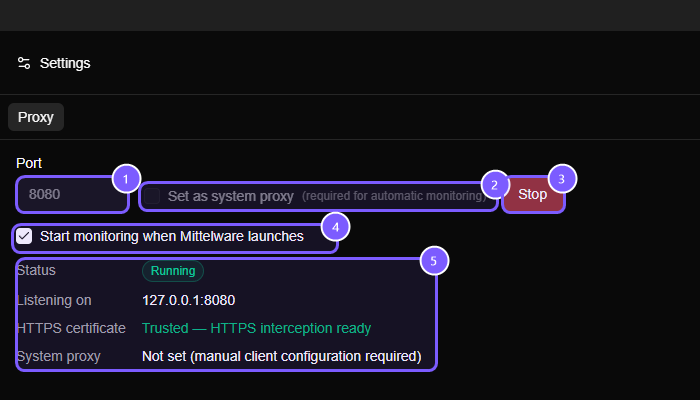
Certificate warnings#
If a browser warns that a connection isn't private while Mittelware is running, the certificate isn't trusted for that application. Trust it from Settings and restart the browser. Firefox keeps its own certificate store on some setups, so it may need the certificate imported separately.
Runtimes with their own certificate list#
Browsers and tools that use the operating system's store trust Mittelware CA once you've trusted it. Some runtimes ship their own list of authorities and ignore the system store. For those, point them at the certificate file (mittelware-ca.pem, kept in the app's data folder):
# Node.js
export NODE_EXTRA_CA_CERTS=/path/to/mittelware-ca.pem

# Python requests
export REQUESTS_CA_BUNDLE=/path/to/mittelware-ca.pem

# curl, for a single call
curl --cacert /path/to/mittelware-ca.pem -x http://127.0.0.1:8080 https://example.com
What can't be inspected#
- Apps that pin their own certificates, which refuse any certificate other than the one they expect.
- Apps that ignore the operating system's proxy settings.
- Bodies over 32 MB aren't captured. A response that arrives in pieces (
text/event-streamand similar) is followed live, chunk by chunk: see Streaming responses. HTTPS streams work once the certificate is trusted.
Removing the certificate#
You can remove trust at any time by deleting Mittelware CA from your operating system's certificate store:
- Windows: run
certmgr.msc, open Trusted Root Certification Authorities → Certificates, and delete Mittelware CA. - macOS: open Keychain Access, select the login keychain, find Mittelware CA under Certificates, and delete it.
After removal, HTTPS traffic can no longer be inspected until you trust the certificate again. Questions? Get in touch.