
Opening apps through Mittelware
Use the Applications page to launch Chromium and Electron apps through the proxy, or copy a ready-made command for curl, wget and HTTPie.
Mittelware can only show you traffic that actually passes through it. There are two ways to get an app's traffic there:
- System-wide. Turn on Set as system proxy in Settings and every app that respects your operating system's proxy settings goes through Mittelware automatically.
- One app at a time. Use the Applications page to launch a specific app through Mittelware. It touches no system settings, and it works for apps that ignore the system proxy.
This page covers the second way, which is also the safest way to start.
How it works#
Switch Mittelware on first (the status under its name should say Monitoring). Then open Applications.
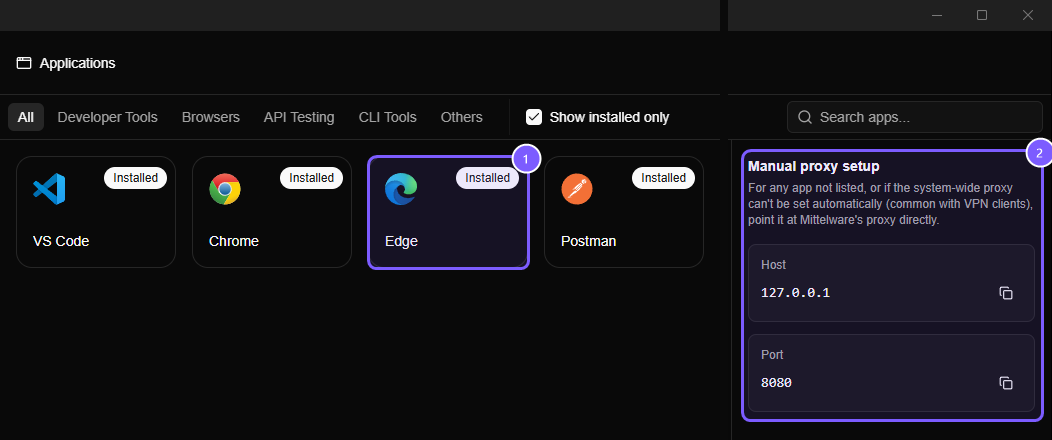
- Each card is an app. The Installed badge means Mittelware found it on your computer. The tabs along the top (Developer Tools, Browsers, API Testing, CLI Tools, Others) group them, and Search apps… finds one by name.
- Manual proxy setup lists the host and port to use for anything not on the page. Click the copy icons to copy them.
Find your app and click its card. What happens next depends on the kind of app:
- Chromium and Electron apps are relaunched with the
--proxy-serverflag pointing at Mittelware. That switch only takes effect for a brand-new process, so if the app is already running Mittelware closes it first. Save your work before you click. - Command-line tools aren't launched. Mittelware copies a ready-to-run command, with the proxy address filled in, to your clipboard.
NOTE
By default the page lists only the apps installed on your machine (the Show installed only checkbox). Clicking a card for an app that isn't installed shows an error.
WARNING
Relaunching closes the app first. Save your work before you click a card for an app that's already open.
Supported apps#
| Category | Apps | What a click does |
|---|---|---|
| Developer tools | VS Code | Relaunches through the proxy |
| Browsers | Chrome, Edge, Brave, Arc, Opera, Vivaldi | Relaunches through the proxy |
| API testing | Postman, Insomnia | Relaunches through the proxy |
| Other | Slack | Relaunches through the proxy |
| CLI tools | curl, wget, HTTPie | Copies a command |
Only apps with a dependable way to use a proxy are listed. Firefox, Safari and Docker, for example, aren't, because they have no switch Mittelware can apply for you. Firefox can still be pointed at the system proxy in its own settings.
The copied commands#
With Mittelware listening on 127.0.0.1:8080, the commands look like this:
# curl
curl -x http://127.0.0.1:8080 https://example.com

# wget
wget -e use_proxy=yes -e http_proxy=http://127.0.0.1:8080 -e https_proxy=http://127.0.0.1:8080 https://example.com

# HTTPie
http --proxy=http:http://127.0.0.1:8080 --proxy=https:http://127.0.0.1:8080 https://example.com
Other tools and languages#
For anything not on the page, set a proxy yourself using the Manual proxy setup values: host 127.0.0.1 and the port shown there (8080 by default). Many tools have a "proxy" box in their settings, where you enter them as http://127.0.0.1:8080. Most command-line tools read the standard environment variables:
export HTTP_PROXY=http://127.0.0.1:8080
export HTTPS_PROXY=http://127.0.0.1:8080
On Windows PowerShell:
$env:HTTP_PROXY = "http://127.0.0.1:8080"
$env:HTTPS_PROXY = "http://127.0.0.1:8080"
HTTPS also needs the tool to trust the Mittelware certificate. Tools that use the operating system's certificate store (curl on Windows and macOS, browsers) get this from trusting the certificate. Runtimes with their own certificate list, such as Node.js and Python, need to be told where to find it. See Why isn't my app's traffic showing up?.