
You switched Mittelware on, used your app, and the Flows page is empty. Or you can see the requests but not what's in them. This is the most common first-run problem with any intercepting proxy, and it almost always has one of a few causes. Go through them in order.
1. Is Mittelware monitoring?#
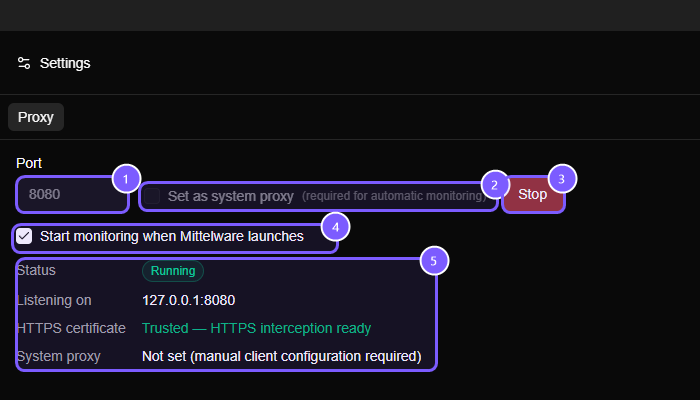
Look at the top of the sidebar. The status under Mittelware's name should say Monitoring, with a green dot. If it says Not Monitoring, flip the switch next to it. If port 8080 was taken, Mittelware picked the next free one, so use the port it reports when you configure other tools. You can change the preferred port under Settings → Proxy.
The Settings page shows the current state at a glance:
2. Is the system proxy on?#
Under Settings → Proxy, Set as system proxy is off by default. Enable it if you want apps that follow your operating system's proxy to start using Mittelware automatically. It's available on Windows and macOS, and you change it while monitoring is off. If you'd rather leave it off, use the Applications page or the options in step 3 instead.
Some VPNs and corporate management tools overwrite proxy settings. If Flows was working and suddenly stopped, check whether something else has taken the proxy settings back.
3. Does the app use the system proxy?#
Plenty of software doesn't. Browsers, many Electron apps and most desktop apps with a normal network stack do. Programs that bring their own HTTP client, and many command-line tools and language runtimes, need to be told.
You have two easy options:
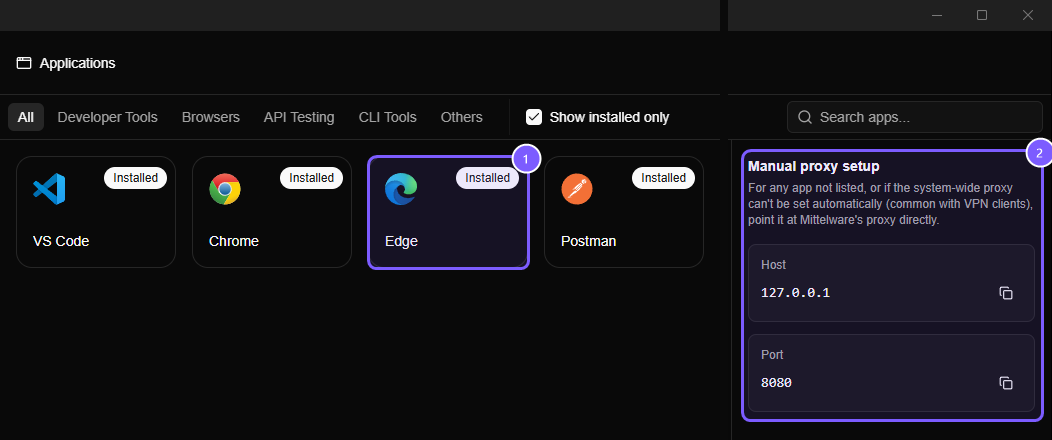
- Applications page. Chromium and Electron apps (Chrome, Edge, Brave, VS Code, Postman, Insomnia, Slack and more) can be relaunched through the proxy with one click, and curl, wget and HTTPie get a copy-paste command. See Opening apps through Mittelware.
- Environment variables. Most tools honor these:
export HTTP_PROXY=http://127.0.0.1:8080
export HTTPS_PROXY=http://127.0.0.1:8080
NOTE
Firefox has its own network settings. Point it at the system proxy, or at 127.0.0.1:8080 directly, in its preferences.
4. HTTPS requests missing, HTTP ones present?#
You probably chose Monitor HTTP Only, or the certificate isn't trusted yet. Open Settings and trust Mittelware's certificate, then restart the app you're testing. The HTTPS certificate line in the status panel (see the screenshot above) should read Trusted — HTTPS interception ready. See HTTPS & certificates.
5. Certificate errors in Node, Python or Java?#
Browsers and tools that use the operating system's certificate store trust Mittelware once you do. Many runtimes keep their own list and will reject the certificate with errors like unable to verify the first certificate or CERTIFICATE_VERIFY_FAILED. Give them the certificate file, mittelware-ca.pem from the app's data folder:
# Node.js
export NODE_EXTRA_CA_CERTS=/path/to/mittelware-ca.pem

# Python (requests)
export REQUESTS_CA_BUNDLE=/path/to/mittelware-ca.pem
Also check that the runtime actually uses your proxy variables. Some HTTP libraries ignore HTTP_PROXY unless you opt in or pass a proxy explicitly.
6. Is the app pinning its certificate?#
Some apps, such as banking apps and certain security-sensitive clients, are built to accept only their own certificates. They refuse Mittelware's by design, and there's no setting to change that from outside. If a particular app fails only while Mittelware is switched on and everything else works, this is the likely cause.
7. Are you calling localhost?#
Browsers commonly bypass the proxy for localhost and 127.0.0.1, so a request to your dev server on localhost:3000 won't show up. If you want to see it, reach the same server by your machine's name or another hostname that resolves to it, instead of localhost.
8. Is it a streaming or very large response?#
A response that arrives in pieces, such as text/event-stream, is followed live. The request shows up in Flows straight away with a green streaming label, and the body appears chunk by chunk in the Stream view. Monitoring streaming responses explains how to read it, and why a stream's body isn't there as a single piece until it has finished.
Bodies over 32 MB aren't captured. The request itself still goes through; you just won't see the body, and response-based rules can't match on it.
Still stuck?#
Check three things and note the results before you get in touch:
- Does a plain browser tab show up in Flows?
- Does
curl -x http://127.0.0.1:8080 http://example.comshow up? - Does the same app work with Mittelware switched off?
If the browser and curl work and your app doesn't, the problem is how that app handles proxies. If nothing works, it's the proxy setup. Telling us which one you have gets you to the answer much faster.