
Template variables
Use {{request.path}}, {{response.status}} and other template variables to reuse parts of a request or response inside a Mittelware rule.
Reuse parts of the traffic inside a rule's action. Wrap a variable in double curly braces and Mittelware fills it in when the rule runs.
Think of it as a mail-merge for requests. If you write a rule that redirects every call to your laptop, you don't want to type each path by hand. {{request.path}} stands in for "whatever path this request used", and Mittelware swaps in the real one every time. New here? Build a plain rule first with the Rules walkthrough, then come back.
http://localhost:3000{{request.path}}Template variables work in the action fields of a rule (URLs, header values, query values and bodies). When you save, Mittelware rejects variables it doesn't recognise or that aren't available for the chosen action, so a typo can't silently produce an empty value.
Let autocomplete do the typing#
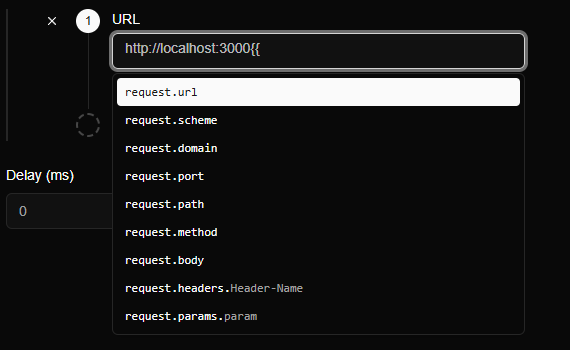
You don't have to remember the names. In any action field, type {{ and a list of every variable available there pops up. This example is a Modify Request rule, in its URL field, after typing http://localhost:3000{{:
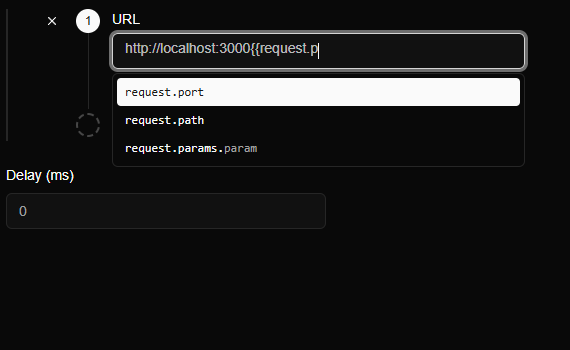
Keep typing and the list narrows to what matches. After request.p, only three entries remain:
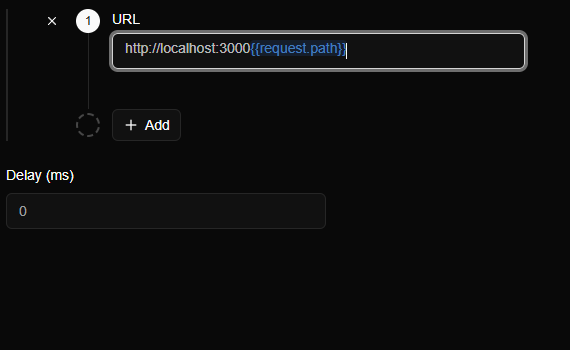
Pick one with the arrow keys and Enter (or click it). Mittelware completes the closing }} for you and colours the finished variable blue, so you can see at a glance which parts are variables and which are plain text:
In the body editor#
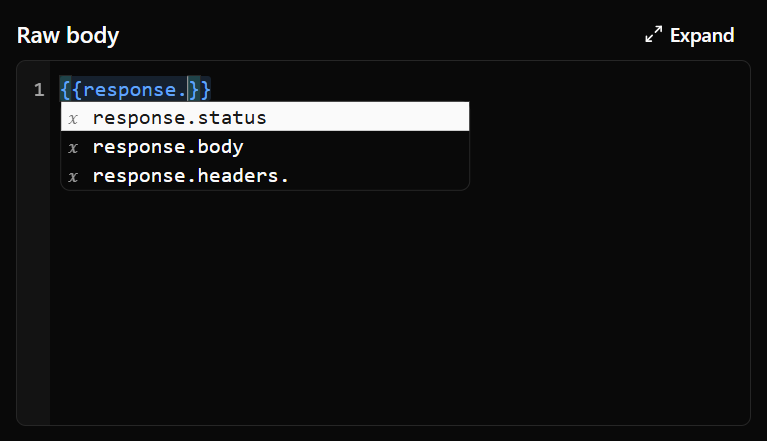
Response bodies are written in a small code editor, which has the same autocomplete in a slightly different style: a scrollable list, with the closing }} added the moment you type {{.
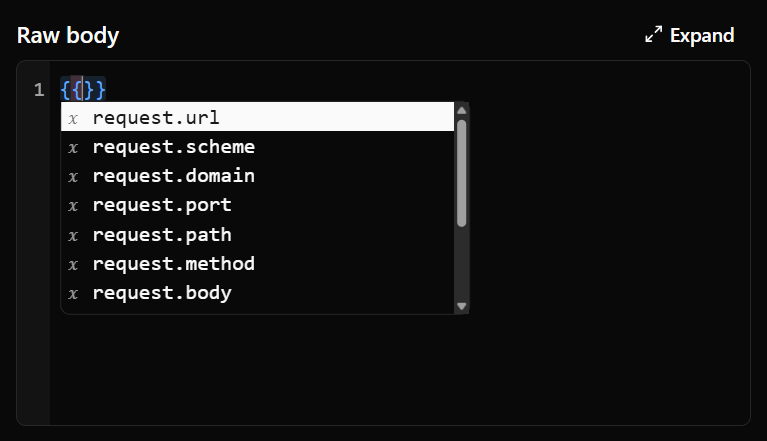
In a Modify Response rule you also get the response.* variables, which don't exist in a Modify Request rule because there's no response yet. Type response. to jump straight to them:
The conditions.* variables show up when the rule's conditions can provide them (see below).
What each action offers#
| Where you are | Variables suggested |
|---|---|
| Modify Request (any field) | request.* |
| Modify Response (including the text of a Stream body) | request.* and response.* |
| Proxy to different endpoint | request.* and response.* |
Entries that end in a placeholder, such as request.headers.Header-Name, are patterns: replace the placeholder with the real name, for example request.headers.User-Agent.
Request variables#
Available in every action.
| Variable | Value |
|---|---|
{{request.url}} |
The full URL |
{{request.scheme}} |
http or https |
{{request.domain}} |
The host name |
{{request.port}} |
The port |
{{request.path}} |
The path, without the query string |
{{request.method}} |
The HTTP method |
{{request.body}} |
The request body |
{{request.headers.Name}} |
The value of the request header Name |
{{request.params.name}} |
The value of the query parameter name |
Response variables#
Available once a response exists: in Modify Response and Proxy to different endpoint. Modify Request runs before any response, so it can only use the request variables.
| Variable | Value |
|---|---|
{{response.status}} |
The status code |
{{response.body}} |
The response body |
{{response.headers.Name}} |
The value of the response header Name |
Values from the rule's own conditions#
A rule can also read what its own conditions matched, numbered from zero in the order they appear.
{{conditions.0.value}}: the value of the first condition.{{conditions.0.matches.1.value}}: capture group 1 of the first condition, when it uses the matches regex operator. Group0is the whole match.{{conditions.0.values.0.value}}: the first entry of the list in the first condition, when it uses is one of or is none of.
These are only offered, and only accepted, for conditions whose operator supports them.
Examples#
Send staging traffic to your laptop#
Rule: URL starts with https://staging.acme.dev → Modify Request.
URL:             http://localhost:3000{{request.path}}
X-Original-Host: {{request.domain}}
{{request.path}} doesn't include the query string. If the endpoint needs parameters, add them back explicitly, for example http://localhost:3000{{request.path}}?page={{request.params.page}}.
Echo a header back in a mocked response#
Rule: URL contains /v1/echo → Modify Response.
{ "you_sent": "{{request.headers.User-Agent}}", "method": "{{request.method}}" }Carry a captured ID into a mock#
Rule: URL matches regex /v1/orders/(\d+) → Modify Response.
{ "id": {{conditions.0.matches.1.value}}, "status": "mocked" }Syntax notes#
- Tags can't be nested. The first
}}after a{{closes it. - Spaces just inside the braces are ignored:
{{ request.path }}works too.
Back to the Rules page.