
WebSocket rules
Change, drop, delay, hold or end the messages of a WebSocket connection. How a WebSocket rule picks its connections and its messages, every condition and action, and worked examples.
A normal rule acts on a request and its response. A WebSocket rule acts on the messages of a WebSocket connection: it can rewrite one on its way, throw it away, slow it down, hold it for you to edit, or end the connection.
It's the same form as any other rule, with the same parts (Source, Label, When…, Then…), and a rule that applies from the very next connection. Two things are different: the rule has a Type, and its conditions can look at a single message.
Create one#
Click Create Rule on the Rules page and set the Type to WebSocket (ws / wss).
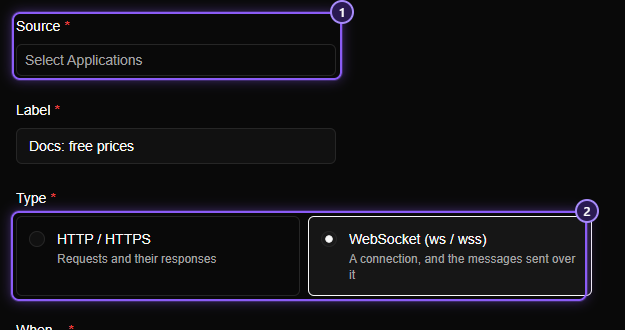
- Source: the application whose connections the rule watches, as for any rule.
- Type: HTTP / HTTPS for requests and responses, WebSocket (ws / wss) for connections and their messages. Switching the type changes what When… and Then… offer, and removes anything that no longer fits (a notice tells you what).
When…#
The Add Condition menu of a WebSocket rule has three groups:
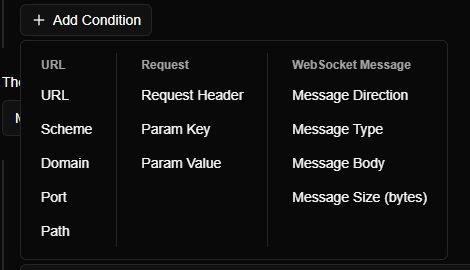
The URL and Request groups work as they do in Conditions, with one difference: they are checked against the address your app opened, which starts with ws:// or wss://, so Scheme is ws or wss. They're checked once, when the connection opens, and decide whether the rule applies to that connection at all.
There's no HTTP Method (a WebSocket always opens with a GET), no Request Body, and no Status Code, Response Header or Response Body: a WebSocket has no response to match.
The WebSocket Message group is checked on every message that crosses the connection:
| Condition | Compares with | Operators | Values |
|---|---|---|---|
| Message Direction | Which way the message is going | is | Sent (your app to the server), Received (server to your app), or Both |
| Message Type | What kind of message it is | is, is not, is one of, is none of | text, binary, ping, pong, close |
| Message Body | The message's text | The usual text operators | Any text |
| Message Size (bytes) | How many bytes the message holds | The usual number operators | A number |
A few details:
- Message Body ignores case, like every text condition. It reads a text message as it is, a close message as its reason, and a binary message as text too, so you can still look for a readable word inside it.
- Message Size counts bytes, not characters:
éis two. - A rule with no message conditions applies to every message of the connections it matches, pings and pongs included.
Then…#
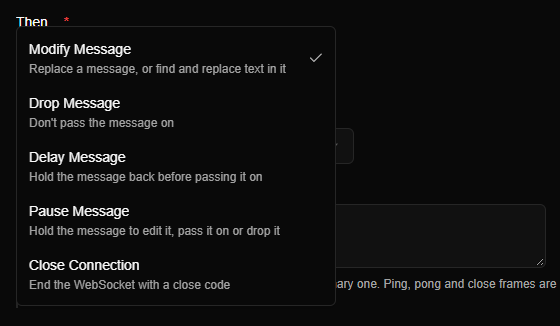
| Action | What it does |
|---|---|
| Modify Message | Replaces the whole message, or finds and replaces text in it, before passing it on |
| Drop Message | Doesn't pass the message on. Neither side is told |
| Delay Message | Holds the message back for the Delay (ms) you set, then passes it on |
| Pause Message | Holds the message for you to edit, forward or drop: see Pause Message |
| Close Connection | Ends the connection with a close code and an optional reason |
Where you see it#
A connection a WebSocket rule has acted on is an intercepted flow, like a request a rule matched:
- Its row in Flows gets the blue rule icon, and it shows under the Intercepted tab. Hover over the icon for the rule's name.
- The details panel names the rule in a badge at the top.
- The Messages tab marks each message the rule touched, with a label that says what it did.
The connection is marked when the rule first acts on one of its messages, so a connection no rule has touched stays out of Intercepted. When several rules act on one connection, the row shows the first. Pause Message adds an amber pause icon while a message waits.
Which rule acts on a message#
- When the connection opens, Mittelware checks each WebSocket rule's Source and its URL and Request conditions against the handshake. The rules that match become that connection's rule list, in the order shown on the Rules page.
- For each message, it goes down that list and picks the first rule whose message conditions all match. That rule acts on the message, and no other rule does.
- Rules you add, change or switch off afterwards apply to connections opened after that. To try a changed rule, reconnect.
Two consequences are worth knowing:
- Put specific rules above general ones. A rule with no message conditions matches every message, so it hides every rule below it.
- A Modify Message rule that has nothing to change still wins. A find and replace whose text isn't in the message passes it on untouched, and the rules below it don't get a turn. Give the rule a Message Body condition for the same text if you want later rules to see the messages it didn't change.
Modify Message#
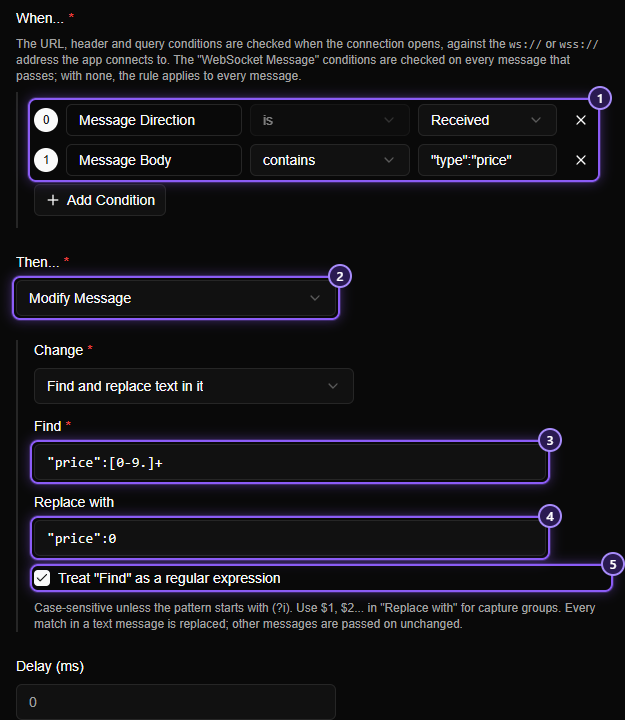
- When…: both conditions must match.
- Then…: Modify Message.
- Find: what to look for.
- Replace with: what each match becomes.
- The regular expression switch.
Change offers two modes:
| Mode | What it does |
|---|---|
| Replace the whole message | The message becomes the text you enter. It replaces a text message's text, or a binary message's bytes |
| Find and replace text in it | Every match of Find in a text message becomes Replace with. Other kinds of message pass on unchanged |
Good to know:
- Find matches the text exactly as typed, including its case, unless you tick Treat "Find" as a regular expression.
- A regular expression is case-sensitive too (start it with
(?i)to ignore case), and Replace with can use$1,$2… for the parts it captured. The syntax is the one the Rustregexcrate uses, which is close to JavaScript's. A pattern that isn't valid stops the rule from being saved. - Without the regular expression switch,
$in Replace with is just a dollar sign. - A modified message is passed on and shown with a blue modified label. Opened, it shows the original and what was actually sent.
- Ping, pong and close messages are never changed.
- Template variables like
{{request.path}}aren't available in WebSocket rules. The text is used as written. - The Delay (ms) field also applies here: if you set one, the changed message is held back that long.
Drop Message#
Matching messages aren't passed on, and nobody is told: the sender thinks it sent them, and the receiver never hears of them. The connection stays open.
Use it to see how an app copes with a message that never arrives, such as a lost acknowledgement. The dropped message is still listed in the Messages tab, with a red dropped label.
WARNING
A Drop Message rule with no message conditions drops everything, heartbeats included. A server that stops getting pings usually closes the connection after a while. Add Message Type is text to keep the heartbeat alive.
Delay Message#
Matching messages are held back for the Delay (ms) you enter (at least 1), and then passed on. It's how you simulate a slow network on a live connection.
A held-back message queues up everything behind it in the same direction, as a slow connection would. Messages going the other way aren't held up. The Messages tab lists a delayed message at once, with an amber delayed label, so its time is when it arrived, and the wait follows.
Close Connection#
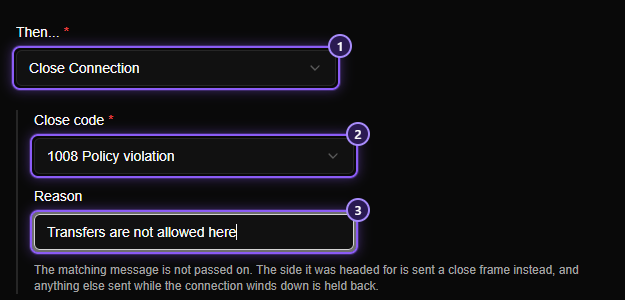
- Close Connection.
- Close code: one of four.
- Reason: optional text, up to 123 bytes.
| Code | Name | Meaning |
|---|---|---|
1000 |
Normal closure | The work is done |
1001 |
Going away | The page was closed, or the server is shutting down |
1008 |
Policy violation | The message broke a rule |
1011 |
Internal error | Something went wrong on the server's side |
When a message matches:
- The message is not passed on. A close frame with your code and reason goes to the side it was headed for instead, and the connection ends the way any connection does when a side says goodbye.
- From then on, only the closing handshake gets through. Any other message sent while the connection winds down is held back, so nothing slips past after the rule fired.
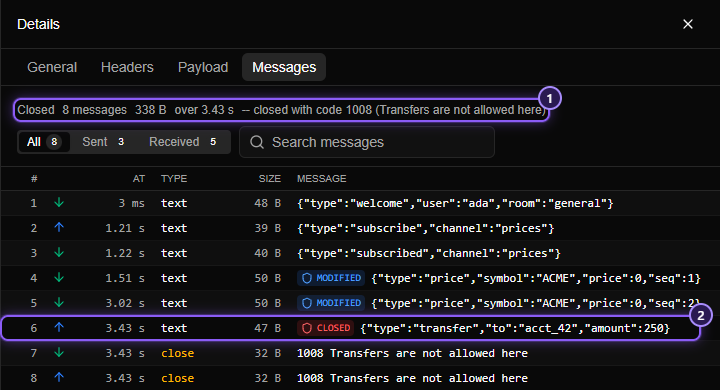
- How the connection ended, as your app was told.
- The message that matched, with its closed label.
Examples#
| You want to… | Type | When… | Then… |
|---|---|---|---|
| Test how the UI shows a free item | WebSocket | Direction is Received, Body contains "type":"price" |
Modify Message: find "price":[0-9.]+ (regex), replace with "price":0 |
| Pretend an acknowledgement was lost | WebSocket | Direction is Received, Body contains "type":"ack" |
Drop Message |
| Make the server feel slow | WebSocket | Direction is Received, Type is text |
Delay Message, Delay 1500 |
| Inspect and edit one particular message | WebSocket | Direction is Sent, Body contains "type":"transfer" |
Pause Message |
| See what the app does when it's kicked out | WebSocket | Body contains logout |
Close Connection, 1008 |
| Stop a connection from ever opening | HTTP / HTTPS | Domain is realtime.example.com |
Block Request: an HTTP rule, see Block |
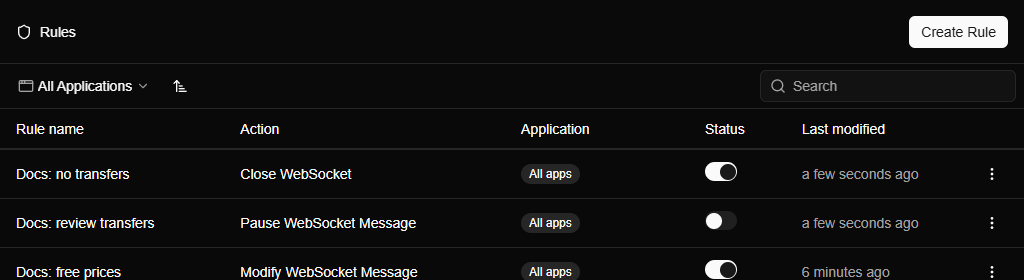
The Rules list marks WebSocket rules by their action:
When a rule doesn't act#
Work down this list:
- Is the rule switched on, and did you reconnect? A rule is looked at when the connection opens.
- Is the type WebSocket? An HTTP / HTTPS rule never sees messages.
- Does the address match? A WebSocket rule's URL conditions see the
ws://orwss://address, so a URLstarts withhttps://…condition never matches. Domain, Port and Path don't care about the scheme, which makes them the safest choice. (An HTTP / HTTPS rule, for its part, sees the handshake as anhttp://orhttps://request.) - Is another rule winning first? Only the first rule that matches a message acts on it. Move the one you want above the other.
- Is the message the type you think? Many "text" payloads are really binary, and a Message Body condition against binary bytes is a lossy read of them. Check the Type column in the Messages tab.
- Is the connection encrypted? A
wss://connection needs the certificate to be trusted, and it must not be on the bypass list.