
Conditions (When…)
Every condition and operator a rule can use to decide which traffic it acts on, how several conditions combine, and why request and response conditions change the actions you can choose.
The When… part of a rule describes the traffic it should act on. A rule only runs on a request that matches every condition you add, so more conditions mean a narrower rule.
Each condition has the same shape: a category (what to look at), an operator (how to compare), and a value (what to compare with). Read it as a sentence: URL contains /v1/users, or Status Code is 404.

Click Add Condition to add one. A rule must have at least one.
The categories#
The Add Condition menu groups the categories into three columns.
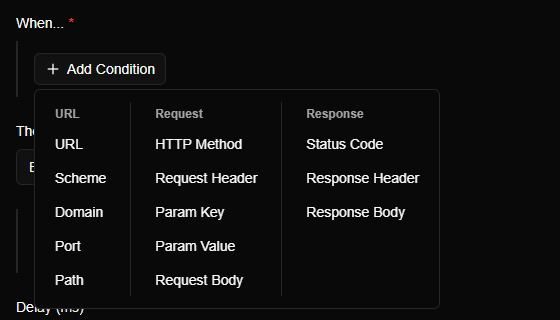
URL#
| Category | What it looks at | Example |
|---|---|---|
| URL | The whole address | contains /v1/users |
| Scheme | http or https |
is https |
| Domain | The host name only | is api.acme.dev |
| Port | The port number | is 8080 |
| Path | The path, without the query string | starts with /v1/orders |
Request#
| Category | What it looks at |
|---|---|
| HTTP Method | GET, POST, PUT, PATCH, DELETE and so on, chosen from a list |
| Request Header | A header the app sent: you give the header's name, then compare its value |
| Param Key and Param Value | The names and the values of the query parameters in the address (?name=value) |
| Request Body | The body the app sent, as text |
Response#
| Category | What it looks at |
|---|---|
| Status Code | The three-digit result from the server, such as 200 or 404 |
| Response Header | A header the server sent back |
| Response Body | The body the server sent back, as text |
Operators#
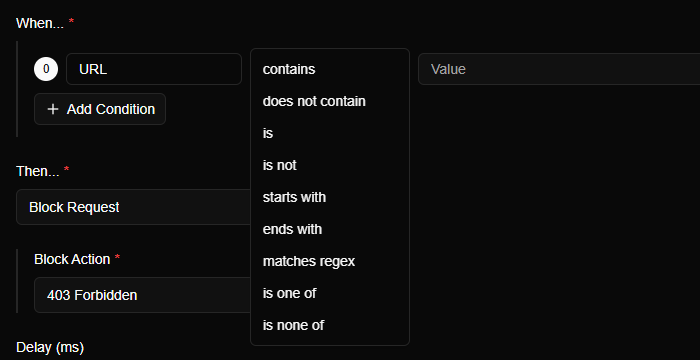
The operators on offer depend on the category. Text categories offer these:
| Operator | Matches when the value… |
|---|---|
| contains / does not contain | includes (or doesn't include) the text |
| is / is not | equals (or doesn't equal) the text exactly |
| starts with / ends with | begins or ends with the text |
| matches regex | matches a regular expression |
| is one of / is none of | is (or isn't) one of a list of values, written separated by commas |
Numeric categories, Status Code and Port, offer is, is not, greater than, greater than or equal to, less than, less than or equal to, is one of and is none of. So Status Code is greater than or equal to 500 catches every server error at once.
TIP
Prefer contains when you're starting out. It's forgiving: you don't have to type the whole address, and it still matches if the app adds ?page=2 on the end. is wants an exact match of the whole value, so it's easy to miss by a character.
Good to know#
- Comparisons ignore upper and lower case.
contains/V1/Usersmatches/v1/users. - A regular expression ("regex") is a compact pattern language for matching text. For example
/users/\d+matches/users/1,/users/42and so on. It's also case-insensitive. If the pattern isn't valid, the rule can't be saved, so a typo doesn't silently match everything. - A list (is one of / is none of) is a comma-separated list such as
401,403. An empty list matches everything. - A header can appear more than once, and the same goes for a query parameter. A positive operator (contains, is…) matches if any of the values satisfies it. A negative one (does not contain, is not, is none of) matches only if none of them does. So Request Header X-Debug does not contain true is also true when the header isn't there at all.
Several conditions#
All the conditions on a rule have to match, so they combine with and. Domain is api.acme.dev and HTTP Method is POST only matches POST calls to that host.
There is no "or" inside one rule. Two ways to get the same effect:
- Use is one of with a list of values: Path is one of
/login,/signup. - Make two rules, one for each case.
The conditions are numbered from zero, in the order shown. The numbers matter when you want a rule's action to reuse something a condition matched, such as a captured part of the address: see Template variables.
Request conditions and response conditions#
Whether a condition looks at the request or the response changes when the rule can run, and which actions you can choose.
- If every condition looks only at the request (the URL group and the Request group), the rule runs before the request is sent.
- If any condition looks at the response (Status Code, Response Header or Response Body), the rule can only run once the response arrives.
| Action | With request conditions | With a response condition |
|---|---|---|
| Block | Block Request | Block Response |
| Modify Request | Yes | Not available: the request has already been sent |
| Pause and Review | Yes | Not available: the request has already been sent |
| Modify Response | Yes | Yes |
| Proxy to different endpoint | Not available | Yes |
The Rules form enforces this: the Then… list only offers the actions that make sense for your conditions. If you change a condition and an action you picked is no longer allowed, choose another.
NOTE
A rule with a response condition lets the request reach the real server first. Anything the request causes there, such as creating an order, still happens.
Streams and very large bodies#
A response condition has to look at the response before your app gets it. For a streaming response, or a body over 32 MB, the body isn't captured whole, so:
- Status Code and Response Header conditions still work, because those arrive before the body.
- Response Body conditions can't match: there's no complete body to look at.
An unlabelled response whose length isn't known is also held back until it ends when a response rule could apply to it, so Mittelware can match on its body. A streaming response that is labelled, such as text/event-stream, is always passed through live.
Examples#
| You want a rule for… | Conditions |
|---|---|
| One endpoint | URL contains /v1/checkout |
| Only writes to that endpoint | URL contains /v1/checkout and HTTP Method is one of POST,PUT,PATCH |
| A whole API host | Domain is api.acme.dev |
| Every ID of one kind | Path matches regex ^/v1/orders/\d+$ |
| Requests that carry a debug flag | Request Header X-Debug is true |
| Every server error | Status Code greater than or equal to 500 |
| Responses that mention a word | Response Body contains maintenance |
| Calls from a search | Param Key is q |
Related#
- Rules overview
- Template variables
- Reading the Flows page: the filter button uses the same kinds of conditions