
Block Request and Block Response
Make a request or response fail on purpose with a status code of your choice, or hang with no answer at all, to test how your app handles errors and timeouts.
Block is the quickest way to make something fail. It stops traffic and answers with an error you pick, so you can see how your app copes with a 403, a rate limit or a server that never answers, without breaking a real server.
It comes in two forms, and Mittelware picks the right one for you from your conditions.
| Form | When you see it | What happens |
|---|---|---|
| Block Request | All your conditions look at the request (URL, method, headers…) | The request is stopped before it leaves your computer. The server never sees it |
| Block Response | At least one condition looks at the response (status code, response header…) | The request does reach the server and is processed. The answer is thrown away on the way back, and your app gets your error instead |
That difference matters when a request has side effects. A blocked request can't create an order or take a payment, because it never arrives. A blocked response can: the server did the work, and your app just never hears about it. That's exactly the "lost response" case that causes duplicate orders in real life, which makes Block Response a good way to test whether your app's retries are safe.
Set it up#
Choose Block Request (or Block Response) under Then…. A Block Action appears below it, and a Delay field below that.
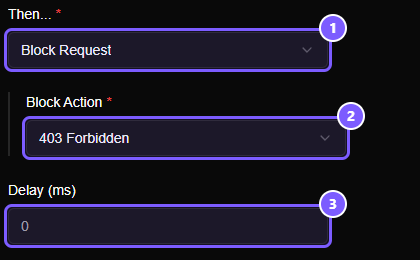
- Then… is set to Block Request. It reads Block Response if a condition looks at the response.
- Block Action is what your app receives. It's
403 Forbiddenuntil you change it. - Delay (ms) waits this long before blocking.
0means straight away.
The Block Action list#
Open the list to pick what your app should see.
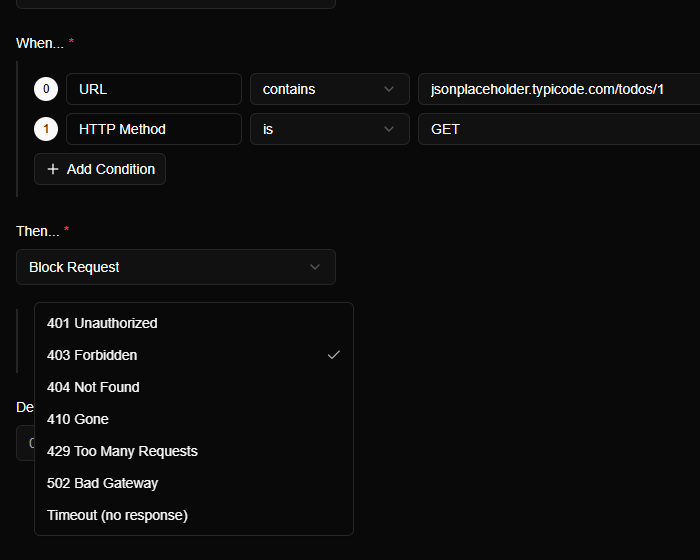
| Choice | What it simulates | What to check in your app |
|---|---|---|
| 401 Unauthorized | An expired or missing login | Does it send the user to sign in, or try to refresh the token? |
| 403 Forbidden | The user isn't allowed | Is there a clear message, or a blank screen? |
| 404 Not Found | The thing doesn't exist | Does it show a "not found" state, or crash on missing data? |
| 410 Gone | The thing was deleted for good | Does it treat this differently from a 404, if it should? |
| 429 Too Many Requests | Rate limiting | Does it back off and retry later, or hammer the server harder? |
| 502 Bad Gateway | The server or a service behind it is down | Is there an error message and a Retry button that works? |
| Timeout (no response) | A server that never answers | See below |
Timeout#
Timeout (no response) doesn't send an error at all. Mittelware holds the connection open and sends nothing back, until your app gives up on its own. This is the case that most often goes untested, and the one that hangs real apps: spinners that never stop, buttons that can be pressed twice, retries that pile up.
Combine it with the Delay field to wait a while first, for example a delay of 2000 makes the request look like it's being processed for two seconds and then goes silent.
What your app receives#
A block answers with only the status code: no body and no custom headers. Mittelware leaves the page blank on purpose, so a blocked response can never be mistaken for content the server really sent. In the details of a blocked request the Response tab says No response body.
For anything more, such as an error message in JSON, headers like Retry-After, or a streamed answer, use Modify Response instead. It can set a status, headers and a body together.
Seeing it in Flows#
A blocked request is tagged like any other request that a rule acted on: a shield icon, and a badge with the rule's name in the details panel.
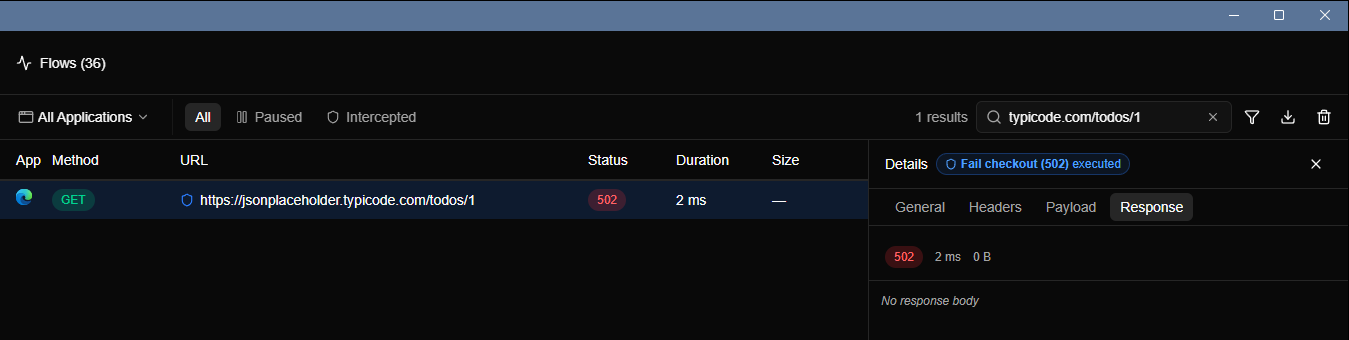
The duration is tiny and the size is blank. A Block Request never goes to the server, so there's no network round trip to time. That's a handy check that the rule really stopped the request.
Good to know#
- Delay applies to every action. With a block, it's the wait before the answer.
- A rule that blocks stays in force until you switch it off. Use the switch on the Rules page when you've finished testing.
- To fail only some requests, make the conditions narrower, for example add HTTP Method
isPOSTso reads still work. - To fail a request only after the server answered with a certain status, use a Status Code condition. The action becomes Block Response.
Worked examples#
- Simulate a 502 from any API without touching the backend
- Test timeouts, retries and slow networks on purpose