
Proxy to different endpoint
When a real response matches your conditions, fetch the answer from a different URL instead and return that, for example to fall back to a test server when the real endpoint returns a 404.
Proxy to different endpoint swaps one response for another. The real server answers first. If that answer matches your conditions, Mittelware sends a request to a different address you choose and hands your app that response instead.
It's a good fit when you want a second server's answer rather than a body you type in:
- The real endpoint doesn't exist yet, so it answers
404. Send those calls to a mock server onlocalhost. - A staging endpoint is flaky. When it answers
500, fetch the same thing from a stable copy. - You want real, varied data from a test server without writing every body by hand.
NOTE
This action is only available when a rule has at least one response condition, such as Status Code. It needs the real response to have arrived before it can decide. For a rule that looks only at the request, redirecting is Modify Request's job.
How it differs from Modify Request#
| Modify Request | Proxy to different endpoint | |
|---|---|---|
| When it acts | Before the request is sent | After the real response arrived and matched |
| Does the real server see the request? | No: the request is rewritten and goes elsewhere | Yes. The real server handles it first, and its answer is then discarded |
| Conditions it works with | Request conditions only | Response conditions |
| Best for | Always redirecting a call | Redirecting only when the real answer is, say, a 404 |
That second row matters if the request has side effects: with Proxy to different endpoint, the real server has already done its work.
Set it up#
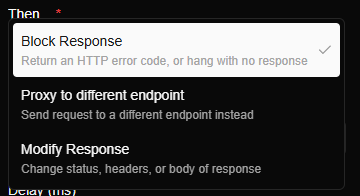
Under When…, add a response condition, then choose Proxy to different endpoint under Then…. When a rule has a response condition, the Then… list offers these three actions:
Here is a rule that sends any 404 to a server on your laptop:
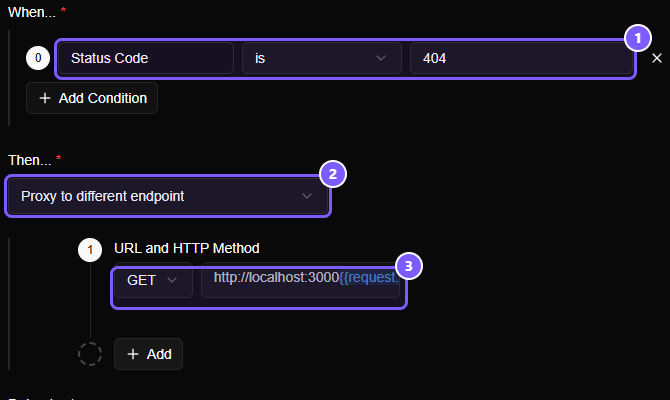
- The condition: Status Code
is404. It only fires when the real server says it can't find the thing. - The action: Proxy to different endpoint.
- URL and HTTP Method: the method to use and the address to ask.
http://localhost:3000{{request.path}}keeps the path of the original request, so/v1/orders/7is fetched from your laptop as/v1/orders/7.
The URL is required, and the method starts as GET. The URL can use template variables, including the response ones ({{response.status}} and so on), because the real response is available by then.
Shape the new request#
By default the new request is the original request, re-sent to the new address with the method you chose. Click Add to adjust it.
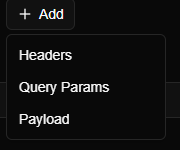
| Part | What it does |
|---|---|
| Headers | Set or Remove headers on the new request, for example a different Authorization for the test server |
| Query Params | Set query parameters |
| Payload | Replace the body |
These work exactly as they do in Modify Request.
What your app sees#
Your app receives whatever the other endpoint returns: its status, its headers and its body. The flow in the list is tagged with a shield and the rule's name, like any other request a rule acted on.
If the other endpoint can't be reached, or the URL doesn't produce a valid address, your app gets a 502 Bad Gateway, and the body says which rule failed and why, for example Couldn't reach http://localhost:3000/… for the rule "…": connection refused. Mittelware waits up to a minute for the other endpoint to start answering.
Good to know#
- The rule's Delay (ms) field, if set, waits before the new request is made.
- To answer with a simulated stream rather than another server's answer, use a Stream body in a Modify Response rule.
- To always send a call to another server, whatever the real one says, Modify Request is simpler, and the original server never sees the request.
Worked example#
Mock an API endpoint before the backend exists ends with this pattern: when the real endpoint answers 404, forward the call to your mock server.