
Finally and No change
Make a rule do something after the traffic has passed, such as keeping a session ID from a login response in a variable for later rules to use. The No change action lets a rule watch without touching anything.
Most rules change traffic: when this matches, then do that to it. Finally… adds a second job that happens after: once a rule has acted and the answer is settled, it can keep a value from the traffic in a variable. Later rules then read that variable as {{vars.name}}.
That is how one rule can learn something from one request and another rule can use it in the next. The classic case is a login: the server answers with a session ID, and every request after it needs to carry that ID.
No change: a rule that only watches#
Not every rule that keeps a value wants to change anything. For those, choose the action No change. The traffic passes through exactly as it is, and the rule exists for its Finally rows.
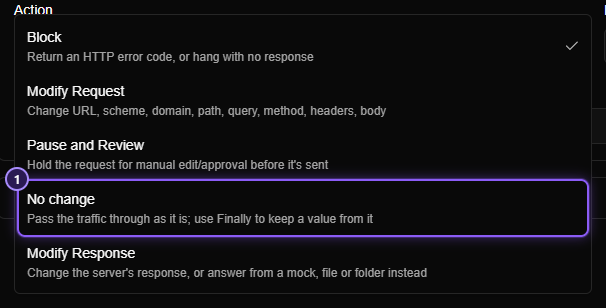
- No change.
A No change rule never takes a request or a response away from another rule. Any number of No change rules can match the same request, and a Modify Request or Block rule listed below one still does its job. So you can add one to watch without disturbing the rules you already have.
Add Finally rows#
Under Then… there is a section called Finally…. On a new rule it is folded, with the summary nothing afterwards. Choose No change and it opens by itself.
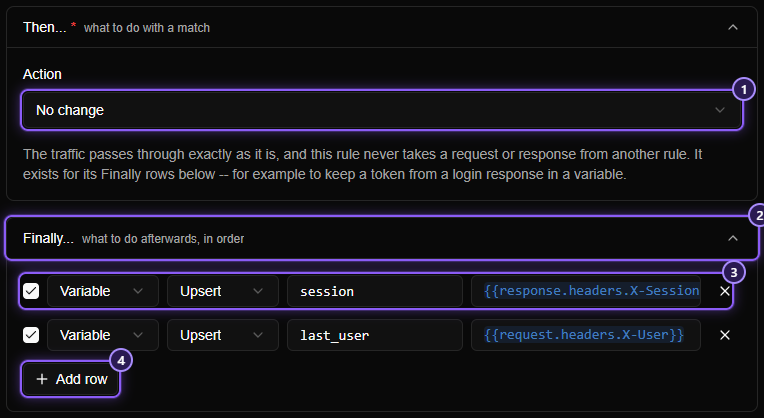
- The action: No change.
- The Finally… section. Folded, its header counts the rows, for example 2 rows.
- A row. Read it left to right: a variable, upsert, named
session, set to the value. - Add row.
Each row has:
| Part | What it does |
|---|---|
| Checkbox | Switches the row off without deleting it. A switched-off row isn't checked or run |
| Variable | The kind of step. Variables are the only kind so far |
| Upsert or Remove | Upsert gives the variable the value, creating it if it doesn't exist. Remove deletes the variable |
| Name | The variable's name. It suggests the variables you already have |
| Value | What to set it to. This is a {{ }} template over the request, the response and other variables. Remove rows have no value |
The value can use any template variable, including the response: {{response.headers.X-Session}} keeps a header from the answer, {{request.headers.X-User}} keeps one from the request, and {{vars.counter}} reads another variable.
When the rows run#
- After the rule has acted and the response is settled. They run once the answer is known, and before your app receives it.
- In order, top to bottom. A later row can read what an earlier row just set. If row 1 sets
a, row 2 can setbto{{vars.a}}and gets the new value. - After any action, not only No change. Add rows to a Block, Modify Request, Modify Response, Respond or Pause rule too. A request that is blocked is never sent to the server, but its rows still run.
- Not for WebSocket rules. A WebSocket rule has no Finally… section.
Seeing what it made#
A variable made by a rule appears on the Variables page as soon as it exists, hidden, because it is probably a token. Click the eye to read it.
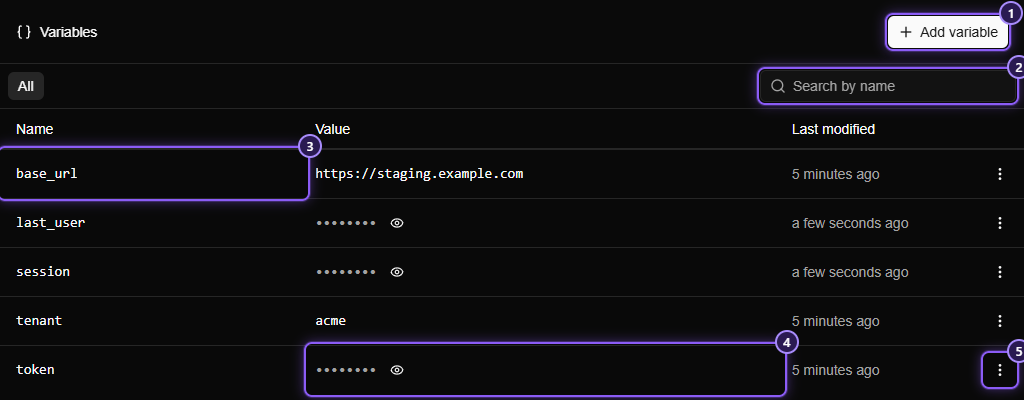
If you already had a variable with that name, the rule changes only its value. Its name, its hidden setting and the place it holds in the list stay.
Worked example: keep the session from a login#
- Rule 1, the observer. App: your browser. When
Path is /loginandHTTP Method is POST. Then No change. Finally: Variable, Upsert,session,{{response.headers.X-Session}}. - Rule 2, the user. App: your browser. When
Path starts with /api. Then Modify Request, add a Headers part: SetCookietosession={{vars.session}}. - Log in. The login request passes through untouched, and
sessionnow holds the header's value. - Browse. Every request to
/api…carriesCookie: session=<the value>.
What to know#
- An empty value leaves the variable alone. If a row's value comes out empty (the response had no such header), the variable keeps its old value, so a missing header can't wipe a good session. To clear a variable on purpose, use a Remove row.
- A value over 64 KB is skipped, and the variable keeps its old value.
- A streamed response has no body to read. A value that needs the response body, such as
{{response.body}}, comes out empty for a stream, and the row is then skipped. Headers and the status are still available. - No change can use response conditions. Status Code is 500 makes the rule act only on 500s, so you can keep a value only from errors.
- A rule that matches but changes nothing shows in Flows like any rule. The flow's details name it. The flow details don't yet list which variables it set, so check the Variables page.
Messages you may see#
| When you save | It means |
|---|---|
| Enter the name of the variable | A row has no name |
| Use letters, digits, _ and -, starting with a letter or _ | A name that a tag couldn't use |
| Enter what to set it to | An Upsert row with no value |
| This "{{" is never closed. | A {{ in a value with no }} |
| Add a Finally row: a rule that changes nothing needs something to do afterwards | No change with no rows |
Switched-off rows aren't checked.