
Find and replace in a response
Edit just a few things inside the server's real page or script, such as swapping a script address or hiding a banner, and leave the rest exactly as the server sent it.
Modify Response can replace a whole body. Often you don't want that. You want the real page, with one script address swapped for your local one, or one banner hidden. Find and replace edits inside the server's real response and leaves everything else exactly as the server sent it.
It's a mode of the Body part of a Modify Response rule, available when the rule's Behavior is After the server responds. The request goes to the real server, the answer comes back, Mittelware makes your replacements in it, and your app receives the edited version.
Set it up#
Choose Modify Response, set Behavior to After the server responds, click Add action and choose Body. Then choose Find and replace next to Raw, From file and Stream.
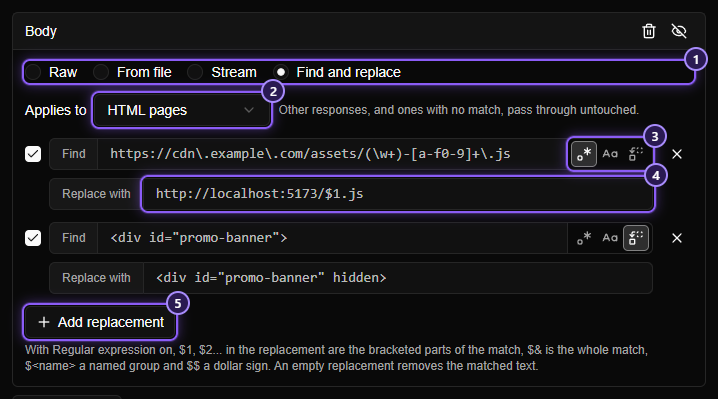
- The Find and replace mode.
- Applies to: which kind of response to edit.
- The options of a replacement: Regular expression, Ignore case and First match only.
- Replace with: what each match becomes.
- Add replacement adds another. You can have as many as you need.
Applies to#
Only the kind of response you choose is edited. Everything else passes through untouched.
| Choice | Edits |
|---|---|
| HTML pages | Responses whose type is HTML |
| JavaScript | JavaScript files |
| JSON | JSON responses |
| CSS | Stylesheets |
| Any text | Any text response, including plain text, XML and SVG. Never an image or an archive |
Replacements#
Each replacement is a Find box and a Replace with box, with three switches on the right of Find:
| Switch | Effect |
|---|---|
| Regular expression | Find is a pattern, not plain text. Replace with can use the groups of the match: $1, $2…, $& for the whole match, $<name> for a named group, and $$ for a dollar sign |
| Ignore case | Capital and small letters match each other |
| First match only | Only the first match is replaced, not every one |
With Regular expression off, Find is searched for literally, so ., ( and $ are just characters, and a $ in Replace with is a dollar sign. An empty Replace with removes the matched text.
A replacement has a checkbox at its left. Untick it to keep it in the rule without running it.
Replacements run in order, top to bottom, and each reads the text the one before it left. So the second can find something the first wrote.
Both boxes accept template variables and your own variables. With Regular expression on, a filled-in value is matched as plain text, so a variable that contains . or ( is safe to use. The pattern you type around it stays a pattern.
Example#
The server's page loads its scripts from a CDN:
<script src="https://cdn.example.com/assets/main-9f8e7d.js"></script>
<div id="promo-banner">Sale!</div>
With the two replacements in the screenshot, your app receives:
<script src="http://localhost:5173/main.js"></script>
<div id="promo-banner" hidden>Sale!</div>
The first replacement is a regular expression with a group around the name: https://cdn\.example\.com/assets/(\w+)-[a-f0-9]+\.js becomes http://localhost:5173/$1.js. The second is plain text. The page now loads your dev server's script, and the banner is hidden, while all the rest of the page is the server's own.
TIP
To serve a whole folder of your local files in place of a deployed one, use From folder instead. Find and replace is for changing a few things in a page you still want from the server.
What is left alone#
Mittelware only touches a response it can safely edit. It leaves the response exactly as the server sent it when:
- its type isn't the one you chose under Applies to, or it has no
Content-Typeat all; - none of your replacements finds anything. The server's bytes, compression included, go through untouched;
- the body isn't text Mittelware can read: a different character set, or bytes that aren't valid text;
- it is streamed (like a live event feed) or too large to capture (over 32 MB);
- it is the answer to a
HEADrequest, which has no body.
Compressed pages#
Servers often compress what they send (gzip, deflate, Brotli or zstd). Mittelware reads the page decompressed, makes your changes, and sends the edited page on plain, with the Content-Encoding header removed and Content-Length corrected to match. Your app doesn't have to know anything about it.
Good to know#
- Not for "Instead of the server". There is no server response to edit, so the mode isn't offered there, and a rule that has one is refused when you save. Use a Raw, From file or From folder body for that.
- The flow shows the edited response. In Flows the response is the one your app received, edited, and the details name the rule.
- Check the pattern. A regular expression that can't be compiled is refused when you save the rule, with the reason. A replacement with nothing in Find says Enter the text to find.