
WebSockets
Watch WebSocket connections and every message sent over them, live. Then change, drop, delay, hold or close messages with WebSocket rules.
Most of what an app does on the network is a question and an answer: the app sends a request, the server sends one response, and that's the end of it. A WebSocket is different. The app and the server open one connection and keep it open, and either side can send a message whenever it likes, in either direction, for as long as the connection lives.
That is why chat apps, live prices, notifications, multiplayer games, collaborative editors and "typing…" indicators use them. Your dev server probably uses one too: Vite, webpack and Next.js reload the page through a WebSocket.
Mittelware follows WebSockets as they happen. The connection shows up in Flows like any other request, and every message that crosses it is recorded with its direction, its time and its contents. Rules can act on those messages, too.
If words like "request", "header" or "status code" are new, read Start here first.
What you'll see#
A WebSocket starts life as an ordinary HTTP request that asks the server to switch protocols. That request is the handshake. If the server agrees it answers 101 Switching Protocols, and from then on the connection carries messages instead of requests.
In the Flows list, that handshake is the row to look for:
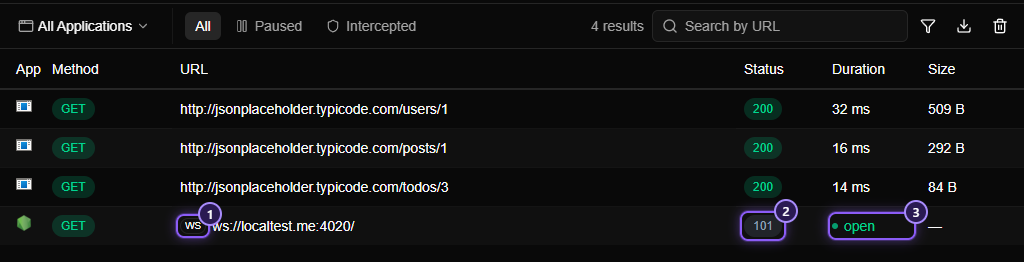
- The WS badge in front of the address marks the row as a WebSocket.
- The status is
101: the server agreed to switch. - A green, pulsing open label takes the place of the duration while the connection is alive. Once it closes, the row shows how long it stayed open, and a count of the messages it carried.
Click the row and the details panel offers a Messages tab, where every message is listed: Reading the Messages tab shows how to read it.
Try it yourself#
You don't need a real chat service to see a WebSocket. This small Node.js server sends a welcome message, a "price" every two seconds, and echoes whatever it receives. It uses the popular ws package:
mkdir ws-demo && cd ws-demo
npm init -y
npm install ws
// ws-demo.mjs (run it with: node ws-demo.mjs)
import { WebSocketServer } from "ws";
const server = new WebSocketServer({ port: 4020 });
server.on("connection", (socket) => {
socket.send(JSON.stringify({ type: "welcome", user: "ada" }));
let tick = 0;
const timer = setInterval(() => {
socket.send(JSON.stringify({ type: "price", symbol: "ACME", price: 100 + (tick++ % 7) }));
}, 2000);
socket.on("message", (data) => {
socket.send(JSON.stringify({ type: "echo", text: data.toString() }));
});
socket.on("close", () => clearInterval(timer));
});Switch Mittelware on and use a browser that is opened through Mittelware. Open a new empty tab (type about:blank in the address bar), press F12 to open the developer tools, and paste this into the Console:
const socket = new WebSocket("ws://localtest.me:4020");
socket.onmessage = (event) => console.log(event.data);
socket.onopen = () => socket.send("hello from the console");
Use localtest.me here, not localhost: it's a public name that always points back at your own computer, and browsers skip the proxy for localhost itself. See Why isn't my app's traffic showing up? for the full story.
NOTE
Starting from about:blank matters. A page served over https:// is not allowed to open an unencrypted ws:// connection (browsers call this mixed content), so the snippet above would fail on most sites. Pages you build yourself can use wss:// instead, which works like HTTPS: see Secure WebSockets below.
Open Flows. A row for ws://localtest.me:4020/ appears with a WS badge, and the Messages tab fills with a welcome message and a price tick every two seconds. To send another message, run socket.send("something") in the console. To end the connection, run socket.close().
Secure WebSockets (wss://)#
A wss:// address is a WebSocket over TLS, the same encryption https:// uses. Mittelware handles it exactly like HTTPS: once you've trusted its certificate, the messages are decrypted, shown and open to rules, and Mittelware's own connection to the server stays encrypted.
Until the certificate is trusted, an app that opens a wss:// connection gets the same certificate error it would for an https:// address. That is true of every encrypted connection, not just WebSockets.
NOTE
A host on the bypass list is passed straight through without being decrypted, and that includes its wss:// connections. They appear as a single CONNECT row, with no messages.
What you can do with them#
| You want to… | Where |
|---|---|
| See every message, in both directions, with timing | The Messages tab |
| Search messages, filter by direction, read a payload | The Messages tab |
| Change a message on its way | WebSocket rules: Modify Message |
| Throw messages away, or slow them down | WebSocket rules: Drop and Delay |
| Close the connection from the middle | WebSocket rules: Close Connection |
| Stop a message, edit it by hand, then let it go | Pause Message |
How WebSockets and rules fit together#
- The handshake is an HTTP request. A normal rule can block it or modify it, for example to add a header or to point it at another server. A rule that blocks the handshake means the connection never opens. Such a rule sees the handshake as an
http://orhttps://request, so match it on Domain or Path rather than on thews://address. - Messages are what WebSocket rules act on. A WebSocket rule has the same parts as any rule (Source, Label, When…, Then…), plus conditions about the message itself: its direction, type, text and size.
- A rule is looked at when the connection opens. Changes to a rule apply to connections opened afterwards. If you edit a rule and nothing changes, reconnect.
Limits#
Mittelware keeps messages in memory, so it caps what it holds. Your app is never affected: every message always reaches the other side, and only what is shown is limited.
| Limit | What happens |
|---|---|
| 10,000 messages or 8 MB of text in one connection | Later messages still pass through (and are counted), but aren't kept. A note in the Messages tab says only the first ones are shown |
| 200 connections | Mittelware remembers the messages of the 200 most recent connections. An older one keeps its row, but its messages are forgotten |
| A single message over 64 KB | Passed on in full, but only its first 64 KB are kept for display. Expanded, it's marked first part only |
| Clear all flows | Also clears every connection's messages |
A few more things to know:
- Compression is switched off. Some browsers offer to compress WebSocket messages (
permessage-deflate). Mittelware doesn't pass that offer on, so messages travel uncompressed and stay readable. Servers fall back without any trouble. - Messages are not guaranteed to be shown when they arrive faster than they can be drawn. A very busy socket can outrun the window. The messages still reach their destination, and the Messages tab tells you how many it didn't capture.
- Servers that need a subprotocol work. If your app asks for one (
new WebSocket(url, "graphql-transport-ws"), for example), the server's choice is passed back to it.
Troubleshooting#
- The WebSocket doesn't show up at all. The same causes as for any missing traffic: the app isn't going through the proxy, monitoring is off, or it connects to
localhostdirectly. See Why isn't my app's traffic showing up?. - I see a
CONNECTrow but no messages. The connection was tunnelled without being decrypted because its host is on the bypass list. Take the host off the list, and reconnect. - My app reports a certificate error. For a
wss://address, that's the certificate not being trusted yet, as forhttps://. - The flow shows an error instead of
101. The server refused the handshake, for example with401or403, or couldn't be reached (502). The details panel shows what it answered, as for any request. - My rule doesn't seem to do anything. Check the rule's type is WebSocket, that the address you typed is the
ws://orwss://one, and that you reconnected after saving it. WebSocket rules has a longer checklist.
Related#
In this section
- Messages tabSee every message of a WebSocket connection in order, which way it went, when, and how big it was. Search them, read JSON and binary payloads, and learn how a connection ended.
- WebSocket rulesChange, drop, delay, hold or end the messages of a WebSocket connection. How a WebSocket rule picks its connections and its messages, every condition and action, and worked examples.
- Pause MessageHold a matching WebSocket message before it reaches the other side, edit its text by hand, then pass it on or drop it. A breakpoint for a single message of a live connection.