
Pause Message
Hold a matching WebSocket message before it reaches the other side, edit its text by hand, then pass it on or drop it. A breakpoint for a single message of a live connection.
Pause and Review holds one HTTP request so you can change it. Pause Message does the same for one message of a WebSocket connection: it holds the message before it reaches the other side, so you can read it, change its text, then send it on or throw it away.
Use it to:
- Look before it leaves. See exactly what your app is about to send over a live connection, with a chance to stop it.
- Test server-side validation. Your chat box won't send an empty message, but the server should reject one too. Pause a message and empty it.
- Change one value once. Turn a transfer of
250into25, or a role fromuserintoadmin, for a single message. - Hold back a reply. Pause a message from the server to see how your app waits, or to change what it is about to believe.
- Lose a message. Drop it, and see how your app copes when one doesn't arrive.
Set it up#
Create a rule with the type WebSocket (ws / wss) and choose Pause Message under Then…. There's nothing else to configure: the conditions are the whole rule.
Keep the conditions narrow. A rule with no message conditions would hold every message, including the ones your app needs to stay connected. Match the one you care about, such as Message Direction is Sent together with Message Body contains "type":"transfer". WebSocket rules lists every condition.
NOTE
Only text and binary messages are ever held. Ping, pong and close messages always pass straight through, because holding them would stall the connection's heartbeat or its goodbye for no reason.
When a message is held#
Everything starts when a message matches. Two things tell you.
In the list, the WebSocket's row gets an amber pause icon next to the blue rule icon that marks a flow a rule acted on. It shows under the Paused tab while a message waits, and under Intercepted as well:

- The pause icon. Hover over it for how many messages are waiting.
- The rule icon. Hover over it for the rule's name.
- The Paused tab, which collects every flow with something held.
- The Intercepted tab, which collects every flow a rule acted on.
Select the row and open its Messages tab, which shows a small amber dot while something is waiting. That is the second sign. The held message opens right in its own row, so you edit it where it sits in the conversation:
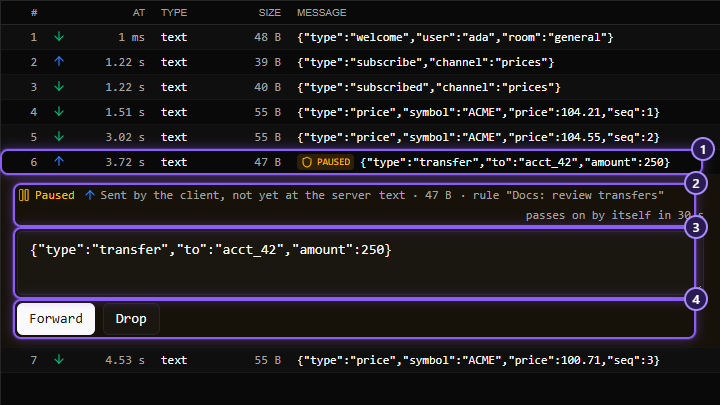
- The held message, in the list with an amber paused label.
- Its header: which way it was going, its type and size, the rule that holds it, and a countdown.
- The message's text, in an editor.
- The buttons that decide what happens next.
The list stops following the connection while a message is held, so what you are editing never moves under you. It scrolls to the message once, when it is first held, and then stays put, even as new messages arrive below. When you scroll away and come back, the text you typed is still there. Once nothing is held, the list follows the connection again when you are at the bottom.
Forward, edit or drop#
| Button | What happens |
|---|---|
| Forward | The message is passed on exactly as it arrived |
| Forward edited | Appears once you change the text. The message is passed on with your text instead |
| Drop | The message is thrown away. Neither side is told |
| Reset | Appears once you change the text. Puts the original back in the editor |
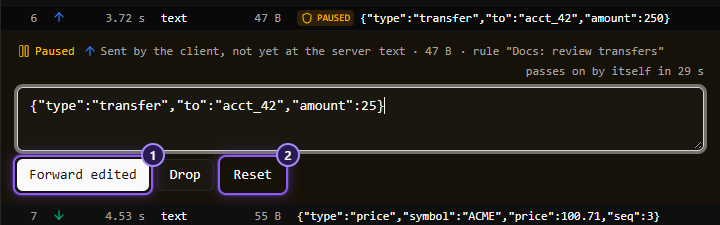
Afterwards the message in the list says what became of it:
| Label | What happened |
|---|---|
| forwarded | You passed it on as it was |
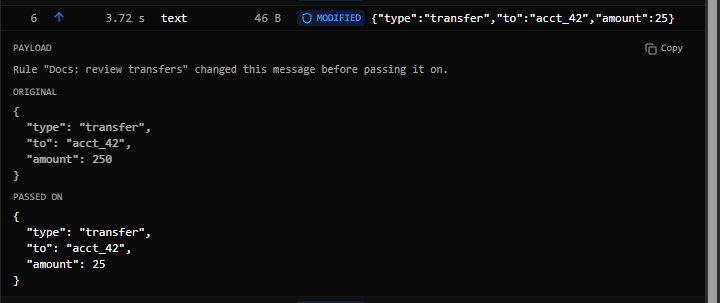
| modified | You passed it on edited. Opened, it shows Original and Passed on |
| dropped | You dropped it |
| timed out | Nobody decided in time, and it was passed on as it was |
The countdown#
A held message passes on by itself after 30 seconds, exactly as it was when it was paused, with none of your unsent edits. The row counts down to it (passes on by itself in 24 s). It's much shorter than the five minutes a paused request gets, for a reason:
- A held message holds up everything behind it in the same direction. The next message your app sends waits for this one. Messages going the other way carry on.
- A connection that goes quiet gets closed. Servers drop a client that doesn't answer their pings for long enough, and a held message eventually stalls those answers.
What you can edit#
- A text message of up to 64 KB can be edited. The text shown is the text sent.
- A binary message can only be forwarded or dropped. Its bytes are shown as a hex dump, and it's always passed on as it arrived, never rebuilt from what's on screen.
- A text message larger than 64 KB can only be forwarded or dropped, because only its start was kept for display. The row says so.
Things to know#
- Stopping monitoring releases everything. Switching Mittelware off passes every held message on as it was.
- A message you didn't get to is not lost. It's passed on when the countdown ends, and its label reads timed out.
- Clients have timeouts too. A request that waits on a held message may give up before you've decided. Work quickly, or raise the timeout of the app you're testing.
- Switch the rule off afterwards. A Pause Message rule left on holds every matching message of every new connection.
- At most one message per direction is held at a time. The ones behind it wait their turn, and each is held in turn when it comes up. The count in the list says how many are waiting right now, and each opens in its own row.
Try it yourself#
With the demo server running, create a rule that pauses sent messages that contain hello, and in the browser console send socket.send("hello again"). Your message is held; open it in the Messages tab, change the text and forward it, and the server's echo shows what it received.
Related#
- WebSocket rules
- Reading the Messages tab
- Pause and Review: the same idea for HTTP requests