
CORS errors and Mittelware
Why a web page behind a proxy can show a CORS error that Postman never does, what Mittelware's Disable CORS enforcement setting changes, what it leaves alone, and how to turn it off.
You open your web app through Mittelware and a request that works without it now fails with "blocked by CORS policy". Meanwhile the same request in Postman or curl is fine. This page explains why that happens and what Mittelware does about it.
What CORS is, in plain terms#
A web page is only allowed to read an answer from another site if that answer says so. The page's browser asks, the server replies with a few Access-Control-… headers, and the browser decides whether to hand the answer to the page's code. That check is called CORS (cross-origin resource sharing).
Two things follow from that:
- It's the browser that enforces it. Postman,
curl, your backend and a mobile app aren't browsers, so they never see a CORS error. They just get the answer. - The error hides the real answer. When the check fails, the page's code is told only that "the request failed". The real status (a
401, a500) is not available to it. That is why a CORS error can feel like the wrong problem.
Why a proxy makes it worse#
When the real server answers, it usually sends the right headers, so your page reads a 401 as a 401. But a proxy sometimes has to answer for the server:
- The server can't be reached, or its certificate can't be verified, so Mittelware answers
502. - A Block rule answers instead of the server.
- A Proxy to endpoint rule answers from somewhere else.
Those answers carry no Access-Control-… headers, so the browser refuses them, and the page reports a CORS error instead of the failure that actually happened. A server that rejects the browser's preflight request (the OPTIONS question a browser asks before a non-simple request) causes the same thing, with or without a proxy.
What Mittelware does#
Mittelware has a setting for this, Disable CORS enforcement, and it is on by default. With it on, for every request that carries an Origin header (which is how a browser marks a cross-origin request):
- Preflights are answered by Mittelware. An
OPTIONSrequest that asksAccess-Control-Request-Methodgets an immediate204that allows the method and headers the page asked about. The server never sees it, which matters because many servers (or the login gateway in front of them) rejectOPTIONS. - Every response is made readable by the page. Mittelware sets
Access-Control-Allow-Originto the page's own origin, allows credentials, lists the response's headers inAccess-Control-Expose-Headersand addsVary: Origin. AnyAccess-Control-…headers the server sent are replaced, not duplicated. - Mittelware's own answers get the same treatment. A
502, a Block rule's status and a Proxy to endpoint answer can all be read, so your page shows what really happened.
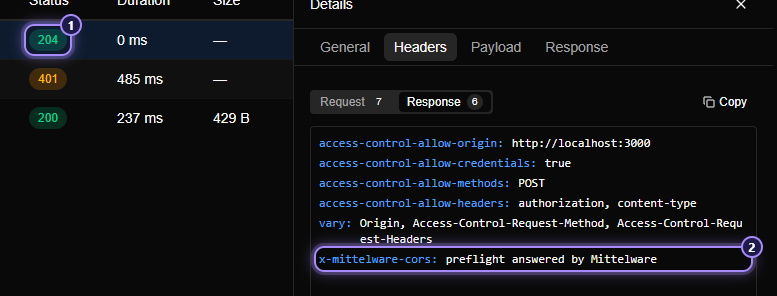
- The preflight, listed in Flows like any other request, with the
204Mittelware answered. x-mittelware-corsis added to anything Mittelware touched, so the Headers tab always tells you that these headers are not the server's own.
What doesn't change#
- The status code and body. A
401stays a401, with the server's body. Only headers are touched. - Requests without an
Origin.curl, backend code and native apps aren't subject to CORS and are left alone. - An ordinary
OPTIONSrequest. One that isn't a preflight (noAccess-Control-Request-Method) goes to the server as usual. - WebSockets. They aren't subject to CORS.
Your rules still win#
The CORS headers are laid down before a Modify Response rule runs, so a rule that sets or removes an Access-Control-… header has the last word. If you want to see a specific header value, say Access-Control-Allow-Origin: https://staging.example.com, set it in a rule, exactly as before.
Turning it off#
Open Settings, go to the Rules tab and switch Disable CORS enforcement off. The change applies to the next request, with no restart.

- Disable CORS enforcement. On by default.
Turn it off when you want to see CORS exactly as your server enforces it. This setting makes your app behave differently from production: a page that works behind Mittelware can still fail for real users if the server doesn't send the right headers. Before you ship, untick it and check that the page still works.
TIP
Seeing a CORS error with the setting on? Then Mittelware couldn't touch that traffic. Check the bypass list: a bypassed host is passed through undecrypted, and Mittelware can't change what it can't read. If the page is on HTTPS, the certificate has to be trusted for the same reason.
What it can't fix#
CORS is one of several rules a browser applies to a page. Mittelware changes only the CORS headers.
- Content-Security-Policy. A page whose policy forbids connecting to a host (
connect-src) is blocked by the browser, not by CORS. - Mixed content. An
https://page can't call anhttp://address, whatever the headers say. - Cookies. A cookie marked
SameSite=LaxorStrictisn't sent on cross-site requests. Allowing credentials in CORS doesn't change that. - Traffic that doesn't go through Mittelware. Browsers commonly skip the proxy for
localhost. See Why isn't my app's traffic showing up?.