
Mock servers
Run a fake API on a port of its own, with HTTP routes, WebSocket routes and streamed answers, and point your app at it while the real backend is missing, broken or slow.
A mock server is a small fake API that runs inside Mittelware. It listens on a port of its own, such as http://127.0.0.1:4010, and answers the requests that reach it with the responses you wrote. Nothing about it is real: no database, no backend, no network. Your app calls it like any other server.
That makes it the right tool when:
- the real API doesn't exist yet, and you want to build the screens against the answers you expect.
- the real API is down, slow, or costs money each time you call it.
- you need to see how your app copes with a failure that is hard to cause: a
500, a three-second wait, a connection that drops. - you want a whole fake backend that a teammate can import and run too.
A mock server answers three kinds of call, each with its own page in this section:
- HTTP routes: a path with the cases it answers under. See Routes and cases.
- WebSocket routes: a path clients open a live connection to, with the messages it sends. See WebSocket routes.
- Streamed answers: a body sent in pieces, word by word, like an AI chat API. See Streamed answers.
Or start from a spec you already have: Import an OpenAPI spec.
NOTE
A mock server is not the same thing as a rule. A rule waits for a real request to go by and changes it or its answer, so your app keeps calling the real address. A mock server is an address of its own, which your app has to be pointed at. Use a rule to change one answer of a real API. Use a mock server when there is no real API to change. The blog post API mocking vs API interception compares the two.
Where to find it#
Click Mock servers in the sidebar, between Variables and Applications. While any server is running, the sidebar item says how many (for example 1 running).
A mock server doesn't need monitoring switched on. It is a server in its own right and starts and stops on its own switch. Your app calls it directly, so its requests are not captured, and they don't appear in Flows.
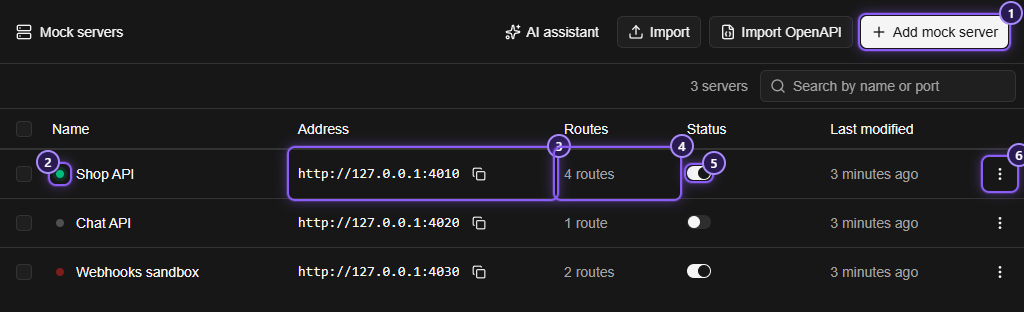
- Add mock server makes a new one. Import OpenAPI makes one from a spec, and Import adds servers from a file another Mittelware wrote.
- The status dot before a name: green and pulsing while it is running, red when it is switched on but can't answer, grey when it is stopped.
- Address: where to point your app. The button next to it copies it.
- Routes: how many paths the server answers.
- The switch starts and stops the server.
- The row's menu: Settings, Copy address, Export and Delete.
Tick servers to see Export (N) in the header, and a Delete button above the list. Search by name or port narrows the list.
Make your first mock server#
This takes about a minute. By the end, curl gets an answer from an API that doesn't exist.
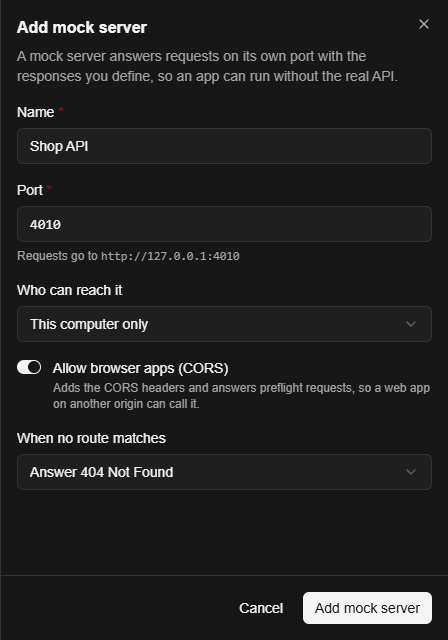
- Click Add mock server. A panel opens on the right.
- Type a Name, such as
Shop API. The Port is already filled in with a free one (4010, or the next free number). Leave the rest as it is and click Add mock server. The server is saved stopped, and its page opens.
-
A new server has no routes, so the page says No routes yet. Click Add route. The Path box already holds a
/: typeproducts/{id}after it, so it reads/products/{id}, and click Add route.{id}stands for any one part of the address. -
The route comes with one case that answers
200with a small JSON body. Open it, and in the Then... part replace the Body with:{"id": "{{request.params.id}}", "name": "Mechanical keyboard", "price": 129}{{request.params.id}}is replaced by whatever stands where{id}is in the address. -
Click Save in the header. Nothing on this page is saved until you do.
-
Turn on the switch in the header. The address bar across the top of the page turns green: the server is listening.
-
In a terminal:
curl http://127.0.0.1:4010/products/42You get back:
{"id": "42", "name": "Mechanical keyboard", "price": 129}Now point your app at http://127.0.0.1:4010 instead of the real base address, and it runs without the real API.
The server's page#
Click a server in the list to open it.
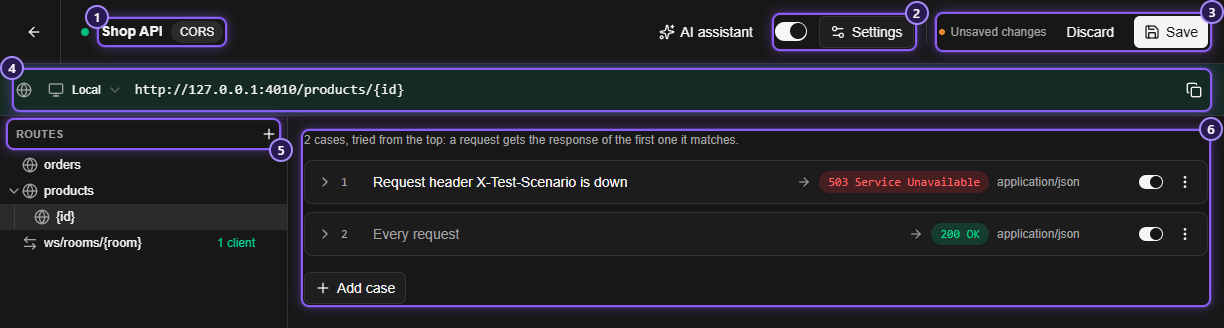
- The server's name, with a CORS badge when it answers browser apps from other origins. If the switch is on but the server can't listen, Not listening appears here, with the reason in its tooltip.
- The switch starts and stops the server at once. Settings opens the server's settings.
- Save writes your edits. Unsaved changes and Discard appear next to it while there are some.
- The address bar: a list to choose the network (Local, or a network address when the server is open to the network), the full URL of the open route and a button to copy it. It is tinted green while the server answers.
- The Routes list. The + adds a route.
- The open route, with its cases.
Save and discard#
Every edit on this page (a new route, a changed case, a deleted folder) goes to a draft. Save (or Ctrl+S, Cmd+S on a Mac) writes the whole draft in one go, and Discard throws it away. If you try to leave with unsaved changes, Mittelware asks Save your changes? and offers Keep editing, Discard changes and Save and leave.
A save is refused as a whole when something is wrong, so the server never ends up half-saved. The Save button explains why in its tooltip (Can't save yet: and the problem), and a route that needs attention has a red dot in the Routes list.
Settings is separate. It has its own Save, which acts at once and doesn't wait for the page's Save.
Changes reach a running server at once#
You can leave the server on while you work. When you click Save, the very next request gets the new answer: there is nothing to restart, and a connection that stayed open doesn't have to reconnect. That covers adding, removing, reordering and switching off cases, adding and removing routes, and changing a response. A change to the server's port or to Who can reach it does restart its listener.
Variables work the same way: a variable changed between two requests is read again on the second one.
Settings#
Open Settings from the header of a server's page, or from the ⋮ menu of a row in the list.
| Setting | What it does |
|---|---|
| Name | Up to 60 characters. Two servers can't have the same name, whatever the capital letters |
| Port | A number from 1024 to 65535. Two servers can't share a port, even when one is stopped |
| Who can reach it | This computer only (the default) or Devices on my network too |
| Allow browser apps (CORS) | On by default. See CORS below |
| When no route matches | Answer 404 Not Found (the default) or Forward to the real API. See Requests no route answers |
Start and stop#
The switch starts and stops the server. A new server is saved stopped. A server that was running when you closed Mittelware starts again the next time you open it.
If the server can't start, it stays off (or shows Not listening) and says why:
Port 4010 is already used by another mock server that is running.Couldn't listen on port 4010:followed by the system's reason, which is what you see when another program holds the port. Pick another port in Settings, and switch the server on again.
Who can reach it#
This computer only listens on 127.0.0.1: only programs on this computer can call it.
Devices on my network too listens on every network interface, so a phone, a tablet or another computer on the same network can call it. The address bar then offers every network address this computer has, in the list on its left, and the URL beside it changes to match. Panels that show an address use the same list.
WARNING
Anyone on your network can call a server that is open to the network. Use it to test a phone or another machine, then switch it back to This computer only.
CORS#
Browsers refuse to let a web page read an answer from another origin unless the server agrees. With Allow browser apps (CORS) on (the default), a mock server agrees for you, so a web app on another address or port can call it:
- A browser's preflight (an
OPTIONSrequest that carriesAccess-Control-Request-Method) is answered straight away with204, before any case is looked at. - Every answer gets
Access-Control-Allow-Origin: the page's own origin, or*when the request names none. A case that sets that header itself keeps its own value. - For a request that names an origin, the answer also carries
Vary: Origin, allows credentials for that origin, and lists your custom response headers inAccess-Control-Expose-Headers, so a page can read headers likeX-Total-Count.
Turn it off when you want to see what your app does without it.
Requests no route answers#
A request is unmatched when no route fits its path, or the route that fits has no enabled case that matches the request. With Answer 404 Not Found the server replies 404 with the plain text Not Found.
With Forward to the real API, you type an address such as https://api.example.com and the server sends the request on there instead, with the same method, path, query string, headers and body. Whatever the real API answers comes back as it is: the status, the headers and the body, errors and redirects included (a redirect is passed on, not followed). The routes list says where unmatched requests go (Unmatched → api.example.com).
This lets you mock only the endpoints you care about and let everything else reach the real API. A route that answers is never forwarded.
- If the real API can't be reached, the server answers
502with a message saying so, and goes on answering the routes you defined. - The address can't be the mock server itself, because every request would be forwarded back to it again and again. Mittelware refuses it and says
This is the mock server itself. Use the address of the real API.
Share and back up#
Tick servers in the list and click Export (N), or use Export in a row's menu, to save them to a JSON file with their routes and cases. Import reads such a file and adds its servers to this copy of Mittelware:
- Each one is added as a new, stopped server. Nothing already there is replaced.
- A name that is taken becomes
Shop API (imported), thenShop API (imported 2), and so on. - A port that is taken moves to the next free one.
- A server that can't be added (a case is refused, say) is skipped and listed in the result. The rest still go in.
A file from Settings, Data works too: the mock servers are read from it and the other sections are ignored.
Delete a server#
Use Delete in a row's menu, or tick several servers and click Delete. Mittelware asks first, and the question says what goes with it: the server, its routes, and anything that calls its address will stop getting answers. A running server is stopped and its port is freed. Deleting can't be undone, so export the server first if you may want it back.
Let an AI assistant build it#
Mittelware's built-in MCP server has tools for mock servers: it can list them, read one in full, create one, change its settings, replace its routes, start and stop it, and delete it. Ask in plain words, for example "Make a mock server called Shop API on port 4010 with GET /products/{id} that returns an id and a name".
- A change an assistant makes shows up in the open list straight away, and a server it deletes disappears.
- A server an assistant creates has CORS off unless it asks for it. The Add mock server panel starts with it on.
- Like anything an assistant does, it takes effect at once. Look at what it made, and switch off or delete what you don't want.
Limits#
| What | Limit |
|---|---|
| Server name | 60 characters |
| Port | 1024 to 65535 |
| Cases in one route | 100 |
| A response's status code | 200 to 599 |
| Delay before a response, or before a WebSocket message | 0 to 60,000 ms (one minute) |
| A request body a server reads | 10 MB. A bigger one gets 413 and the text The request body is too large for a mock server, or couldn't be read. |
| WebSocket close reason | 123 bytes |
| Messages kept per WebSocket client | the last 200, each cut at 10 KB in the log |
| Ended WebSocket connections kept | the last 50, across all servers |
| OpenAPI spec size | 64 MB |
Related#
- Routes and cases
- WebSocket routes
- Streamed answers
- Import an OpenAPI spec
- Template variables and Variables
- Answer without the server: the rule that answers a real request itself
- Mock servers in Mittelware
In this section
- Routes and casesHow a mock server decides which answer to give. Routes are paths with {parameters}, cases are the When and Then pairs inside them, and the first match wins.
- WebSocket routesFake a WebSocket server. Send messages when a client connects, answer each message it sends, close the connection on cue, and watch every connected client live.
- Streamed answersMake a mock server answer with a body sent in pieces, word by word like an AI chat API, in plain chunks, Server-Sent Events, OpenAI or Anthropic format, at the pace you choose.
- OpenAPI importTurn an OpenAPI or Swagger spec into a working mock server in one step, with a route for each path and an answer for each documented response, using the spec's own examples.