
WebSocket routes
Fake a WebSocket server. Send messages when a client connects, answer each message it sends, close the connection on cue, and watch every connected client live.
A WebSocket route is a path that clients open a live, two-way connection to, instead of making a single request. A mock server can fake the other end of that connection: it greets the client, answers the messages it sends, and hangs up when you tell it to. It is the quickest way to build a chat screen, a live-prices ticker or a notifications feed without the real service.
If WebSockets are new to you, WebSockets explains them. For the basics of a server, see Mock servers.
A WebSocket route lives on the same port as the server's HTTP routes. Clients connect to the server's address with ws:// in front, for example ws://127.0.0.1:4010/ws/rooms/lobby. The address bar on the route's page shows the full ws:// address, with a button to copy it.
Add a WebSocket route#
- Open a mock server and click + above the Routes list.
- Under Answers, choose WebSocket.
- Type the Path (the box starts with
/), such as/ws/rooms/{room}.{room}works as in an HTTP route: it stands for one part of the address, and{{request.params.room}}reads it. - Click Add route, then Save in the header.
The route has a WebSocket icon (two arrows) in the Routes list. Its page has three parts.
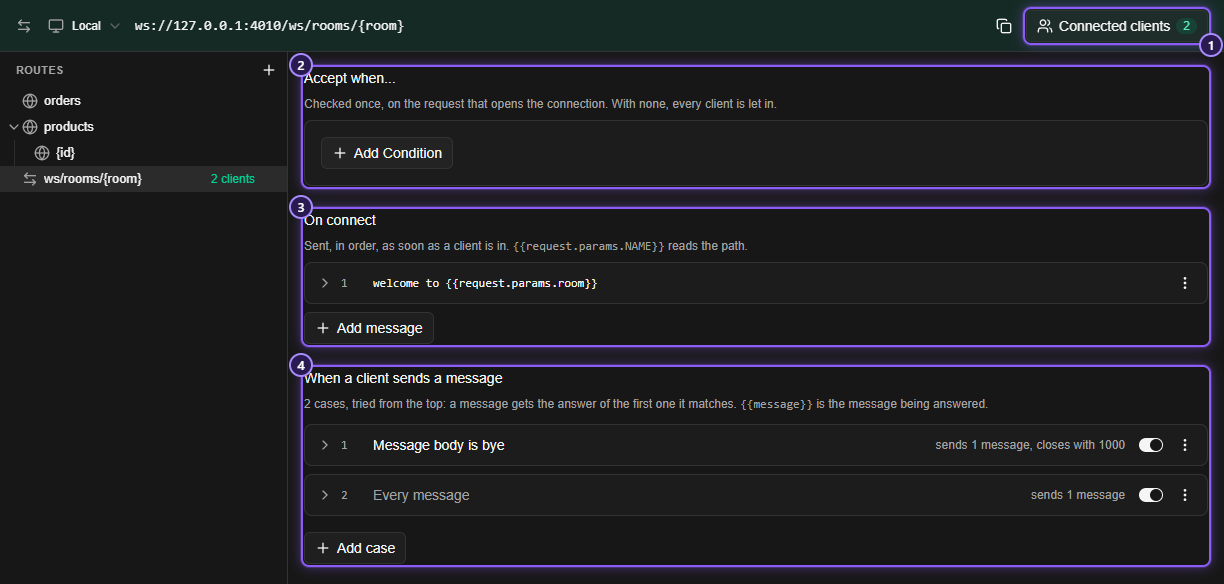
- Connected clients, with the number connected now.
- Accept when...: who is let in.
- On connect: what is sent as soon as a client is in.
- When a client sends a message: the cases that answer each message.
Accept when...#
Conditions on the request that opens the connection. They are checked once, when a client connects. With none, every client is let in.
You can look at a Request Header (give its name) and at Param Key and Param Value of the address. They are the same conditions as in Routes and cases. A client that doesn't meet them all isn't let in: it is answered like a request for a path nobody serves, 404 Not Found unless the server forwards unmatched requests.
Use it to make a route that only lets in a client with a token, for example Request Header Authorization is Bearer test, to see how your app handles being turned away.
On connect#
Messages sent in order, as soon as a client is in. Click Add message, type the text, and optionally set Wait N ms before sending (0 to 60000) to delay that message. A message can use template tags: {{request.params.NAME}} reads the path, and {{vars.NAME}} reads a variable. {{message}} is not available here, because the client hasn't said anything yet.
The menu on each message has Move up, Move down, Duplicate and Remove.
When a client sends a message#
Cases, tried from the top for every message a client sends. The first enabled case whose conditions all hold answers. With no case that fits, the message gets no answer. A new route starts with one case that has no conditions (Every message).
Each case has a When... part and a Then... part, like an HTTP case:
- When... can look at Message Type (
textorbinary) and Message Body (its text; a binary message is read as text). The operators are the same as in a rule's conditions and ignore capital letters. - Then... lists the messages to send these messages back, in order. Use Add message for more, and the same Wait field for a pause before one.
- Then close the connection, a switch under the messages, ends the connection after they are sent. Turn it on and pick the Close code (
1000 Normal closure,1001 Going away,1008 Policy violation,1011 Internal error, or Custom code from3000to4999) and an optional Reason of up to 123 bytes. Other codes are refused, because a browser fails the connection on them.
The case's row has a switch, and a menu with Move up, Move down, Duplicate and Remove, as for HTTP cases.
In a reply you can use:
| Tag | Gives |
|---|---|
{{message}} |
The message being answered |
{{request.params.NAME}} |
A {NAME} part of the path the client connected to |
{{request.headers.NAME}} |
A header of the request that opened the connection |
{{conditions.0.matches.1.value}} |
A capture group of a matches regex condition on Message Body |
{{vars.NAME}} |
One of your variables |
Replies are always sent as text messages.
NOTE
A mock server only reads text and binary messages. Ping, pong and close frames are handled for you and never reach your cases. If a client asks for a subprotocol, the server agrees to the first one the client offers.
An echo, and a goodbye#
A route /ws/rooms/{room} with this set up:
- On connect: one message,
welcome to {{request.params.room}}. - Case 1: Message Body is
bye. Then: the messagesee you, and Then close the connection with1000 Normal closure. - Case 2: no conditions. Then: the message
echo: {{message}}.
You can try it from a browser's developer console, on any page:
const socket = new WebSocket("ws://127.0.0.1:4010/ws/rooms/lobby");
socket.onmessage = (event) => console.log("server:", event.data);
socket.onclose = (event) => console.log("closed", event.code);
socket.onopen = () => {
  socket.send("hello");
  socket.send("bye");
};
The console prints server: welcome to lobby, server: echo: hello, server: see you, and closed 1000.
Changes apply to open connections#
You don't have to reconnect after you edit a route. When you click Save, a client that is already connected uses the new cases and replies from its next message on. Two things are decided only once, when the connection opens, and stay as they were: the Accept when... conditions and the On connect messages.
- A route you remove closes the connections open on it, with code
1001and the reasonThis route was removed. - Changing a route's path keeps its connections.
- Stopping the server, or changing its port or who can reach it, closes every connection (code
1001).
Connected clients#
Every WebSocket client that connects to a route is listed live, with everything that is said. Click Connected clients in the route's address bar, or the green N clients on the route's row in the list, to open the panel.
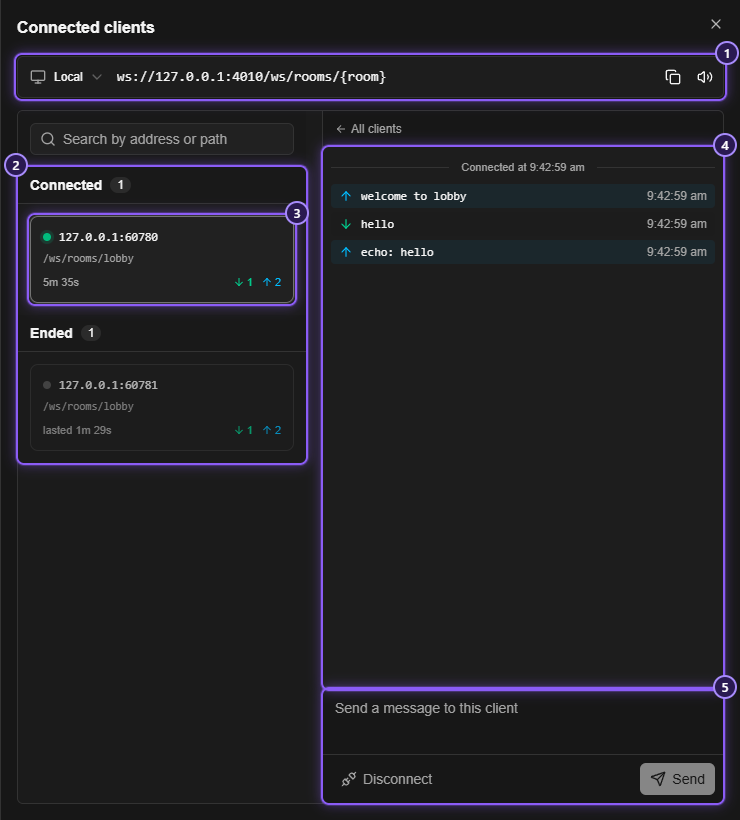
- The route's
ws://address, with the network list to choose from, a copy button, and a button to turn message sounds on or off. - Connected clients, and Ended ones: closed connections stay listed, with what was said, until the server stops.
- A client card: where it came from, what it connected to, how long it lasted, and how many messages went each way. A yellow count marks messages it sent that you haven't looked at.
- The conversation: the time it connected (Connected at) and, once it ended, when (Disconnected at). Messages from the client are green, and the ones the server sent are blue. Hover a message to copy it, or, when it is JSON, to Format the JSON.
- Send a message to this client: type and click Send (or press
Enter;Shift+Enteradds a line, andUpandDownbring back what you sent before). Disconnect ends the connection.
Search by address or path narrows the cards. With nobody connected, the panel says Waiting for a client, or This server isn't running when the server is stopped.
The panel is live, and it is not saved: Mittelware keeps it in memory, so closing the app clears it. Stopping a server clears its clients, too. Each client keeps its last 200 messages, and a message longer than 10 KB is cut in the log. Mittelware keeps the 50 most recent ended connections, across all servers.
Related#
- Mock servers
- Routes and cases
- WebSockets: watch and change a real WebSocket
- Debug a WebSocket without writing a client