
Import an OpenAPI spec
Turn an OpenAPI or Swagger spec into a working mock server in one step, with a route for each path and an answer for each documented response, using the spec's own examples.
If an API already has a spec, you don't have to type its routes. Import OpenAPI reads an OpenAPI or Swagger file and makes a mock server from it: one route for each path, and a case for each response the spec documents, answering with the spec's own examples (or values made up from its schemas). You get a fake of the whole API to run your app against, before a line of the backend exists.
The import reads OpenAPI 3.0, OpenAPI 3.1 and Swagger 2.0, as JSON or YAML.
Import a spec#
- Click Mock servers in the sidebar, then Import OpenAPI in the header. The Import OpenAPI spec dialog opens.
- Click Choose a file (JSON or YAML), or paste the spec into the box under or paste it. Click Continue.
- Check what Mittelware found, name the server, pick its port, and click Import N paths.
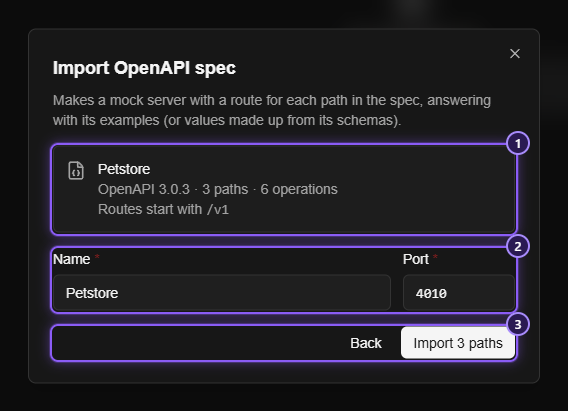
- What the spec holds: its title, its version, how many paths and operations it has, and the base path every route will start with.
- The server's Name (from the spec's title, made unique if it is taken) and its Port (a free one).
- Back returns to choosing the spec, and Import N paths builds the server.
A bar shows the progress (Reading the spec…, Building routes… and Saving the mock server…), and the dialog can't be closed until it finishes. When it is done, the new server opens.
A toast says Imported N routes. If anything had to be left out it says Imported N routes, M left out, and lists the first five reasons, with a count of the rest.
The new server is stopped, so turn it on with its switch when you're ready. It has the default settings (This computer only, Allow browser apps (CORS) on, and Answer 404 Not Found for anything unmatched), which you can change in Settings.
How a spec becomes routes#
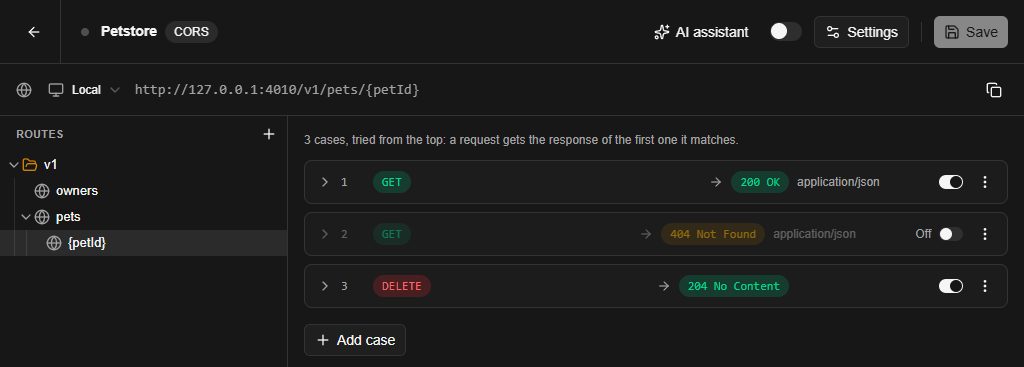
- One route for each path. If the spec has a base path (the path part of the first entry in
serversin OpenAPI 3, orbasePathin Swagger 2.0), every route starts with it. Parameters such as{petId}stay as they are, so{{request.params.petId}}works in a body. A character a parameter name can't hold is changed to_. - One case for each response of each operation, each with an HTTP Method is condition for its method (
GET,POST,PUT,DELETE,PATCH,OPTIONS,HEADorTRACE). An operation's note, if it has one, becomes the route's summary. - Only the first success is switched on. Cases are tried from the top, so a request would never get past the first one. The lowest status that is under
300is switched on (or the lowest one there is, when the operation documents no success), and the other responses (404,500and the rest) are kept off. Switch one on, or reorder the cases, to answer with it. See Routes and cases. - Status codes.
200is200. A range such as2XXor4XXbecomes200or400.defaultis used only when an operation documents nothing else, and then it answers200. A code outside200to599is skipped, because a mock server can't send it. - The body comes from the spec: the response's
example, else the first of itsexamples, else a value made up from itsschema(a string becomesstring, a number0, a booleantrue, adate-timea fixed date, and so on). A JSON type is preferred when the response offers several.$refs inside the file are followed, and a schema that contains itself is cut short. A made-up body is limited to about 300 values, and the rest isnull. A204or304has no body. - Headers a response lists (other than
Content-Type) are set from their examples.
NOTE
The import makes the shape of the API, not its behaviour. A route answers whatever method and request fit, and it doesn't check a request against the spec. Add conditions, delays and your own bodies to the cases afterwards, in the server's page.
When something is left out#
The import skips what a mock server can't hold, says so in the toast, and carries on with the rest:
- A path that isn't valid for a route is left out.
- A response whose case would be refused is left out, named like
GET /pets 200: left outwith the reason. - A path that comes out the same as an earlier one (after the base path is added) is left out as already defined.
- A route can have at most 100 cases. If an imported route would have more, the ones that are on are kept first, then the others in order, and the toast says how many were kept.
The import stops with a message when:
- the file isn't a spec:
That isn't an OpenAPI spec: it has no "openapi" or "swagger" version. - the version isn't supported, for example
OpenAPI 1.2 isn't supported yet. Use 3.0, 3.1 or Swagger 2.0. - the text isn't valid JSON or YAML:
That isn't valid JSON or YAML:followed by the reason. - the spec has no paths:
The spec has no paths to mock. - nothing in it can be mocked:
The spec has nothing that can be mocked.
Only references inside the spec (#/components/…) are followed. A $ref to another file or a URL isn't, and what it points to is treated as empty.
Big specs#
A spec of up to 64 MB can be imported. It is read off the page's own thread, so a large one doesn't freeze Mittelware. A paste of about 200,000 characters or more isn't shown in the box: the dialog says Pasted spec, gives its size, and reads it as it is. The × next to it removes it.