
Streamed answers
Make a mock server answer with a body sent in pieces, word by word like an AI chat API, in plain chunks, Server-Sent Events, OpenAI or Anthropic format, at the pace you choose.
A normal body is sent all at once. A Stream body is cut into small pieces and sent one at a time, with a pause between them, so the answer appears gradually. Your app reads it exactly as it would read a real stream.
On a mock server this gives you a fake AI chat endpoint you can build a chat screen against, without a model and without paying for calls. It works just as well for any feed that arrives in pieces.
The Stream body is the same one a rule can use. Stream a response describes every setting in detail. This page shows how it fits into a mock server and what is different there.
Add a stream to a case#
- Open a route and a case, or add one with Add case. If you haven't made a route yet, see Routes and cases.
- In Then..., keep the Status Code at
200. - Click Add action and choose Body. A body has three modes: Raw, From file and Stream. Choose Stream.
- Pick the Format, type the Text to stream, and set the pacing.
- Click Save, and make sure the server is switched on.
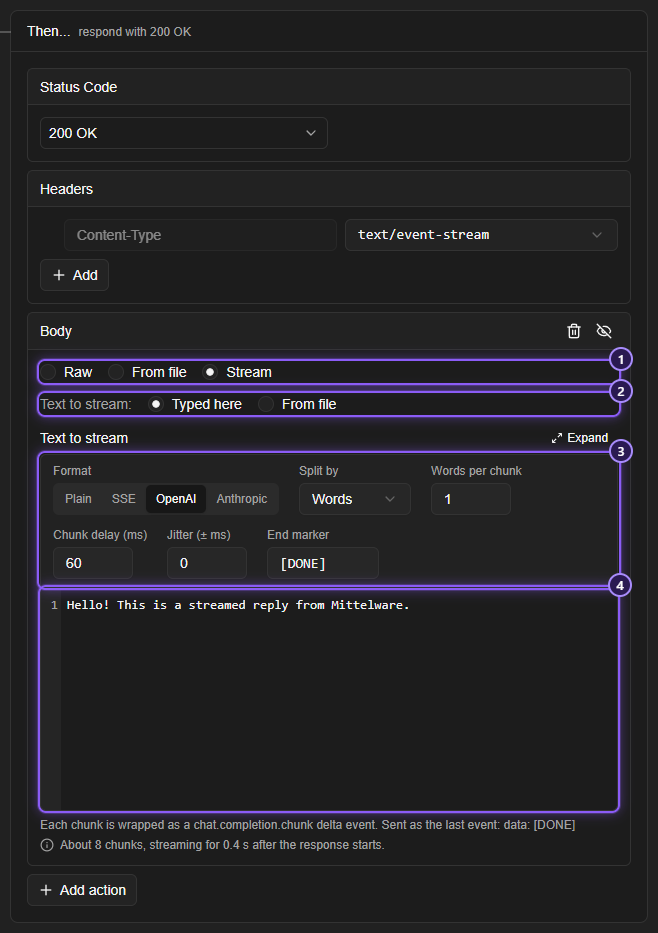
- The Body modes: choose Stream.
- Text to stream: Typed here, or From file, which reads a text file from your disk each time.
- The stream settings: Format, Split by, how many words, lines or characters go in each chunk, Chunk delay (ms), Jitter (± ms) and End marker.
- The text itself. Write it as normal text: Mittelware cuts it up.
The four Format choices are Plain chunks, Server-Sent Events, OpenAI chat completions and Anthropic messages. Pick the one your app expects. Stream a response shows what each one puts on the wire.
What is different on a mock server#
- The content type follows the format. The three event formats (Server-Sent Events, OpenAI chat completions, Anthropic messages) answer with
Content-Type: text/event-stream, even though the case's own Content-Type row says something else. Plain chunks leaves the case's Content-Type alone. - The case's Delay comes first. If the case has a Delay, the server waits that long before it sends the first chunk. Chunk delay is the pause between chunks after that.
- Tags work in the text.
{{request.params.name}}reads the path, and the other template tags work too. A route/v1/chat/{topic}can stream a sentence that names the topic, withHere is what I know about {{request.params.topic}}. - A client that leaves doesn't stop the server. If the app aborts the request halfway, the mock server carries on and answers the next one.
- Settings that can't work are refused on save. A chunk size of
0, or a delay that isn't a number, shows a message under the field.
Try it#
Make a route /v1/chat/completions with a case that has the Status Code 200 and a Stream body with Format Server-Sent Events, Split by Words, Words per chunk 1, and the text Hi there. With the server running on port 4010, ask for it with -N, which makes curl show each piece as it arrives instead of waiting for the end:
curl -N http://127.0.0.1:4010/v1/chat/completionsYou see the pieces arrive one after the other:
data: Hi

data:  there

data: [DONE]
Now point your chat screen's base address at http://127.0.0.1:4010. With OpenAI chat completions as the format, the same endpoint answers the way OpenAI's chat API does, so a client written for OpenAI reads it as it is.
TIP
To see how your app copes with a stream that is slow to start, add a Delay of a few seconds to the case. To see how it copes with one that arrives in bursts, raise Jitter. To see what happens when it ends without a marker, empty the End marker box.
Related#
- Stream a response: every setting, and what each format sends
- Monitoring streaming responses: watch a real stream
- Mock servers
- Routes and cases