
Routes and cases
How a mock server decides which answer to give. Routes are paths with {parameters}, cases are the When and Then pairs inside them, and the first match wins.
A mock server answers by route and by case. A route is a path, such as /products/{id}. A case says how that path answers: when the request looks like this, then respond like that. This page covers both, and what a response can be made of.
If you haven't made a server yet, start with Mock servers.
Routes#
Open a server and click the + above the Routes list, or Add route when the server is empty. In the panel:
- Answers picks HTTP requests or WebSocket. A route that exists keeps its kind. This page is about HTTP routes. See WebSocket routes for the other.
- Path starts with
/, such as/api/v1/products/{id}. It can't hold a query string (no?or#) or spaces. - Summary is an optional note of up to 200 characters. It shows when you hover the route in the list.
A new HTTP route comes with one case already in it: a 200 answer with a small JSON body, for every request.
Parts that change: {name}#
A word in curly braces matches one part of the address, between two slashes:
| Route path | Matches | Doesn't match |
|---|---|---|
/products/{id} |
/products/42, /products/abc |
/products, /products/42/reviews |
/files/{name}.json |
/files/report.json |
/files/report.xml, /files/.json |
/v{major}.{minor} |
/v2.10 |
/v2 |
A name can use letters, digits, _ and -, and starts with a letter or _. A name can't be used twice in one path. A trailing slash makes no difference: /products and /products/ are the same route. Percent-escapes in a request (%20, %C3%A9) are decoded before they are compared, so /files/john%20doe gives the parameter the value john doe.
The value of a part is available to the answer as {{request.params.id}} (for a route with {id}). The Add route panel shows you the exact tag for each name you type.
The routes list#
The list on the left is a tree built from the paths themselves. /api/v1/products and /api/v1/orders sit under a folder called api/v1. There are no folders to create: they appear as you add routes.
- A route's ⋮ menu has Edit, Duplicate, Copy URL, Add route under it and Delete.
- A folder has a + that adds a route in it, and a menu with Edit, Add route here and Delete all N routes.
- Edit on a route changes its path. Routes under it move with it, and the panel shows which (for example 2 routes under it move too). Edit on a folder (the panel is called Edit folder) moves everything in it.
- Two routes on one server can't have the same path, whatever their kind and whatever the capital letters: the panel says
/products is already defined on this server. - Drag the edge of the list to change its width. Double-click the edge to reset it.
- A route whose cases are all switched off is dimmed.
Keyboard: Up and Down move between rows, Right opens a folder, Left closes it, and Enter opens a route or folds a folder.
Which route answers#
Several routes can fit one request, for example /users/me and /users/{id} both fit /users/me. The most specific route goes first: a plain word beats text around a parameter ({name}.json), which beats a bare {name}, compared part by part from the left. It doesn't matter where they stand in the list.
If the route that goes first has no enabled case that matches the request, the next route that fits is tried. Only when none answers does the server's fallback run.
Cases#
Open a route and its cases are listed in the order they are tried. A request gets the answer of the first case that matches it. A case is skipped when its switch is off, or when any of its conditions fails.
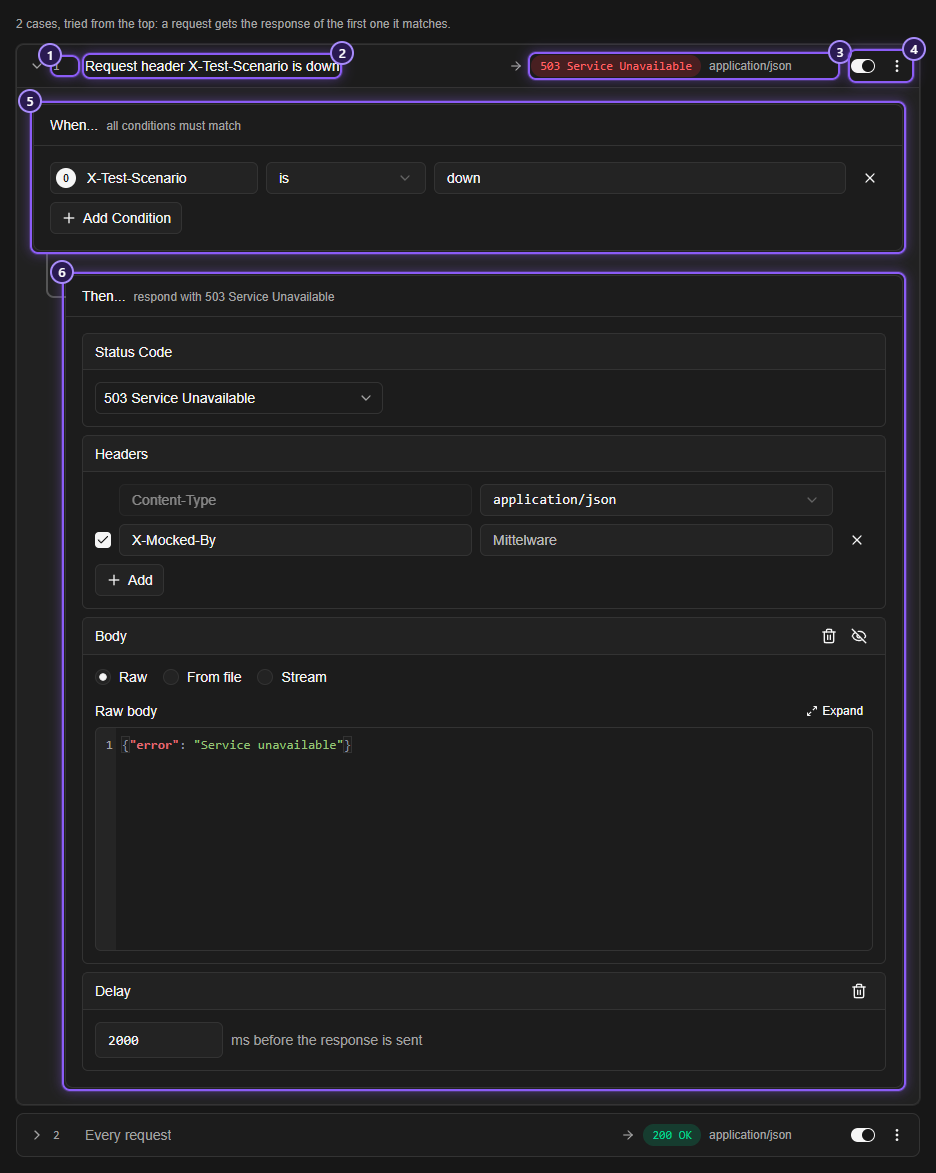
- The case's number, which is also its place in the order.
- Its conditions in a few words (Every request when it has none), and +N more when it has several. A case that has an HTTP Method condition shows the method as a badge in front.
- What it answers: the status and the media type.
- The case's switch. Off means it never matches. The menu has Move up, Move down, Duplicate and Remove.
- When...: the conditions a request must meet. All conditions must match.
- Then...: the response.
Click Add case to add another at the end. A route can have 100 cases, and the button says so when you reach it.
TIP
Cases are tried from the top, so put the specific ones first and the catch-all last. A case with no conditions says Every request and answers everything that reaches it, so any case under it is never used. Use Move up and Move down to reorder them.
When...#
Click Add Condition. A mock server can look at what an HTTP request carries:
| Category | What it looks at |
|---|---|
| HTTP Method | GET, POST, PUT, PATCH, DELETE, HEAD or OPTIONS |
| Request Header | A header the app sent: give the header's name, then compare its value |
| Param Key, Param Value | The names and values of the query parameters (?name=value) |
| Request Body | The body the app sent, as text |
The operators are the ones a rule uses (contains, is, starts with, matches regex, is one of and the rest), and they ignore capital letters. See Conditions. There is no URL condition, because the route's path already does that job.
With no conditions, the case applies to every request. A case is for every method unless it has an HTTP Method condition. To give one path different answers per method, add one case per method, each with HTTP Method is the method it answers.
Then...#
A case answers with the same parts as a rule that answers without the server. Status Code and Headers are always there. Click Add action for Body, or for a Delay.
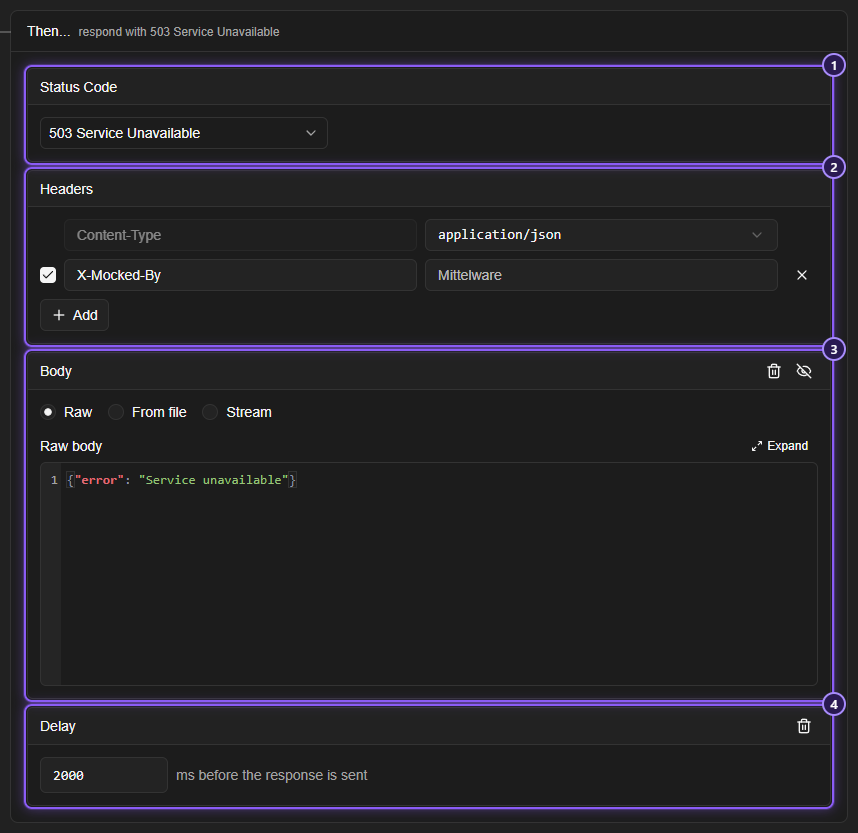
- Status Code: from
200to599. A1xxcode can't be the final answer of a server, so Mittelware refuses it. - Headers: the first row is a fixed Content-Type, and you pick its value from the list:
application/json,application/xml,text/plain,text/html,text/csvorapplication/x-www-form-urlencoded. The rows under it each set a header. You can't add a secondContent-Typerow: the message says to choose its value in the fixed row. - Body: Raw (what you type), From file, or Stream. Adding a body to a response with no content type gives it
application/json. - Delay: a wait of
0to60000ms before the response is sent. Add it from Add action, and remove it with the bin button on its card.
A HEAD request gets the status and the headers, without a body.
Body from a file#
From file reads a file from your disk each time a request is answered, so an edit to the file shows on the next call, with no save. If the file has gone, the case still answers with its status and an empty body, and the answer comes back as soon as the file does. The file is a template too, so a {{request.params.id}} in it is filled in.
Stream#
Stream sends the body in pieces. See Streamed answers.
Template tags#
A body and a header value can use {{ }} tags to reuse parts of the request. These are the ones you will use most. The full list is in Template variables.
| Tag | Gives |
|---|---|
{{request.params.NAME}} |
The {NAME} part of the path (or, if the path has none of that name, the query parameter NAME) |
{{request.method}} |
GET, POST and so on |
{{request.path}} |
The path, without the query string |
{{request.query_string}} |
The query string, without the ? |
{{request.url}} |
The whole address, with the host the app called |
{{request.headers.X-Test}} |
The value of the request header X-Test |
{{request.body}} |
The body the app sent |
{{vars.token}} |
One of your variables |
{{conditions.0.matches.1.value}} |
What the first capture group of a matches regex condition caught. conditions.0 is the first condition of the case |
A response made here has no real response to read, so the {{response…}} tags are not available: using one stops the save, with a message that names the route and the case. So does a {{ that is never closed. Text in double braces that isn't one of Mittelware's own tags, such as {{test}}, is sent exactly as typed.
For example, a case for GET /search with the condition Param Value matches regex ^(\d+)-(\w+)$ can answer with the body {"page": {{conditions.0.matches.1.value}}, "sort": "{{conditions.0.matches.2.value}}"}.