
Answer without the server
Answer a request yourself with a mock, a file or a whole folder, and never contact the real server. Instant, works offline, and nothing happens on the real server.
Normally a rule that changes a response lets the request reach the real server, then edits the answer on its way back. Modify Response has a second way to work: Instead of the server. Mittelware answers the request itself, and the real server is never contacted.
That makes it the right tool when:
- the endpoint doesn't exist yet, or the server is down or unreachable. You can build and test offline.
- the request has side effects you don't want, such as creating an order or sending an email. It never leaves your computer.
- you want to serve your local build in place of the deployed one. See Serve a folder.
- you want the answer to be instant, with no network round trip.
Choose the behavior#
Under Then…, choose Modify Response. A Behavior card appears at the top of the action:
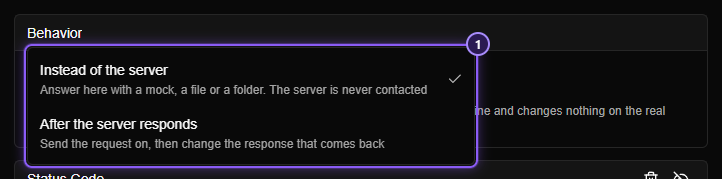
- The two behaviors.
| Behavior | What happens |
|---|---|
| Instead of the server | The request is answered here. The server is never asked. A new Modify Response rule starts on this |
| After the server responds | The request goes to the server, and the answer that comes back is changed on its way to your app. See Modify Response |
You can flip between the two. Each keeps its own parts while you flip, so nothing you typed is lost.
NOTE
Instead of the server is not available while a rule has a response condition (a status code, a response header or the response body), because those conditions need a real response to look at. It shows an Unavailable tag with the reason, and adding a response condition switches the rule back to After the server responds.
In the Rules list the action reads Modify Response (instead of server).
Build the answer#
Click Add action and choose the parts of the answer, as for any Modify Response rule: Status Code, Headers and Body. Because there is no real response to start from, set everything the app needs. A mock needs a body, usually a status code and a Content-Type header.
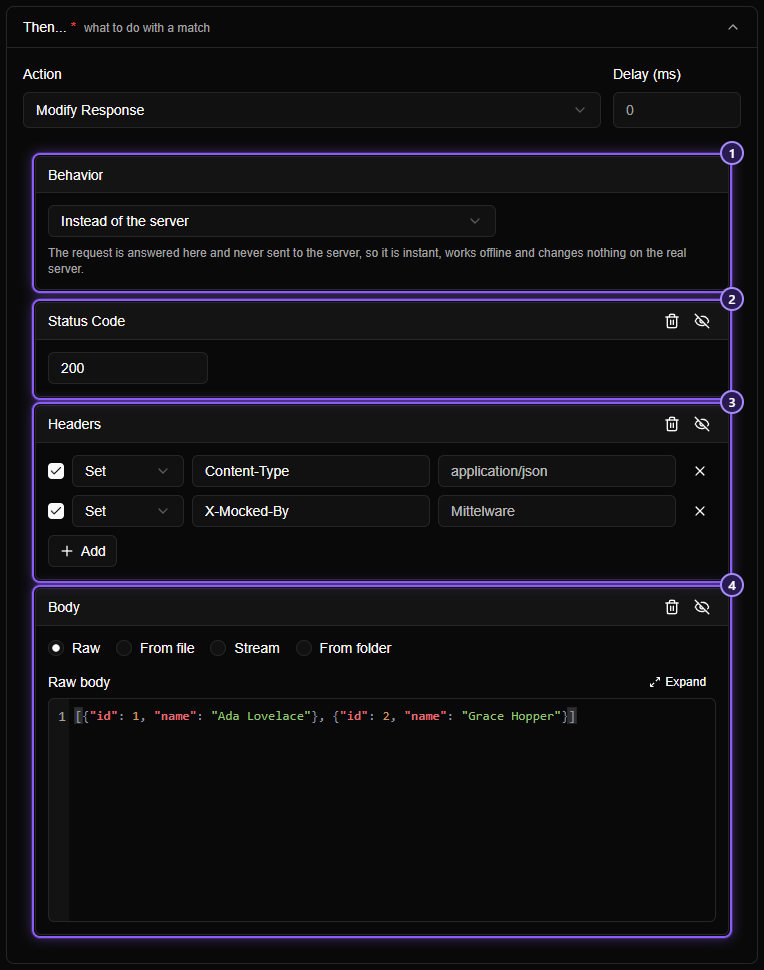
- Behavior: Instead of the server.
- Status Code:
200. - Headers: tell the app it's JSON.
- Body: the answer.
A Body can be Raw (what you type), From file (read each time the rule runs), Stream (sent in pieces, like an AI chat), or From folder (below). A body can use template variables and your own variables, but it can't read {{response.…}} values, because there is no response.
TIP
To see which request got the mock, open Flows. The row has the shield icon and the details name the rule. In the request's details there is no server round trip: the answer comes back as fast as Mittelware can build it.
Serve a folder#
Choose From folder for the Body and one rule serves a whole folder of files: a build output, a set of mock files, a folder of images. A request whose path starts with the address you give is answered with the file at the same place in the folder.
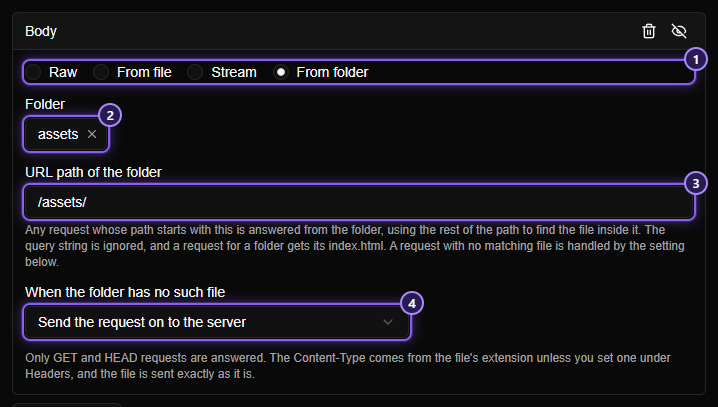
- From folder mode.
- Folder: click it to choose the folder on your computer. The × clears the choice.
- URL path of the folder: the start of the request's path that stands for the folder, such as
/assets/. Enter just the path, not a whole address, and no?or#. - When the folder has no such file: Send the request on to the server (the rule steps aside and the real server answers), or Answer 404 Not Found.
Say the rule's folder is C:\work\my-app\dist\assets and its URL path is /assets/:
| The app asks for | It gets |
|---|---|
/assets/app.js |
the file app.js in the folder |
/assets/chunks/vendor.js?v=3 |
chunks\vendor.js (the query string is ignored) |
/assets/ |
the folder's index.html |
/assets/missing.js |
whatever you chose for a missing file |
Pair it with a When condition for the address you want to take over, for example Domain is app.example.com and Path starts with /assets/. Then a deployed page loads its scripts and styles from your local build, while everything else still comes from the real server.
How it behaves:
- Only
GETandHEADrequests are answered. Anything else goes on to the server. - The
Content-Typecomes from the file's extension, so.jsis JavaScript and.htmlis a page. To override it, add a Headers part that setsContent-Type; yours wins. A file with an unknown extension is sent asapplication/octet-stream, never as a page. - Files are sent exactly as they are. A file that contains
{{ something }}is not read as a template. - Browsers are told not to keep a copy (
Cache-Control: no-cache), so an edit you make to a file shows on the next reload. - Nothing outside the folder is ever served. A path that tries to climb out of it with
.., an encoded.., a drive letter or a link out of the folder is treated as a missing file. - A body from a folder can't be combined with another body in the same rule, and it can't be used with response conditions.
WARNING
Mittelware reads the folder you choose on this computer, each time a request arrives. If you move or rename it, requests for its files are treated as missing. Open the rule and choose the folder again.
Order and other rules#
A rule that answers Instead of the server takes the request, like Block. A Modify Response rule below it never sees that request, because there is no real response to change. If a Modify Response rule is listed above it, that rule is the one that acts. See Order, and when two rules act on one request.