
The design is approved, the contract is agreed, and the backend team is two sprints out. You can wait, or you can build the UI against the response you know is coming.
A mock server is one way. But that means another process to run, a base URL to switch, and a fake that slowly drifts from the real thing. There's a lighter option: let the app call the real URL and rewrite the answer on the way back.
A simple mock#
Say the new endpoint is GET /v1/orders/{id}. Open Rules, click Create Rule, and set it up:
- Source: the app you're building.
- Label:
Mock order - When…
- URL → Path
matches regex^/v1/orders/\d+$ - HTTP Method
isGET
- URL → Path
- Then… choose Modify Response and fill in all three parts:
- Status:
200 - Header:
Content-Type: application/json - Body:
- Status:
{
  "id": 1042,
  "status": "shipped",
  "items": [
    { "sku": "KB-75", "name": "Mechanical keyboard", "qty": 1 }
  ],
  "total": 129.0
}
Reload your app. The real request still goes out, and the endpoint probably answers 404, because it doesn't exist yet. The rule replaces whatever comes back with your JSON.
TIP
In a Modify Response rule every part is optional, and anything you leave unset passes through from the real response. To fully replace a response, set the status, headers and body yourself, as above.
Make the mock respond to the request#
A mock that returns order 1042 for every ID gets old fast. Capture the ID from the URL and use it in the body.
Change the condition to capture the number, using a group in the regex:
- URL → Path
matches regex^/v1/orders/(\d+)$
Then reference the capture group in the body with a template variable:
{
  "id": {{conditions.0.matches.1.value}},
  "status": "shipped",
  "total": 129.0
}
conditions.0 is the first condition, and matches.1 is capture group 1 (group 0 is the whole match). Request /v1/orders/7 and you get "id": 7; request /v1/orders/9001 and you get 9001.
Query parameters work the same way. For /v1/search?q=keyboard, {{request.params.q}} returns keyboard, which is handy for echoing a search term back in a mock.
See it work#
Here is the same idea running against a free practice server, so you can follow along without any backend of your own. The rule watches for /todos/ followed by a number, captures the number, and answers with a body that uses it:
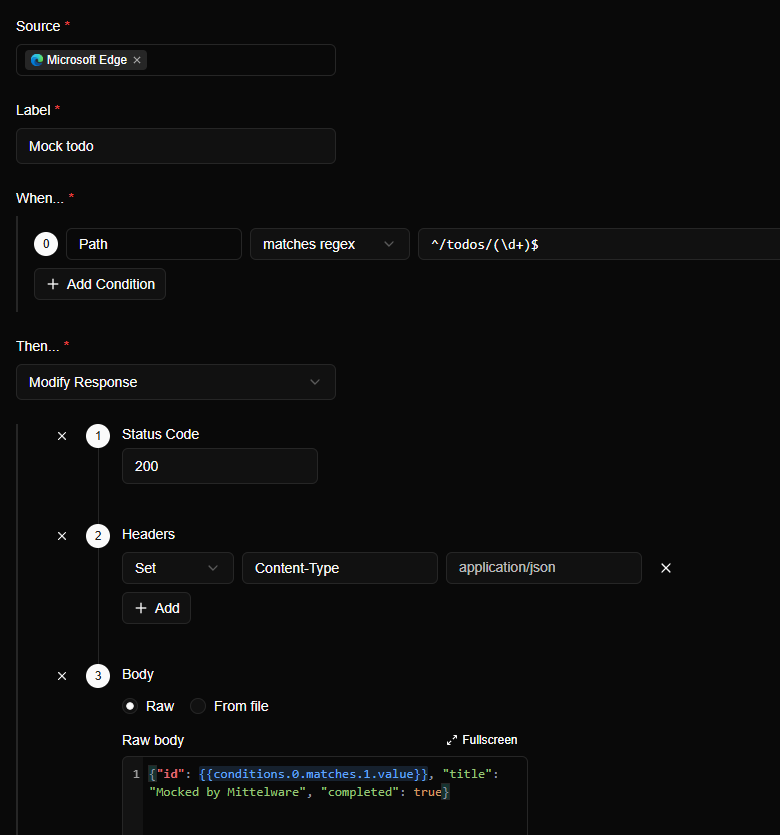
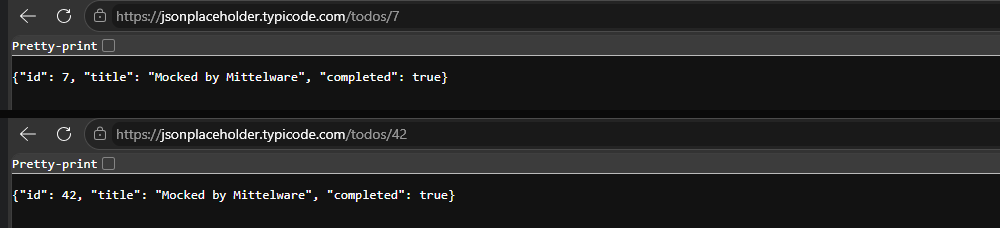
Request /todos/7 and then /todos/42, and each gets its own number back:
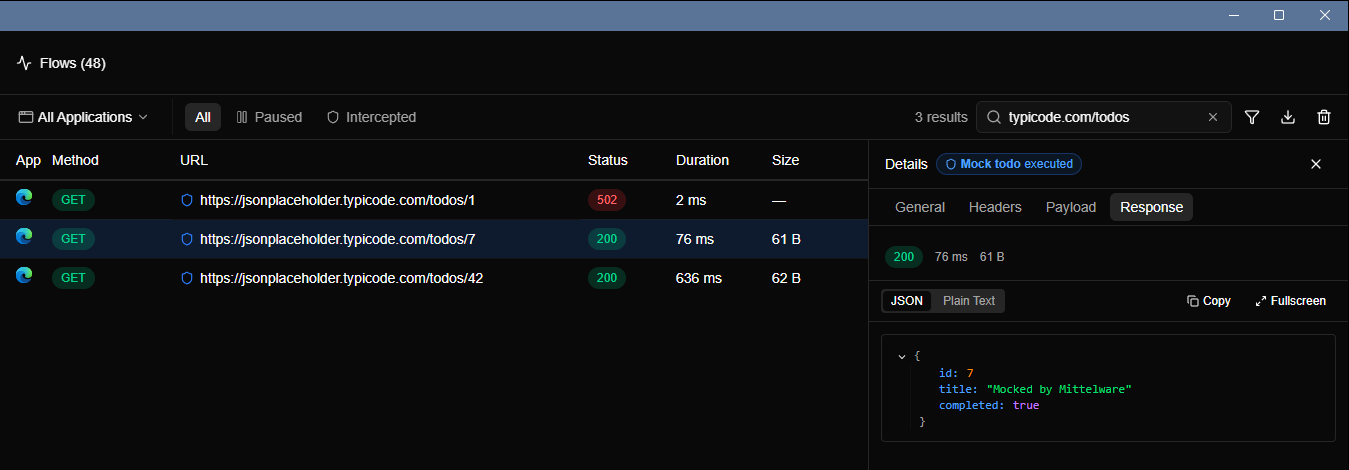
In Flows, every mocked request carries a shield and the rule's name. The details panel shows the response your app really received:
Mock the sad paths too#
The happy path is easy to build and easy to test. The valuable part of a mock is the responses you can't get on demand. Add a few more rules, switch them on one at a time, and check each screen:
- An empty list:
{ "items": [] } - A huge list, to check scrolling and performance
- A validation error with a
422and field messages - A missing field that the contract says is optional
- A response with unexpected values, like a
nullwhere you assumed a string
When you'd rather use a real mock server#
Mittelware can also hand the request to a server of your choosing. A Proxy to different endpoint rule fetches the response from another URL and returns that instead. It's only available when the rule matches on the response, for example Status Code is 404, so it fits this case well: when the real endpoint doesn't exist and answers 404, forward the call to your mock server on localhost.
When the real endpoint ships#
Switch the rule off. The app now talks to the real thing, with no code changes to undo.