
You log in once and the server hands back a session: a header, a cookie, a token. From then on every request has to carry it. That's fine for the app that logged in. It is not fine for the other thing you want to run: a script, a second tool, a different browser profile, a test you're trying out with curl. Each of them needs the session the first one got, and the usual way to give it one is to copy the value by hand, paste it into a header, and do it all again when it expires.
Mittelware can do the copying for you. One rule watches the login and remembers the session. A second rule adds it to every request that needs it. This post builds both, in about five minutes.
What we'll build#
A tiny server with two endpoints:
POST /loginanswers200and puts the session in a response header:X-Session: sess_9f3a1c7e.GET /api/...wants that session back, asCookie: session=sess_9f3a1c7e.
You'll make:
- A rule that watches the login and keeps
X-Sessionin a variable calledsession. - A rule that adds the cookie to
/apirequests, reading the variable.
The login can come from your browser, an app, anything that passes through Mittelware. The requests that need the cookie can come from a different app altogether.
Rule 1: remember the session#
A rule that only needs to watch has a special action for it. No change lets the traffic through exactly as it is, and the rule exists for what it does afterwards.
- Click Create Rule.
- App: the app that logs in, for example your browser.
- Label:
Remember the session. - When… two conditions:
Pathis/login, andHTTP MethodisPOST. - Then… choose No change.
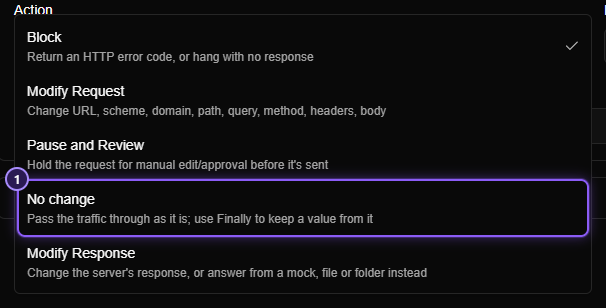
Choosing No change opens the Finally… section below it. A Finally row runs once the answer is known, and can keep a value from the request or the response in a variable.
- Click Add row. Leave the first two boxes on Variable and Upsert (give the variable this value, creating it if needed).
- Name:
session. - Value:
{{response.headers.X-Session}}.
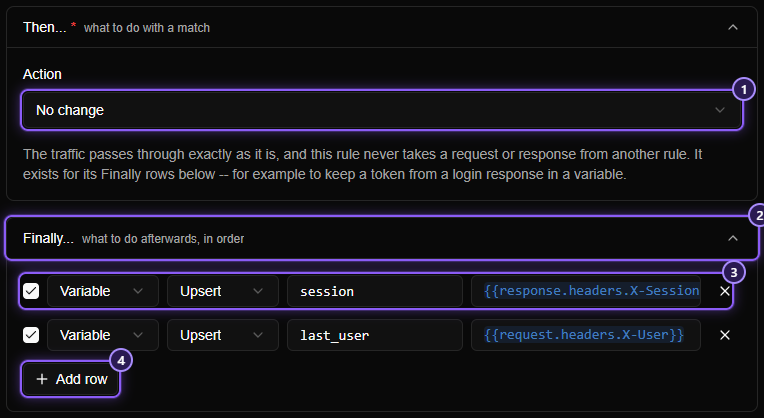
Type {{ in the value and Mittelware lists what you can use there: the request, the response, and your other variables. Click Create.
TIP
A rule can have several rows, and they run in order. A later row can read what an earlier one just set. That is handy for keeping a user name next to the session, as in the screenshot.
See it work#
Log in the way you normally would. The login itself is untouched: the app gets its answer as always. Now open Variables in the sidebar.
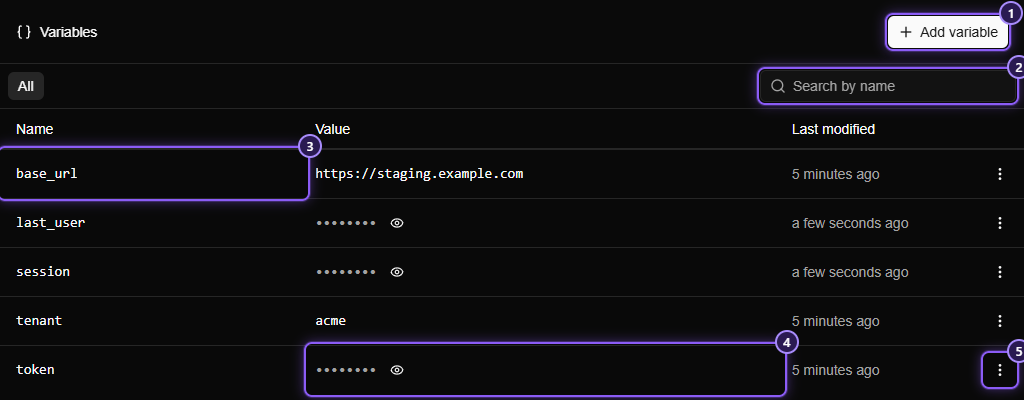
session is there. You didn't add it: the rule did. A variable made by a rule starts hidden, because it is most likely a secret, so its value shows as dots. Click the eye to read it.
Rule 2: use it#
Now the second rule. It will add the cookie to requests from the second tool.
- Create Rule. App: the app that needs the session. A command you run in a terminal shows up under its own name, for example The curl executable on Windows, and you can pick it from the App box.
- Label:
Send the session cookie. - When…
Pathstarts with/api. - Then… Modify Request. Click Add action and choose Headers.
- Set header
Cookietosession={{vars.session}}.
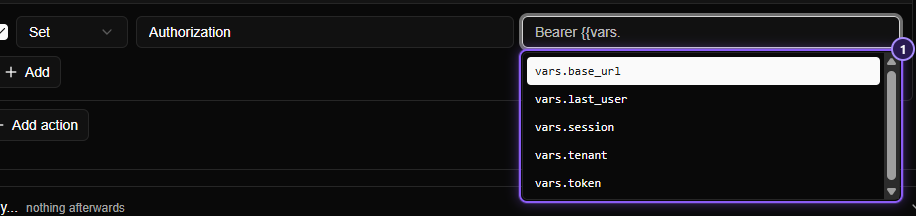
Type {{vars. and the list offers vars.session. A rule reads a variable when it runs, so there is nothing to refresh.
Try it#
From a terminal, send a request through Mittelware with curl. Use the proxy address from the Settings page, for example 127.0.0.1:8080:
curl -x http://127.0.0.1:8080 http://localhost:4100/api/ordersWithout Mittelware's help that request carries no cookie and the server would refuse it. With the two rules, the server receives Cookie: session=sess_9f3a1c7e, the value the login produced. Open the request in Flows and look at its Headers: the rule's badge names Send the session cookie.
Log in again and the variable gets the new session; the very next request uses it. You never touch either rule.
Things worth knowing#
- A missing header leaves the variable alone. If a login answers without
X-Session(a failed login, say), the row's value comes out empty, and Mittelware keeps the old value instead of wiping a good session. - To forget the session, remove it. Add a Remove row to a rule that watches
/logout: choose Remove, namesession. The variable is deleted. - Hidden isn't encrypted. The eye only keeps the value off your screen. It is stored on your computer in plain text, like your rules. It never goes into a file you share with Export: a rule holds the tag
{{vars.session}}, not the value. - A variable nobody set reads as nothing. Before the first login,
Cookie: session=goes out empty. If a header comes out blank, check the variable's name and whether the login has run. - No change doesn't compete. Any number of No change rules can match one request, and a rule listed below one still does its job. You can add the watcher without disturbing the rules you have.
Where to go from here#
The same two-rule pattern works for anything one request hands to the next: a CSRF token in a header, an ID in a response, a tenant a gateway adds. The first rule keeps it, and the second one uses it.
- Finally and No change lists every setting and message.
- Variables covers names, limits, hidden values and search.
- Template variables shows everything you can put in
{{ }}. - Run your frontend against staging without code changes adds headers to every request, which pairs well with a variable.