
Until now, mocking in Mittelware meant rewriting a call: your app asks the real address, and a rule swaps the answer on the way. That's the right tool when there's a real API to bend. It's the wrong one when there isn't an API at all, when you want to hand a teammate a whole fake backend, or when the thing you're faking is a WebSocket or a chat stream.
So Mittelware now has mock servers. A mock server is a small fake API that runs inside the app, on a port of its own, and answers with the responses you wrote. This post builds one in a few minutes and then pushes it further.
Make one#
Click Mock servers in the sidebar, then Add mock server. Give it a Name (Shop API), leave the Port Mittelware suggests (4010), and click Add mock server. It opens on a page that says No routes yet.
Click Add route and type products/{id} after the / already in the Path box. The {id} stands for any one part of the address. The new route comes with a case that answers 200. Open it, and in Then... replace the Body with:
{"id": "{{request.params.id}}", "name": "Mechanical keyboard", "price": 129}Click Save, turn on the switch in the header, and ask for it:
curl http://127.0.0.1:4010/products/42{"id": "42", "name": "Mechanical keyboard", "price": 129}That 42 came out of the address. There's no backend behind it: just a route, a case and a body with one {{ }} tag in it. Point your app's base URL at http://127.0.0.1:4010 and it runs.
Make it fail on demand#
The happy path is the easy part. What you can't normally get on demand is the failure. A route holds cases, tried from the top, and a request gets the first case that matches it. So you can keep the failure in the route, switched on by a header your test sends.
Click Add case. In its When... part click Add Condition, choose Request Header, name it X-Test-Scenario, and set it is down. In Then... set the Status Code to 503, and the Body to {"error": "Service unavailable"}. Click Add action, choose Delay, and enter 2000. Then open the case's ⋮ menu and choose Move up, so it is tried before the success case.
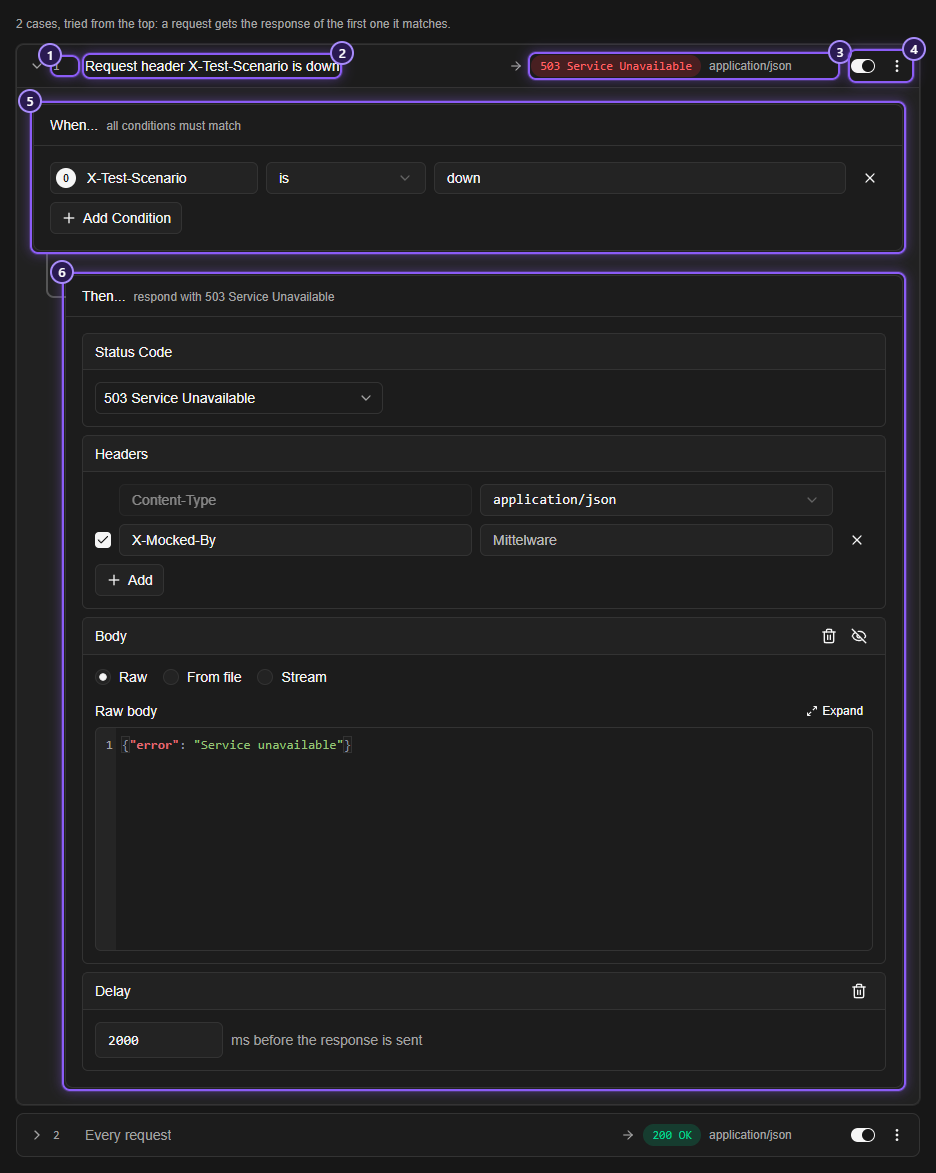
Save, and now one header turns your app's good day into a bad one:
curl -i -H "X-Test-Scenario: down" http://127.0.0.1:4010/products/42It waits two seconds, then answers 503 with the error body. Without the header you still get the keyboard. A loading spinner, an error banner and a retry button all have something real to run against, and you didn't touch a line of backend.
The same pattern gives you a 404 for an ID that doesn't exist, a 401 when there's no Authorization header, or a slow 200. A case can look at the HTTP Method, a Request Header, a query parameter's name or value, and the Request Body. Routes and cases has the whole list.
A WebSocket, too#
Add another route, choose WebSocket under Answers, and give it the path /ws/rooms/{room}. A WebSocket route has three parts: Accept when... (who is let in), On connect (what is sent at once) and When a client sends a message (cases, again tried from the top).
Under On connect, add one message: welcome to {{request.params.room}}. Edit the case under When a client sends a message so it sends echo: {{message}}. Save, then open any page's developer console and try it:
const socket = new WebSocket("ws://127.0.0.1:4010/ws/rooms/lobby");
socket.onmessage = (event) => console.log(event.data);
socket.onopen = () => socket.send("hello");
You get welcome to lobby, and then echo: hello. A case can also end the connection, with a Then close the connection switch, a close code and a reason, which is how you test a client's reconnect logic.
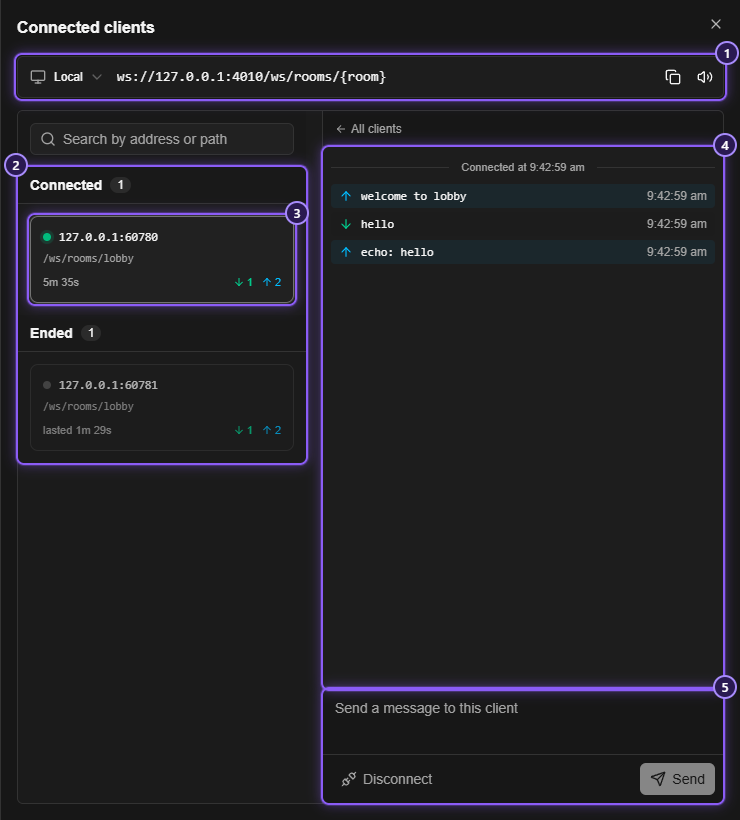
On the route's page, Connected clients opens a live panel: every client that is connected, what it sent and what the server sent back. You can type a message into it and send it to a client yourself, or Disconnect one.
An AI chat that costs nothing#
A case's body can be a Stream: the text is cut into pieces and sent one at a time, like a chat API. Choose Stream in the Body part, pick OpenAI chat completions (or Server-Sent Events, or Anthropic messages), type the text, and set the pace. A chat screen that expects a typing effect gets exactly that, with no model and no bill. Streamed answers shows how.
Already have a spec?#
If the API has an OpenAPI or Swagger file, skip the typing. Import OpenAPI takes a JSON or YAML spec and builds a server from it: a route for each path, and an answer for each response the spec documents, using its examples or values made up from its schemas. The first success of each operation is switched on and the error responses are kept off, ready for you to switch on when you want to test one. Import an OpenAPI spec has the details.
Leave it running#
You don't have to stop a server to change it. When you click Save, the next request gets the new answer, and a WebSocket client that is already connected uses the new cases from its next message on, with no reconnect. A server that was running when you closed Mittelware starts again the next time you open it.
A server can also be open to Devices on my network too, so a phone on the same network can call it. That makes it callable by anyone on the network, so use it for the test and switch it back to This computer only.
And once you have a set you like, tick the servers and Export them to a file. A teammate clicks Import, and gets the same fake backend, stopped, ready to switch on. Or ask an AI assistant connected over MCP to build one: "Make a mock server on port 4010 with GET /products/{id}" (see AI assistants).
A mock server or a rule?#
They solve different problems, and you can use both.
| You want to… | Use |
|---|---|
| Change one answer of a real API and leave the rest alone | A rule |
| Fake an API that doesn't exist yet, or a whole one | A mock server |
| Keep your app calling the real address, with no config change | A rule |
| Fake WebSocket conversations, or answer from an address of your own | A mock server |
| Hand a teammate a fake backend in a file | Either: both export |
A mock server can also forward what it doesn't know: set When no route matches to Forward to the real API, and only the routes you wrote are faked while everything else reaches the real thing.
Try it#
Open Mock servers in the sidebar and make one. A server, a route and a curl take about a minute, and the Mock servers docs go through the rest.