
API mocking replaces an API with a fake one that you control. API interception leaves the real API in place and sits in the middle of the conversation, so you can watch, change, delay or block the requests and responses as they pass.
Both let you test your app against responses you can't get on demand. They get there in opposite ways, and they fail in opposite ways too. This post explains the difference, shows when each one is the right tool, and ends with the part most comparisons skip: the two aren't rivals, and you can do mocking with an interceptor.
The short answer#
| API mocking | API interception | |
|---|---|---|
| What it does | Replaces the API with a stand-in | Sits between your app and the real API |
| Is the real API used? | No | Yes, unless a rule blocks the call |
| Where it lives | A mock server, or code and test config in your app | A proxy on your machine, outside your app |
| Code changes needed | Usually: a base URL, a handler or a test setup | None |
| Best at | Repeatable automated tests, working with no backend | Debugging, reproducing states, inspecting any app |
| Main risk | The mock drifts away from the real API | You forget a rule is on and chase a bug that isn't there |
Here is the same request travelling both ways:
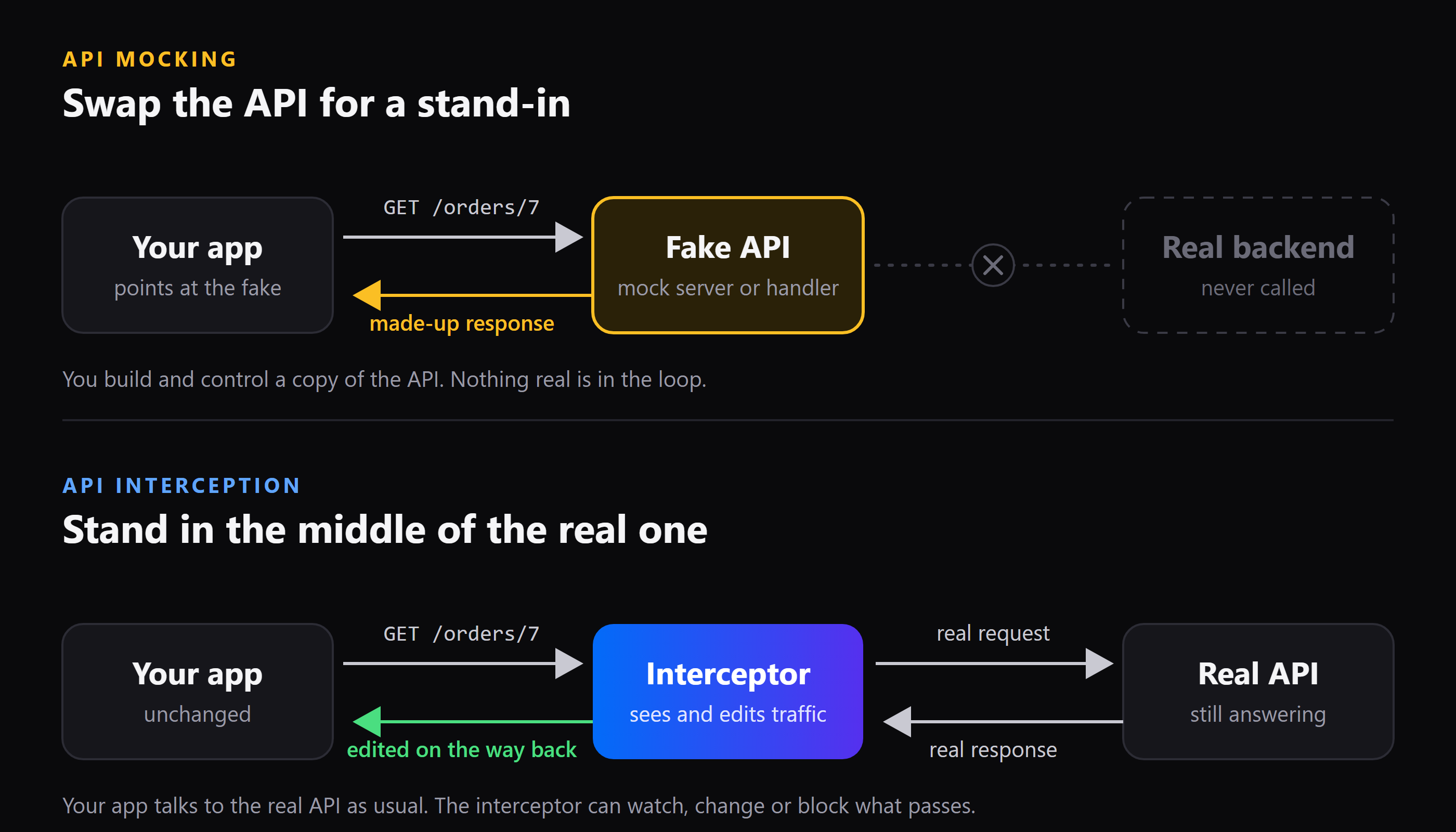
In the top row, the app is pointed at something that isn't the API. In the bottom row, the app is pointed at the real API and doesn't know anyone is listening.
What is API mocking?#
API mocking means answering your app's API calls with fake data instead of calling the real service. The fake can be:
- A mock server such as WireMock, Mockoon or json-server, running on
localhost - A hosted mock, such as the mock servers offered by API design and testing tools
- Handlers inside your test code, often through a library like Mock Service Worker (MSW)
Mocking is popular for good reasons:
- It works before the backend exists. The contract is agreed, so the frontend team can start.
- It's deterministic. The same call returns the same answer every time, which is what automated tests need.
- It's safe and free. No real data is touched, no rate limit is hit, no third-party bill grows.
- It runs anywhere, including a CI machine with no network.
The costs show up later:
- Mocks drift. The real API renames a field, and your mock keeps returning the old shape. The tests stay green while production breaks.
- Someone has to maintain them. Every endpoint you fake is more code, more fixtures and more to keep in sync.
- They need your cooperation. You have to change the base URL or the code of the app, and you can't do that for an app you didn't write.
What is API interception?#
API interception means putting a tool between your app and the API so that every request and response passes through it. An intercepting proxy does this from outside your app. It runs on your computer, and your apps send their traffic through it. Because it sees the real traffic, it can:
- Show every request and response, in real time
- Change a request on the way out, or a response on the way back
- Block a request, or answer it with an error
- Delay it, or hold it until you've edited it by hand
- Redirect it somewhere else, such as a server on your laptop
If you've used Charles, Fiddler, Proxyman or mitmproxy, you've used an interceptor. The important property is that nothing about your app changes. It makes the same real request to the same real URL, and the interceptor decides what to do with it.
The costs are different too:
- It isn't a test suite. It's an interactive tool for your machine, not something you run in CI.
- A forgotten rule is a confusing bug. If a rule is still switched on, your app keeps getting the edited answer.
- HTTPS needs a trusted certificate. And a few apps that pin their own certificates can't be inspected at all.
Where the two terms blur#
The words overlap, and that causes most of the confusion in search results. Three common cases:
- "Interceptor" in code. An Axios interceptor or a
fetchwrapper runs inside your app. It can add a header to every call, but it only works in that app, and you have to write it. That's a code-level interceptor, not the network-level kind this post is about. - Mocking libraries that intercept. MSW is a mocking library, but it works by intercepting requests inside your app (through a service worker in the browser, or a hook in Node) and answering them with your handlers. So it's mocking, achieved through interception. The difference from a proxy is where the interception happens: inside your process, versus outside it.
- Proxies that mock. An intercepting proxy can answer a request with a body you wrote. From your app's point of view, that's a mock.
A useful way to keep them apart: mocking is about what answers the call. Interception is about where you stand while the call happens. You can mock without intercepting a network (a handler in your test), and you can intercept without mocking (just watching and logging). When people compare them, they usually mean a mock server versus a proxy that sits in front of the real API.
When to use API mocking#
Choose a mock when you need an answer that is the same every time, with nothing real behind it:
- Automated tests. Unit, component and end-to-end tests need fast, predictable responses and shouldn't depend on a server being up.
- CI. A pipeline can't reach a staging API reliably, and shouldn't hammer it.
- A demo or workshop, where the network might not be there.
- Contract-first development, where a whole team builds against an agreed API before a line of it is written.
- Paid or rate-limited third-party APIs, where you don't want a test run to cost money.
When to use API interception#
Choose interception when you need to see or change what really happens:
- Debugging "is it the frontend or the backend?" Change the real response to what you expect, and see whether the screen is fixed. We walked through this here.
- Reproducing hard-to-cause states: a
502, a429, a timeout, an empty list or anullwhere your code expects a string. - Apps you can't change. An Electron app, a third-party client, a legacy tool or a command-line script has no place to add a mock.
- Finding out what an app sends. Read the real request, headers and body leaving your machine.
- Pointing a production build at your laptop without rebuilding it. See Point a production app at your local server.
- Trying a fix before you write it, by editing the response by hand first.
Mocking with an interceptor#
Here's the part that's easy to miss. An interceptor can do more than one thing, and answering a request with your own data is one of them.
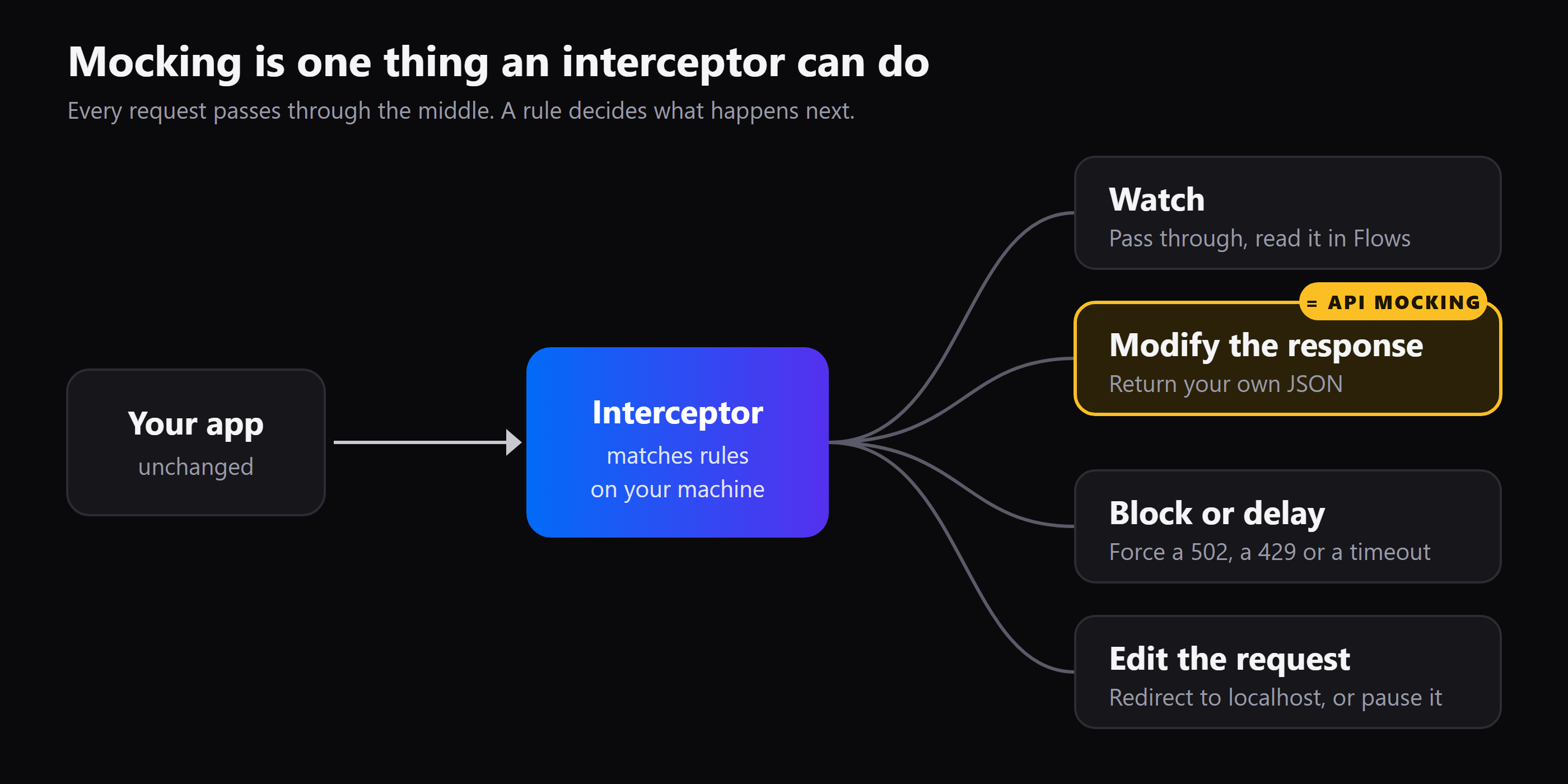
That gives you a middle path. Instead of running a mock server and switching your app's base URL, your app keeps calling the real URL, and a rule rewrites the answer. When the real endpoint ships, you switch the rule off. There's no config to revert and no code to delete.
It also covers cases a mock server can't. Say the real server answers an order request with a 200 and the right data, and you want to know how your app behaves when the same call returns a 502. A mock server would need a second route. With an interceptor, you add one rule to the same URL and switch it on for the test.
See it in Mittelware#
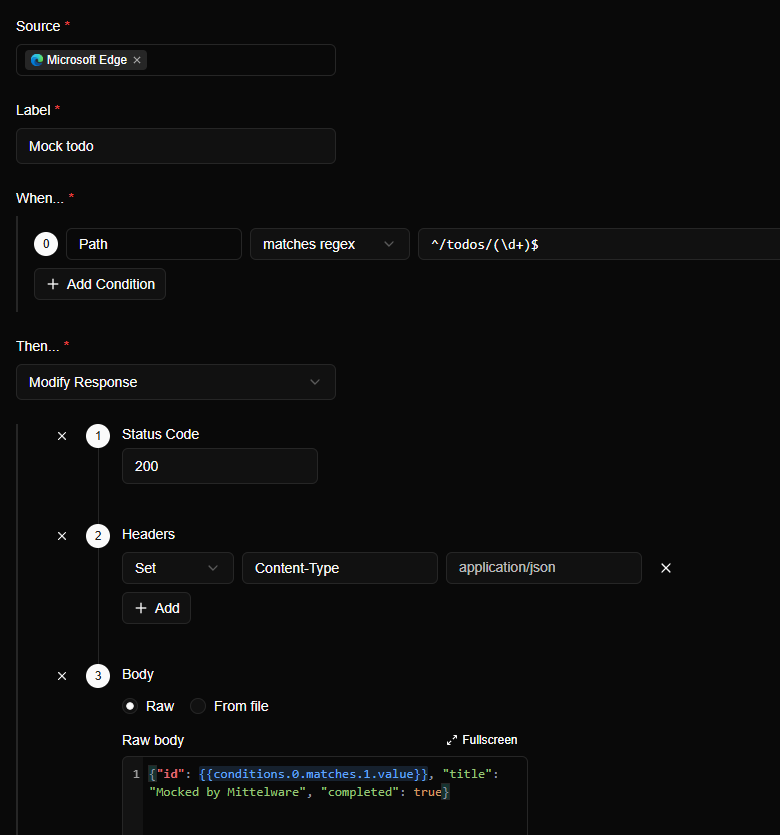
Mittelware is a desktop interceptor for Windows and macOS. Everything above maps onto two screens: Flows to watch real traffic, and Rules to change it. A rule has a Source (which app to watch), a When… (which requests match) and a Then… (what to do).
Open the Then… list and you can see the whole idea in one place:
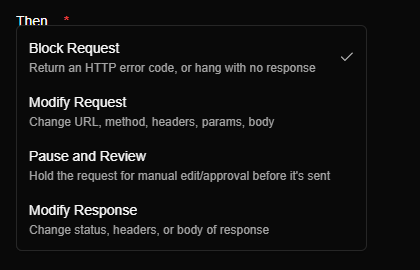
Here is a mock built with Modify Response. The rule matches any path like /todos/7, captures the number, and answers with JSON that uses it:
Then open Flows. Every request a rule touched carries a shield icon, and the details panel names the rule that ran:
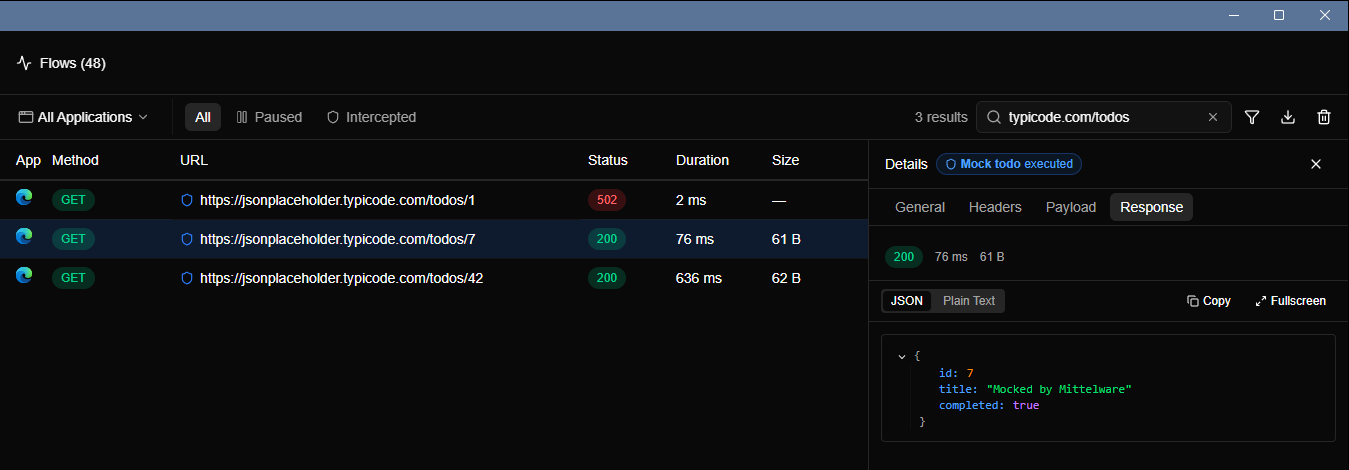
That badge matters for debugging. You can always tell whether you're looking at the real thing or at your own edit. The full steps are in Mock an API endpoint before the backend exists.
From the same screen you can switch to the rest of the toolbox, none of which is mocking:
- Block a request and answer with a
401,403,404,410,429or502, or let it time out - Modify Request to redirect a call to
localhostor add a header - Pause and Review to hold a request and edit it by hand
- Stream a response to fake an AI chat answer, a piece at a time
- A Delay on any rule, to test slow networks
What an interceptor won't do#
To keep this comparison honest, here are the limits of the interceptor approach in Mittelware:
- The real request still goes out with a Modify Response rule. The server answers first, then Mittelware swaps in your version. A real mock server never touches the real API. If the request has side effects, like creating an order, use Block Request so it never leaves your computer.
- It's not for CI. Mittelware is a desktop app you use while developing. Keep your automated tests on mocks.
- HTTPS needs a trusted certificate, and apps that pin their own certificates can't be inspected. See HTTPS & certificates.
Which one should you use?#
| If you need… | Use |
|---|---|
| Fast, repeatable tests in CI | Mocking |
| A fake backend for a whole team | Mocking (a mock server) |
| To find out whether a bug is client or server | Interception |
| To debug an app you didn't write | Interception |
| To see the real request your app sends | Interception |
| A quick mock for one endpoint, with no setup | Interception (Modify Response) |
| To test a 502, a 429 or a timeout in a running app | Interception (Block, Delay) |
| A response that matches the real API | Interception, since the real one is still there to compare against |
Most teams end up with both: mocks for automated tests, an interceptor for everything that needs a human looking at a real, running app. They solve different problems, so there's no reason to pick only one.
Try it on your own traffic#
The quickest way to feel the difference is to do it. Download Mittelware, switch monitoring on, open your app through it, and add a Modify Response rule for one endpoint. You'll have a working mock in about two minutes, without a mock server or a change to your code.
FAQ#
What is the difference between API mocking and API interception?#
API mocking replaces an API with a fake that answers in its place, so the real API isn't called. API interception puts a tool, usually a proxy, between your app and the real API so you can watch and change the real traffic as it passes. Mocking changes what answers. Interception changes what you can see and alter.
Is API interception the same as API mocking?#
No, though they overlap. An interceptor can mock by answering a request with data you wrote, but it can also show traffic, block it, delay it, redirect it or let you edit it by hand. Mocking is one thing an interceptor can do.
Can I mock an API without running a mock server?#
Yes. With an intercepting proxy, your app keeps calling the real URL and a rule replaces the response on the way back. In Mittelware that's a Modify Response rule, and it needs no changes to your code. Switch it off and the app uses the real API again.
Is MSW mocking or interception?#
Both. Mock Service Worker is a mocking library, and it works by intercepting requests inside your app and answering them with your handlers. A proxy intercepts from outside the app instead, which is why it works for apps you can't change.
Which is better for automated tests?#
Mocking. Tests need the same answer every time, with no dependence on a network or a running server, and mocks give you that. Use an interceptor for the interactive work around the tests: debugging, reproducing a bug and exploring what the real API does.
Does API interception change the real API?#
No. The interceptor works on your machine and changes only what your own app sends or receives. The server isn't modified, and other users aren't affected. With a Block Request rule, the request doesn't even reach the server.
Is it safe to intercept HTTPS traffic?#
On your own machine, yes. Mittelware creates its own certificate authority, trusts it only for your user account and doesn't upload your traffic. See HTTPS & certificates.