
AI assistants have made it cheap to write code. They have not made it cheap to trust code. A generated API client compiles, reads well and passes the tests the same assistant wrote, and then shows undefined on a real screen, because the server returned "price" where the code expected "amount".
That mismatch lives in one place: the network. It's the seam between code you (or an AI) wrote and a system you can't see into. And the fastest way to debug a seam is to stand in the middle of it. That's what a network interceptor does, and it's more useful now than it was before AI started writing half the client code.
What a network interceptor is#
"Interceptor" means two different things, and mixing them up makes search results confusing:
- A code-level interceptor lives inside your app: an Axios interceptor, a
fetchwrapper, a mock handler library. You write it, ship it and remove it. It only works in the app you changed. - A network interceptor (an intercepting proxy) sits outside your app, on your machine, between the app and the internet. Every request passes through it, so it can show, block, change, delay or redirect traffic without a single line of your code changing. It works for any app, including ones you didn't write.
This post is about the second kind. If you've used Charles, Fiddler, Proxyman or mitmproxy, you know the idea. Here the worked examples use Mittelware, a desktop interceptor with a rules engine, but the workflow applies to any tool in that class.
Why AI makes this more important, not less#
AI assistants are good at the code in front of them and blind to what happens when it runs against a real server. Three things follow from that:
- The API contract is often a guess. The assistant infers a response shape from a prompt, a type definition or an old example. The real payload has extra nesting, a renamed field, or a
nullwhere the code assumed a string. - The failure paths are the least exercised. Generated code tends to cover the happy path first. Checks for a non-2xx status, a timeout, a
429or an empty list are easy to leave out, and nobody notices until production. - There's more code nobody read closely. When a feature arrives as a 400-line diff, you review the logic. You rarely check whether it fires the same request three times, or sends an auth token in a query string.
None of these show up in the code. They show up on the wire. A proxy is how you look.
1. Fix the response first, then fix the code#
This is the scenario that saves the most time, so it comes first.
The bug: a cart screen shows NaN for the total. The question that decides where you spend the next hour is simple. Is the server sending bad data, or is the client mishandling good data? Reading code won't tell you quickly, and neither will asking an assistant to guess. Changing the response will.
- Switch Mittelware on and reproduce the bug. Open Flows, search for the endpoint and read the real response in the Response tab. Say it contains
"total": "19.99", a string, where the UI does arithmetic on a number. - Create a Modify Response rule that matches that URL and returns the body the way you believe it should look, with
"total": 19.99. - Reload the screen.
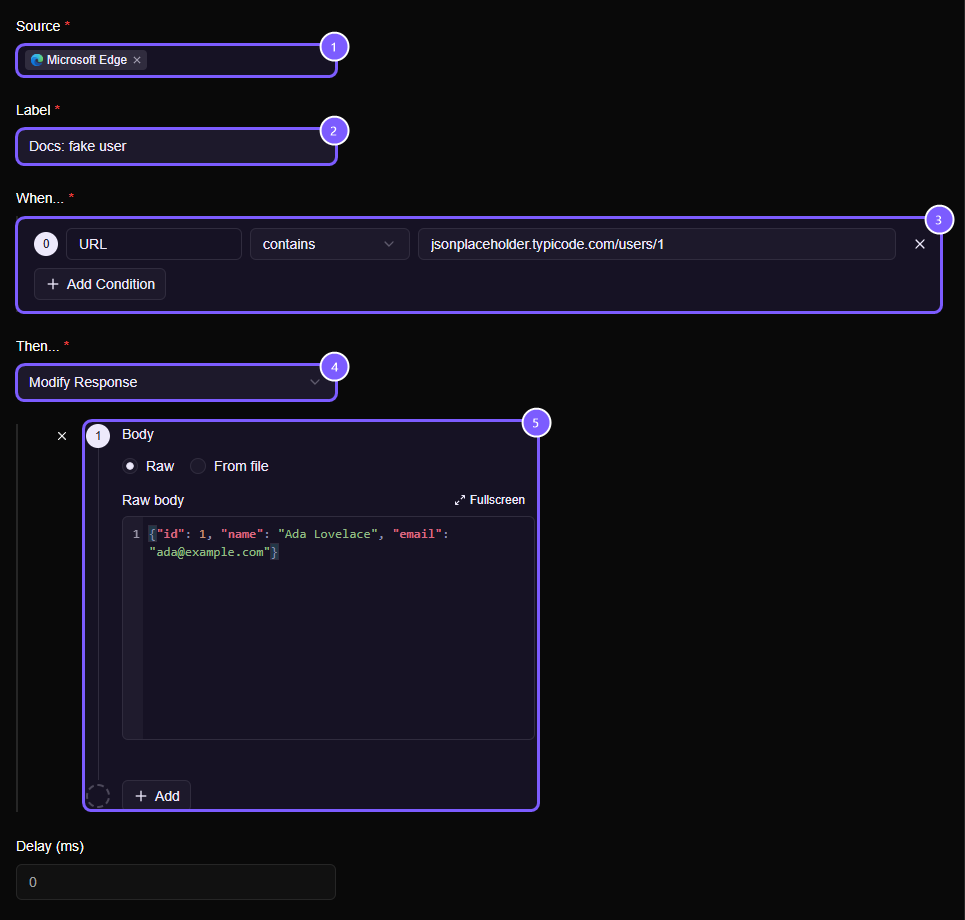
Here's the rule as it looks in the editor. The numbered boxes are, in order: (1) the Source, the app whose traffic the rule watches; (2) the Label, a name you'll recognize later; (3) the When… condition that decides which requests match; (4) the Then… action, here Modify Response; and (5) the body that replaces what the server sent. This example returns a fake user from a practice API, but the shape is identical for your own endpoint.
Now read the result:
- The screen is correct. The client is fine and the backend is the problem. You now have the exact payload to put in a bug report, and the frontend work is unblocked while the backend catches up.
- The screen is still broken. The data was never the problem. The bug is in the client, and you've ruled out half the system in a couple of minutes, without opening a backend repo or redeploying anything.
Either way, you tested the hypothesis before writing a fix, which is the opposite of the "apply the AI's patch and see" loop.
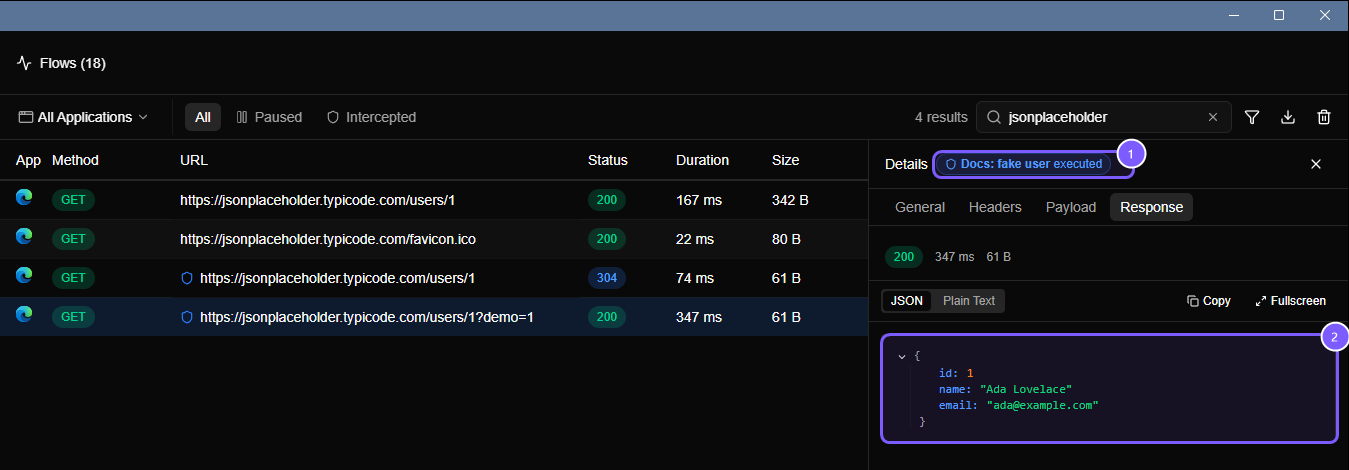
Flows marks every request a rule touched. In this screenshot, the badge at (1) says which rule ran, and the body at (2) is the response the app received, not the one the server sent. That matters when you're debugging: you can always tell whether you're looking at the real thing or your own edit.
WARNING
Modify Response lets the real request reach the server and only changes what comes back. If the request creates an order or takes a payment, that still happens. For requests with side effects, use Block Request instead (see Simulate a 502 without touching the backend).
2. Reproduce UI states that are hard to cause#
Frontend engineers spend a surprising amount of time trying to get the screen into the state they need to build or test: an empty list, a half-loaded profile, an expired session, a rate limit. Seeding backend data for each one, or writing temporary mock handlers you must remember to delete, is slow and leaves debris.
With an interceptor you describe the state once and switch it on. Against the same endpoint you might keep:
| State to test | Rule |
|---|---|
| Empty | Modify Response, body { "items": [] } |
| Partial data | Modify Response, body with an optional field removed or set to null |
| Permission denied | Block Request, 403 Forbidden |
| Session expired | Block Request, 401 Unauthorized |
| Rate limited | Block Request, 429 Too Many Requests |
| Broken payload | Modify Response, body { "items": [ (invalid JSON) |
The Block Action list is where you choose the status code your app will see:
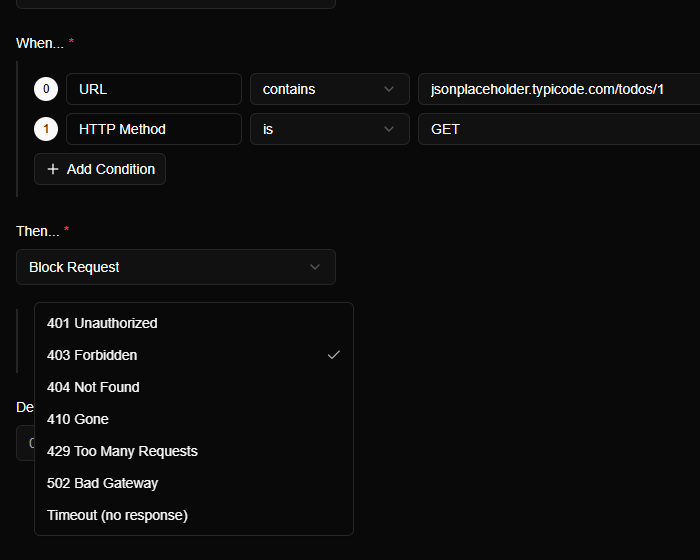
The same pattern works for mocking an endpoint that doesn't exist yet: the app calls the real URL and the rule answers. Your app code never learns that a mock is involved, and switching the rule off sends traffic to the real thing. We covered that end to end in Mock an API endpoint before the backend exists.
This is also where AI and an interceptor complement each other. An assistant is a good way to draft the realistic JSON for each state. The interceptor is how you deliver it to the running app instead of a unit test that never touches your actual rendering code. For a chat screen, a rule can even stream the fake answer a word at a time, in the format of the OpenAI or Anthropic APIs, so you can build the typing effect without paying for a real model call: Stream a response.
3. Debug applications you don't own#
Code-level mocking has a hard limit: you need to be able to edit the app. A lot of the time you can't.
- A desktop client or Electron app that calls an API and fails with a vague error.
- A third-party tool or SDK that behaves differently in production.
- A legacy app with its API address baked in.
- A script or command-line tool, whether you wrote it or an AI agent did.
An external interceptor doesn't care who wrote the app. On Mittelware's Applications page you click an app and it relaunches through the proxy; for anything not listed, you point the app at the proxy address by hand.
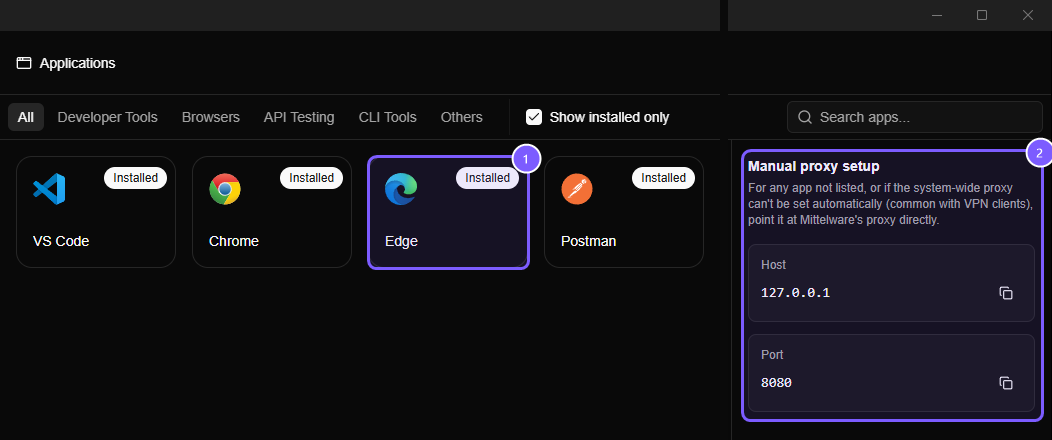
In the screenshot, (1) is an installed app's card; clicking it restarts that app so its traffic flows through the proxy. (2) is the Manual proxy setup panel, with the host (127.0.0.1) and port (8080) to give to a command-line tool or any app that has its own proxy setting.
This also covers an increasingly common case: finding out what your own AI-enabled app sends to a model provider. You can read the request that leaves your machine, including the endpoint, headers, model name and the prompt in the body, and check that nothing you didn't mean to include is in there. The answer comes back the same way it does in a chat window, a few words at a time, and Mittelware follows it live: every chunk is listed with the moment it arrived, so you can see how long the model took to start and whether the stream finished or was cut off. See Monitoring streaming responses.
Two honest limits. Apps that pin their own certificates can't be inspected, and HTTPS inspection requires trusting a local certificate on your own machine. Both are covered in HTTPS & certificates.
4. Check what the client really sends#
Everything above changes responses. The other half of the wire is the request, and it's where generated client code goes quietly wrong: a retry that fires three times, a header that's missing, an ID that's an object instead of a string, a token sitting in a query string that ends up in server logs.
Flows shows every request your app sends. A Pause and Review rule goes further and works like a breakpoint for HTTP: it holds a matching request before it leaves your machine, so you can read it, edit it and decide whether to send it.
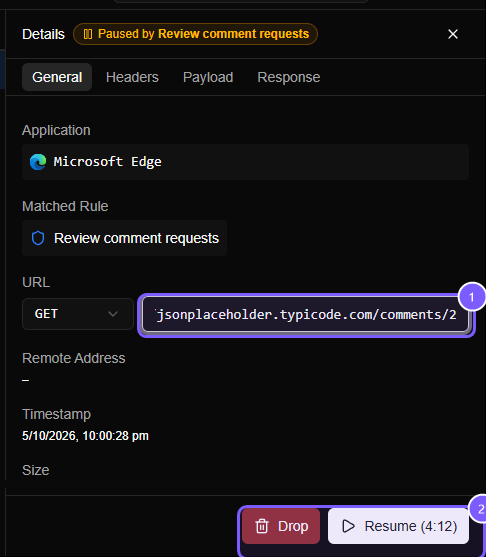
In this screenshot (1) is the URL, an editable field (we changed comments/1 to comments/2), and (2) holds the Drop and Resume buttons. You can edit the method, URL, headers and body too. That makes it a quick way to check whether the server validates what the UI never lets you send, such as a negative quantity, or an ID that belongs to someone else. The full walkthrough is in Pause a request, edit it by hand, then send it.
5. Simulate unreliable networks and APIs#
AI can write a test that mocks a timeout. It can't tell you what your running app does when a timeout happens: whether the spinner stops, whether the double-click on Pay sends two requests, whether retries back off.
Mittelware has a Delay field on every rule and a Timeout (no response) option on block rules. Together they let you make a real request slow, late or silent.
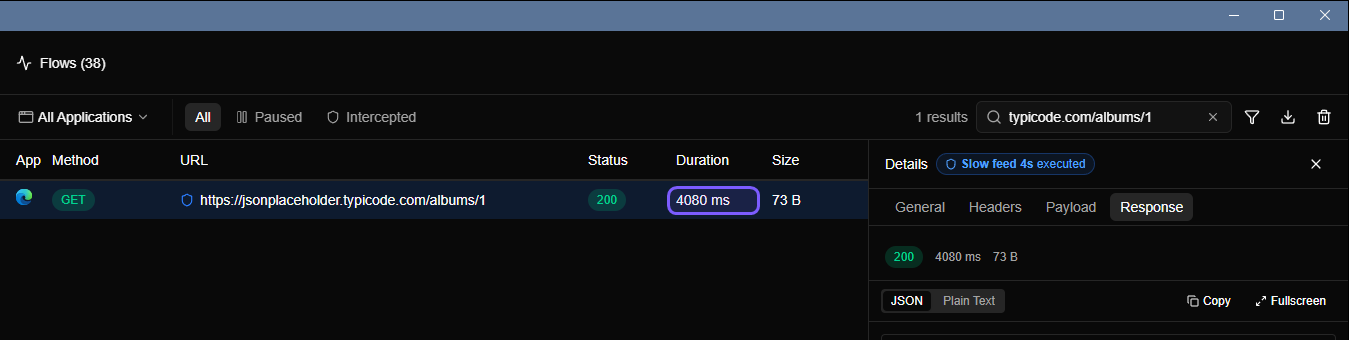
The highlighted cell is the Duration: 4080 ms, which is the 4000 ms delay from the rule plus the real round trip. Try a few values and watch what changes:
- 300 to 800 ms shows whether loading states flicker.
- A few seconds exercises skeleton screens and "taking longer than usual" messages.
- A hung request reveals whether the user can cancel, and what happens when the client finally gives up.
More in Test timeouts, retries and slow networks on purpose.
6. Keep scenarios you can switch back on#
The first time you set up a failing checkout, it's a clever trick. The fifth time, it's a chore. Rules persist, and every rule has an on/off switch, so a handful of them become a small test library for your product that you can switch on one at a time.
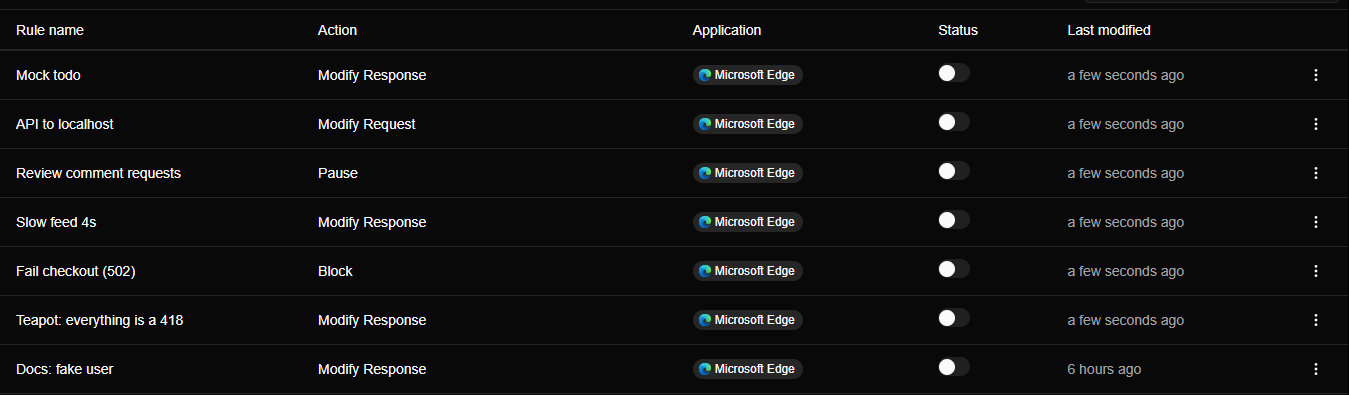
Name rules after the situation (Cart total as string, Checkout 502, Slow feed 4s), not the technique, and a bug that took an afternoon to reproduce becomes a one-click scenario. Keep them off by default, because a forgotten rule is a confusing bug of its own.
Which tool for which job#
An interceptor doesn't replace your other tools. It covers a gap they leave:
| Tool | Best at | Where it falls short |
|---|---|---|
| Browser DevTools | Looking at web traffic, quick one-off overrides | Browser only, limited rules, no other apps |
| Code-level mocks and interceptors | Repeatable automated tests, CI | You have to change and maintain code; mocks drift from the real API |
| A mock server | A full fake backend | Another process to run, another base URL to switch |
| A network interceptor | Changing real traffic from any app, with no code changes | Not a replacement for automated tests; some apps (pinned certificates) can't be inspected |
Use all of them. The interceptor is the one you reach for when you want to know right now what the system does, without changing it.
The common thread: don't touch the backend#
Every scenario above has the same property. You change what the app sees, or what the server sees, from the outside. You don't edit the backend, deploy a branch, ask someone for test data or add temporary code to the client. That keeps experiments cheap to run and cheap to undo: switch the rule off and the app is talking to the real system again.
In an era when code arrives faster than anyone can read it, that's the point. The skill worth keeping sharp isn't writing the first draft. It's checking, quickly and cheaply, what the first draft actually does.
FAQ#
Is the bug in my frontend or my backend?#
Compare the real response with what your client expects, then change the response in transit to the shape you expect. If the screen is fixed, the backend is sending the wrong data. If it's still broken, the bug is in the client. Section 1 shows the steps.
How do I modify an API response without changing the backend?#
Use an intercepting proxy with a rule that matches the request and replaces its status, headers or body on the way back. Your app and your server stay untouched. In Mittelware that's a Modify Response rule.
What's the difference between an HTTP interceptor and a network proxy?#
An HTTP interceptor in code (such as an Axios interceptor) runs inside the app you wrote and only affects that app. A network interceptor is a proxy outside the app, so it works with any application and needs no code changes.
How do I simulate a 502, a 429 or a timeout?#
Create a rule that blocks the matching request with the status you want, or choose a no-response timeout. Because the request is blocked, it never reaches the server, so nothing happens on the other side. See Simulate a 502 without touching the backend.
Can I trust AI-generated API client code?#
Treat it like any other code you didn't write: verify it against real behavior. Check what it sends, check what it does with unusual responses and errors, and check that it handles slow and failed requests. All three are easy to see at the network layer.
Is it safe to intercept HTTPS traffic on my own machine?#
Yes, when the tool keeps everything local. Mittelware creates its own certificate authority, trusts it only for your user account, and doesn't upload your traffic. Details are in HTTPS & certificates.