
You've got a bug that only reproduces against the deployed frontend, or a desktop app that has its API URL baked in. You've fixed the backend locally. How do you check the fix without rebuilding the client or editing a config file?
Redirect the traffic. The client keeps talking to https://api.acme.dev, and Mittelware quietly sends each request to http://localhost:3000 instead.
The rule#
Open Rules, click Create Rule, and fill it in:
- Source: the app that makes the calls, such as Chrome or Postman.
- Label:
API → localhost - When…
- URL → Domain
isapi.acme.dev
- URL → Domain
- Then… choose Modify Request and set the URL to:
http://localhost:3000{{request.path}}{{request.path}} is a template variable. Mittelware replaces it with the path of the original request, so /v1/users/42 on the production host becomes http://localhost:3000/v1/users/42.
Save the rule and reload the app. Open Flows and look at the request: it's tagged with your rule, and your local server's logs show it arriving.
See it work#
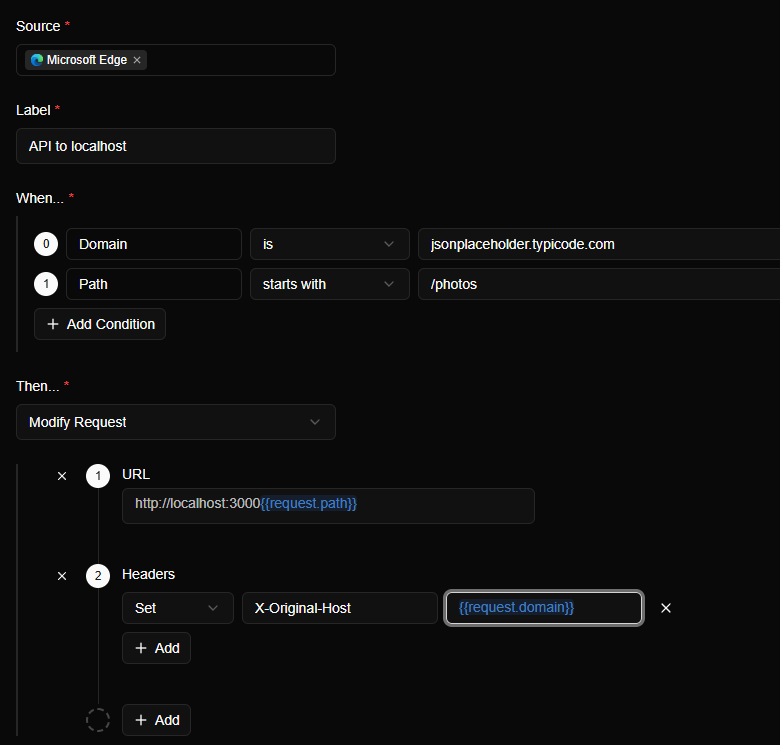
We ran this recipe against a free practice server, with a tiny local server standing in for "the API on my laptop". The rule has two conditions, Domain is the practice server and Path starts with /photos (a narrower match, as recommended below), and one action, Modify Request, which sets the URL and adds the X-Original-Host header described further down:
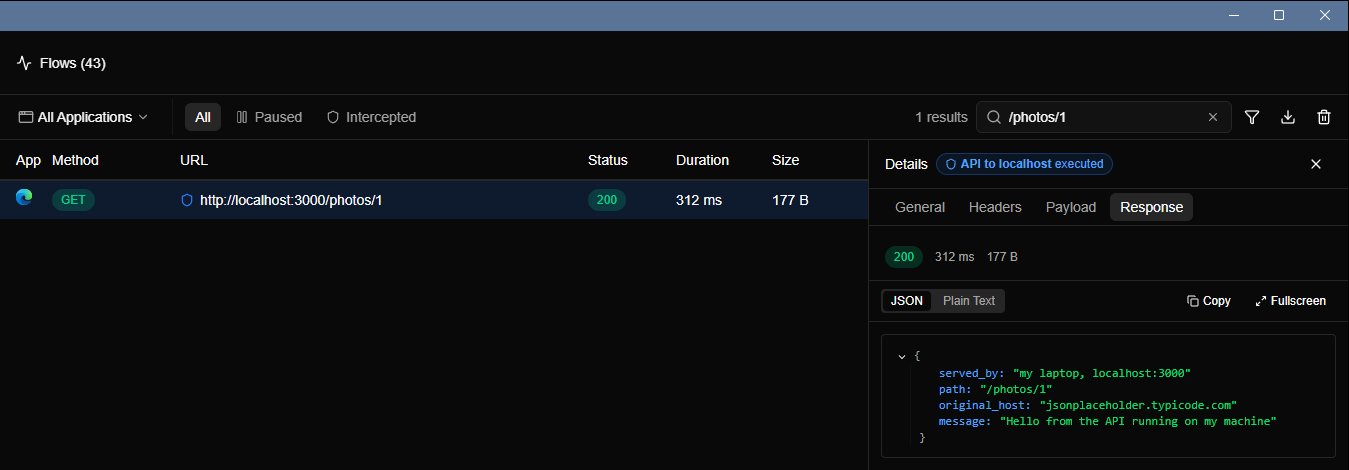
Then we opened a /photos/1 address on the practice server. The browser's address bar still says it is talking to that server, but the answer came from the machine next to it:

Flows tells the same story. Look at the URL column: it shows the rewritten address, the one Mittelware actually sent.
Keep the query string#
NOTE
{{request.path}} is only the path. It does not include the query string.
If your endpoint depends on query parameters, add them back explicitly with {{request.params.name}}:
http://localhost:3000{{request.path}}?page={{request.params.page}}&limit={{request.params.limit}}For a handful of known parameters this is fine. After saving, check in Flows that the request reached your server with the parameters you expect.
Tell your server who it's really talking to#
The original Host is gone once you redirect, which can matter for multi-tenant apps. Add a header in the same rule, using another template variable:
X-Original-Host: {{request.domain}}Your local server can read that header to behave as it would behind the production hostname.
Scope it tightly#
A redirect rule is powerful, so keep its blast radius small.
- Pick the app. Choose only the application you're testing in Source. Other apps on your machine keep talking to production.
- Match narrowly.
Domain is api.acme.devis safer thanURL contains acme. Add a Path starts with condition if only some routes should move. - Name it clearly. When you come back in a month and wonder why production looks different, the label tells you.
- Switch it off when done. The toggle on the Rules page is faster than deleting and rebuilding the rule.
Things to watch for#
- CORS. A browser app on
https://app.acme.devcalling your local server cross-origin needs the server to send the rightAccess-Control-Allow-Originheaders. Mittelware doesn't add them for you here. - HTTP vs HTTPS. Redirecting to plain
http://localhostis fine for a local server. Check in Flows that the redirected request succeeds. - Auth. Your local server will receive the production client's real tokens. Make sure it's yours, and that you're comfortable with that.