
In 1998, someone wrote a serious-looking standards document describing the Hyper Text Coffee Pot Control Protocol. It was an April Fools' joke (RFC 2324), and it came with a status code: 418 I'm a teapot. If you ask a teapot to brew coffee, the teapot is allowed to refuse, because it's a teapot.
Nobody ever expected to use it. And yet, more than twenty-five years later, it's one of the most useful status codes you can throw at your own app.
Why a teapot is a great test#
Think about the error handling in the last app you built. You probably wrote code for 401 (log in again), 404 (not found) and 500 (something broke). Maybe 429 (slow down) if you were feeling careful.
Now ask: what happens on a status code you didn't plan for? Does the app:
- show a helpful message, or a blank screen?
- try to read the response as if it were a normal answer, and crash on
undefined? - keep retrying a request that will never succeed?
- treat it as success because the body was valid JSON?
A teapot is perfect for finding out, because nothing in the world special-cases it. If your app survives an unexpected 418, it will survive plenty of unexpected things in real life.
It's also a nice excuse to see Mittelware do what it does best: stand between an app and a server, and quietly change the answer.
What we'll do#
We'll take a real request to a real (practice) server, and make it come back as a teapot. The recipe is the same whether the request comes from a browser, a mobile app or a script. Follow along with any browser. For this post we used Microsoft Edge and JSONPlaceholder, a free server that returns made-up data for practice. Its /posts/1 address normally returns a harmless blog post.
If you're new to rules, the Getting started tutorial covers the basics, and the Rules page explains every field.
1. Write the rule#
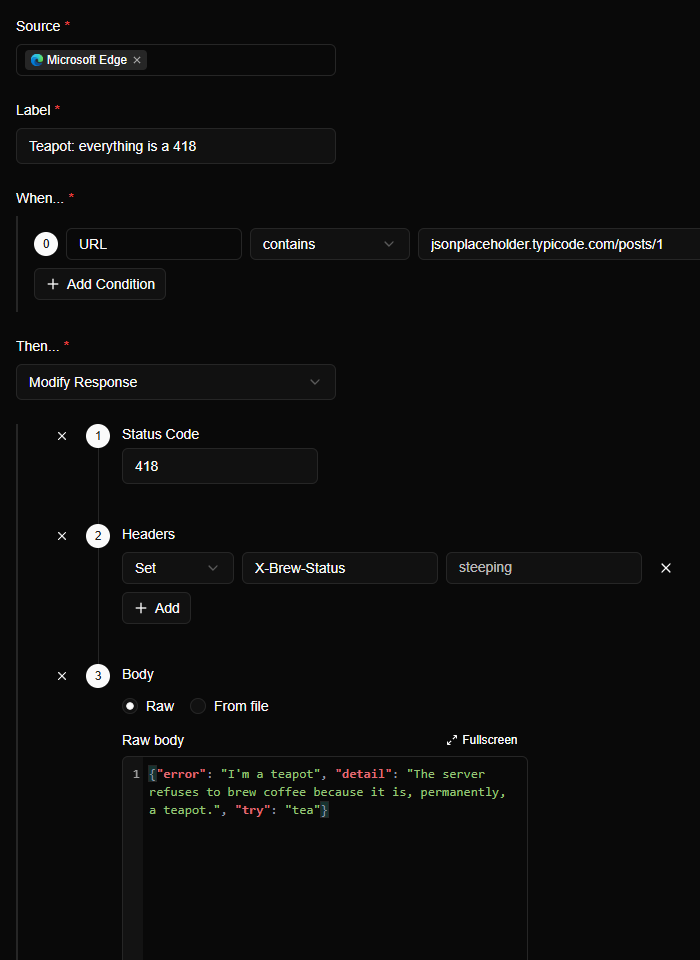
Open Rules and click Create Rule. Fill it in like this:
| Field | Value |
|---|---|
| Source | Your browser (we chose Microsoft Edge) |
| Label | Teapot: everything is a 418 |
| When… | URL contains jsonplaceholder.typicode.com/posts/1 |
| Then… | Modify Response, with three parts: a Status Code of 418, a Header X-Brew-Status: steeping, and a Body (below) |
For the body, we went with:
{"error": "I'm a teapot", "detail": "The server refuses to brew coffee because it is, permanently, a teapot.", "try": "tea"}Here is the finished rule:
Click Create. The rule is live straight away.
2. Ask for the post#
Open https://jsonplaceholder.typicode.com/posts/1 in the browser (a private window is handy, since it avoids cached copies). Instead of a blog post, you get this:

The browser asked a real server for a real blog post. The server answered. Mittelware changed the answer on the way back.
3. See what really happened#
Switch to Flows and search for the address. The row has a shield icon, an orange 418, and the details panel names the rule that did it.
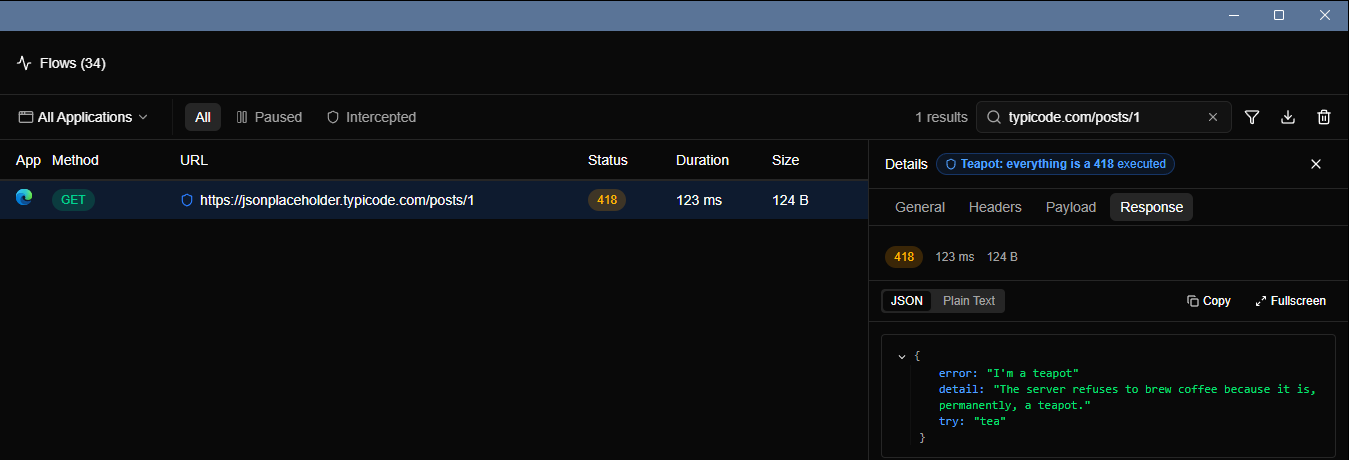
The header we added is there too. Open the Headers tab, switch to Response, and scroll to the bottom:
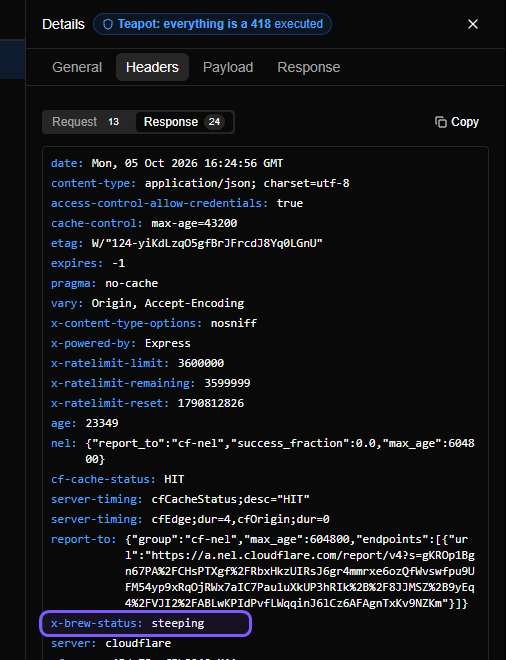
4. Now break your own app#
This is the fun part, and the useful one. Point your real app at the rule (use the real URL it calls, in place of the practice one) and go through this list:
- Does the UI say something? "Something went wrong" is fine. A blank screen or an eternal spinner is a bug.
- Does the message make sense? If it displays
undefinedor[object Object], the error branch was never tested. - Does it retry? Watch Flows. A teapot isn't going to turn into coffee, so a sensible app gives up after a few tries with growing delays. A bad one hammers the server every second.
- Is the rest of the app still alive? One failing request shouldn't take down the whole page.
- Does it log something useful? The
erroranddetailfields in the body are there for exactly this. Does your app show or log them? - Does it treat any 4xx the same way? Try
418, then409,451and507. Each one is a code a lot of apps have never met.
TIP
Want a variation? Change the status to 503 and add a Retry-After: 30 header to see whether your app respects it. Or set the status to 200 but keep the error body, to check whether your app trusts the status code or the content. Real servers do both.
A note on side effects#
Modify Response lets the real request reach the server and only changes what comes back. That's harmless for a GET like this one. But if the request creates an order or sends an email, the server still does it, and your app just thinks it failed. For anything with consequences, use Block Request instead, which stops the request before it leaves your machine. Simulate a 502 without touching the backend covers the difference in detail.
Put the kettle on#
When you're done, switch the rule off from the Rules page. You don't need to delete it. A tiny library of rules like this one (a teapot, a slow response, a 502) is a handy thing to keep around for the next time something needs breaking on purpose.
A teapot can't brew coffee. But it can tell you a lot about your app.