
If the backend team has written an OpenAPI spec, the frontend team does not have to wait for the server. A spec already describes every path, method and response, which is exactly what a fake API needs.
Mittelware reads the spec and builds that fake API for you. This guide takes you from a spec file to a working local server.
What you need#
- Mittelware installed.
- An OpenAPI 3.0, OpenAPI 3.1 or Swagger 2.0 file, as JSON or YAML. If you have no spec to hand, any public one works for a trial.
You do not need to switch monitoring on. A mock server runs by itself, on a port of its own.
1. Import the spec#
- Click Mock servers in the sidebar, then Import OpenAPI in the header.
- Click Choose a file (JSON or YAML), or paste the spec into the box. Click Continue.
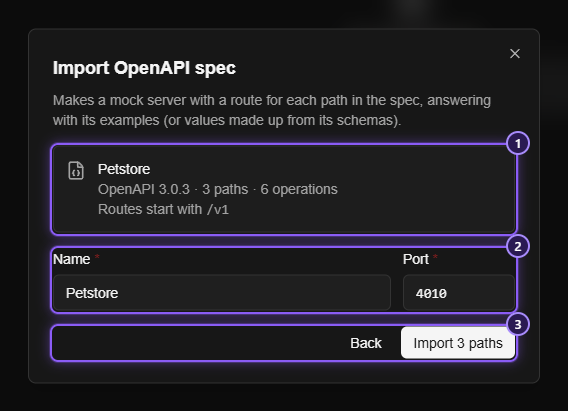
- Check what Mittelware found: the title, the version, how many paths and operations the spec has, and the base path every route will start with.
- Name the server, pick its port, and click Import N paths.
A toast says Imported N routes. If anything had to be skipped it says how many and lists the first reasons, so you can see what the spec asked for that a mock cannot do.
2. Look at what you got#
Open the new server. It has one route for each path, and one case for each response the spec documents. The case answers with the response's own example, or a value made up from its schema when there is no example.
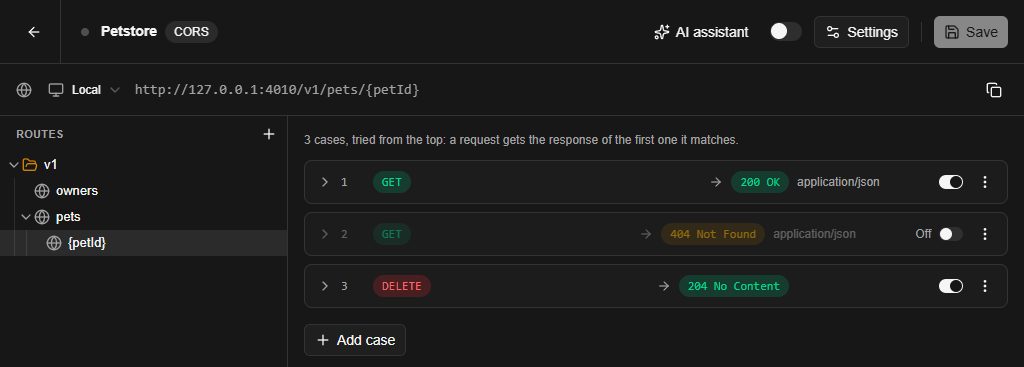
Only the first success of each operation is switched on, so a request gets a normal answer by default. The 404, 500 and other documented responses are kept off but ready.
3. Turn it on and point your app at it#
The new server starts stopped. Switch it on, then change your app's API base URL to the server's address, for example http://localhost:4010. Run the app and every call to a documented path returns data.
By default only this computer can reach the server, browser apps are allowed (CORS is on), and anything the spec does not describe gets a 404 Not Found. All three can be changed in the server's Settings.
4. Make it fail on demand#
This is where a mock earns its place. The spec's error responses are already there. To see how your app copes with a 404 on a pet, switch that case on and move it above the success case. Cases are tried from the top, and the first one that matches answers.
You can also add your own conditions and a delay to any case. A request only gets the slow, failing answer when you want it, and everything else stays healthy. For more ideas see Mock servers in Mittelware.
What the import does not do#
- It makes the shape of the API, not its behaviour. A route answers whatever method and request fit. It does not check a request against the spec.
- It follows references inside the file only. A
$refto another file or a URL is treated as empty. - A status outside
200to599is skipped, because a mock server cannot send it.
Add conditions, delays and your own bodies to the cases afterwards.
When the real API ships#
Change the base URL back. Nothing else in the app should have to change. If a route differs from the spec, you found the mismatch before it reached production, which is a good trade for a fake API.
Related#
- Import an OpenAPI spec, the full reference
- Mock an API endpoint before the backend exists, for a single endpoint with a rule instead of a server
- Mock servers in Mittelware
- Download Mittelware