
A handful of rules is easy. Twenty is a chore. By the time you have a few mocks, a staging setup, a set of error cases and the rules you made while chasing last week's bug, the list is a pile, and every task starts with scrolling for the right three rules and switching off the wrong four.
Collections fix that. A collection is a named group of rules with a switch of its own. This post shows how to use them, and the one thing about them that surprises people: how they decide which rule wins.
Make one#
Open Rules. Down the left there's a panel called Collections, with All rules at the top and Uncategorized at the bottom. Uncategorized is always there and holds every rule you had before collections existed.
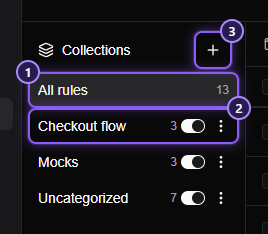
Click +, type a name, press Enter. That's it. The new collection opens, empty. Names can be up to 60 characters, in any language, and can't repeat (capital letters don't make two names different).
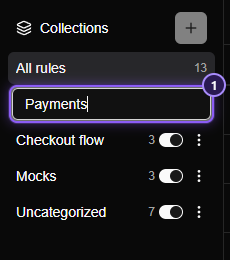
Put rules in it#
There are three ways, and you can always move a rule again later:
- While creating. The rule form has a Collection box. A new rule starts in whichever collection you were looking at, so open the collection first and click Create Rule.
- Many at once. Tick rules and use Move to… in the bar above the list.
- One at a time. The rule's three-dot menu has Move to collection.
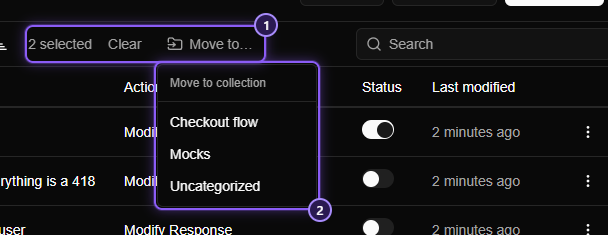
Moved rules land at the top of their new collection, in the order they had.
The reason to bother: one switch for the group#
Each collection has a switch. Turn it off and every rule in it stops on the very next request. Turn it on and they all come back.
That's more useful than it sounds, because the collection's switch never changes the rules' own switches. A rule you'd switched off by itself stays off when the collection comes back; the ones that were on are on again. You can flip a collection off to test something and back on without losing track of which rules were which.
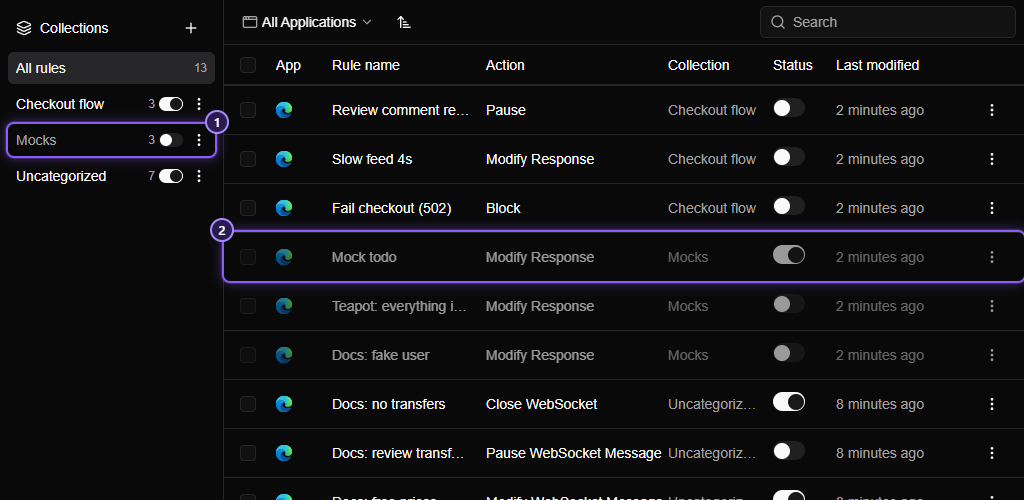
A rule in a switched-off collection is dimmed, and hovering its switch says why. A rule runs only when both its own switch and its collection's are on.
Some collections that earn their place:
- Mocks: every rule that answers instead of a real backend. Off when you want the real thing, on when the backend is down.
- Errors: the 500s, the timeouts, the slow responses. Off by default; on for the afternoon you test error handling.
- Staging setup: the headers and redirects your front end needs against staging. On every Monday.
- A bug you're chasing: switch it on, reproduce, switch it off, and delete the collection when it's fixed.
The surprise: collections decide who wins#
Rules have always been checked from the top, and the top matching rule wins. With collections, "from the top" means:
- the collections, in the order the panel lists them: newest first, Uncategorized last;
- then, inside each collection, its rules, top to bottom.
So if the Mocks collection and the Staging setup collection both have a rule for /api/config, the one in the collection nearer the top of the panel wins. You can't drag collections around, because the order is meant to be predictable: what you made last is on top.
TIP
All rules lists everything in exactly that order, collection after collection, so the list reads top to bottom as Mittelware will try it. A rule that never seems to fire may simply be below one that wins.
If a rule in an older collection ought to win, move it into a newer one, or make the newer collection's rule more specific so it only matches what you intend.
Share a collection#
A collection's three-dot menu has Export collection, which writes just its rules to a file. Send it to a teammate: when they Import it, the collection is made again on their side, with the same name and the rules in it. A collection they already have, with that name, receives the rules instead.
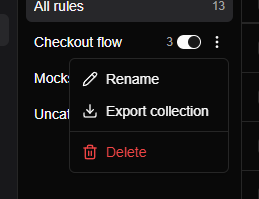
Delete asks first, and it never deletes the rules: they move to Uncategorized, keeping their own switches and order. So you can't lose rules by tidying up.
Small things that help#
- Search and filters work inside the collection you're looking at, and the search stays when you switch collection.
- The Collection column shows under All rules, so you can see where each rule lives.
- Every change starts at the top. Pick a collection, search or flip the sort, and the list shows its first row, not wherever you had scrolled to.
- An import keeps a file's collections. Rules go into the collections the file names, and any that don't exist yet are made for you.
Where to go from here#
- Collections is the full reference.
- Seven rule tricks you'll use every day is the one for switching, copying and sharing single rules.
- Export and import rules explains the file, and what to check after importing.